0ALJ-080
Setting Up Connection by Selecting a Wireless Router
You can search the wireless routers (or access points) available for connection and select one from the display of the machine. For the
network key, enter a WEP key or TKIP. Before selecting a wireless router, check and write down the required setup information, including
the SSID and network key (
Checking the SSID and Network Key).
NOTE
Security settings
If the wireless connection is set up by selecting a wireless router, the WEP authentication method is set to <Open System> or
the WPA/WPA2 encryption method is set to <Auto> (AES-CCMP or TKIP). If you want to select <Shared Key> for WEP
authentication or <AES-CCMP> for WPA/WPA2 encryption, you need to set up the connection using the manual entry method
(
Setting Up Connection by Specifying Detailed Settings).
Press .
Use / to select <Network Settings>, and press .
If the logon screen appears, enter the correct ID and PIN using the numeric keys, and then press . Logging on to the
Machine
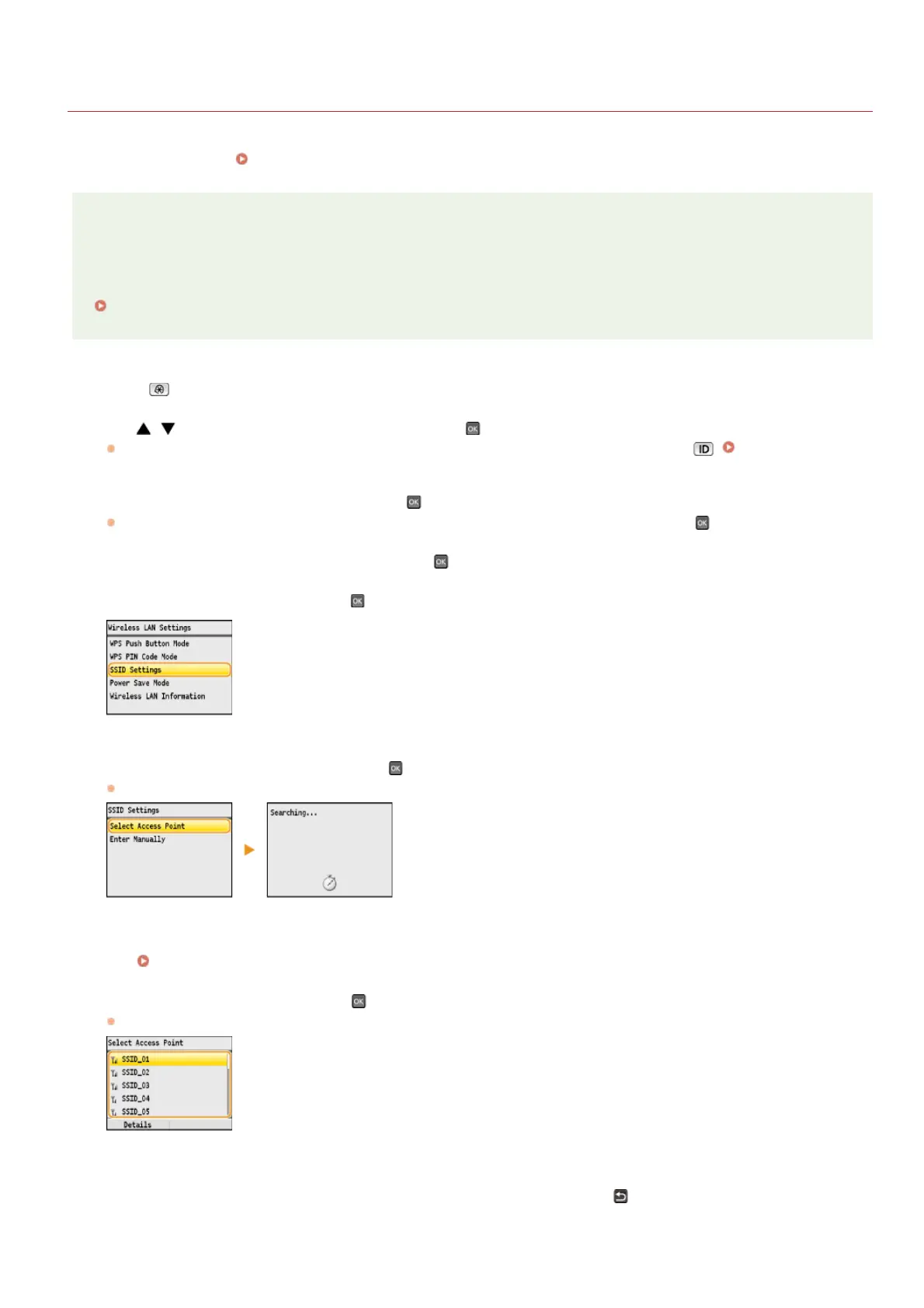
Select <Wireless LAN Settings>, and press .
If the <Do you want to enable the wireless LAN?> message is displayed, select <Yes>, and press .
Read the message that is displayed, and press .
Select <SSID Settings>, and press .
Select <Select Access Point>, and press .
The machine starts searching for available wireless routers.
NOTE:
If <Cannot find the access point.> is displayed
See
When an Error Message Appears.
Select a wireless router, and press .
Select the router whose SSID matches the one that you have written down.
NOTE:
Viewing the details of security settings
Select a wireless router, and press <Details>. To return to the previous screen, press
(Back).
1
2
3
4
5
6
7
㻟㻟㻜㻌㻛㻌㻢㻣㻢











 To Next Page