0ALJ-047
Importing/Exporting Address Book Data
Address Book data in CSV format created on applications such as Microsoft Excel can be imported into the machine, or the Address Book
data can be exported to a file for use on other fax machines or applications. The machine supports two file formats: CSV (*.csv) files and
Canon Address Book files (*.abk).
Importing Address Book Data
Exporting Address Book Data
Changing Location to Save Address Book Data
NOTE
You cannot use the Address Book if you do not have permission to access the folder where the Address Book is saved. Log on as
a user who has permission to access the folder, or change the save location of the Address Book.
Changing Location to Save Address Book Data
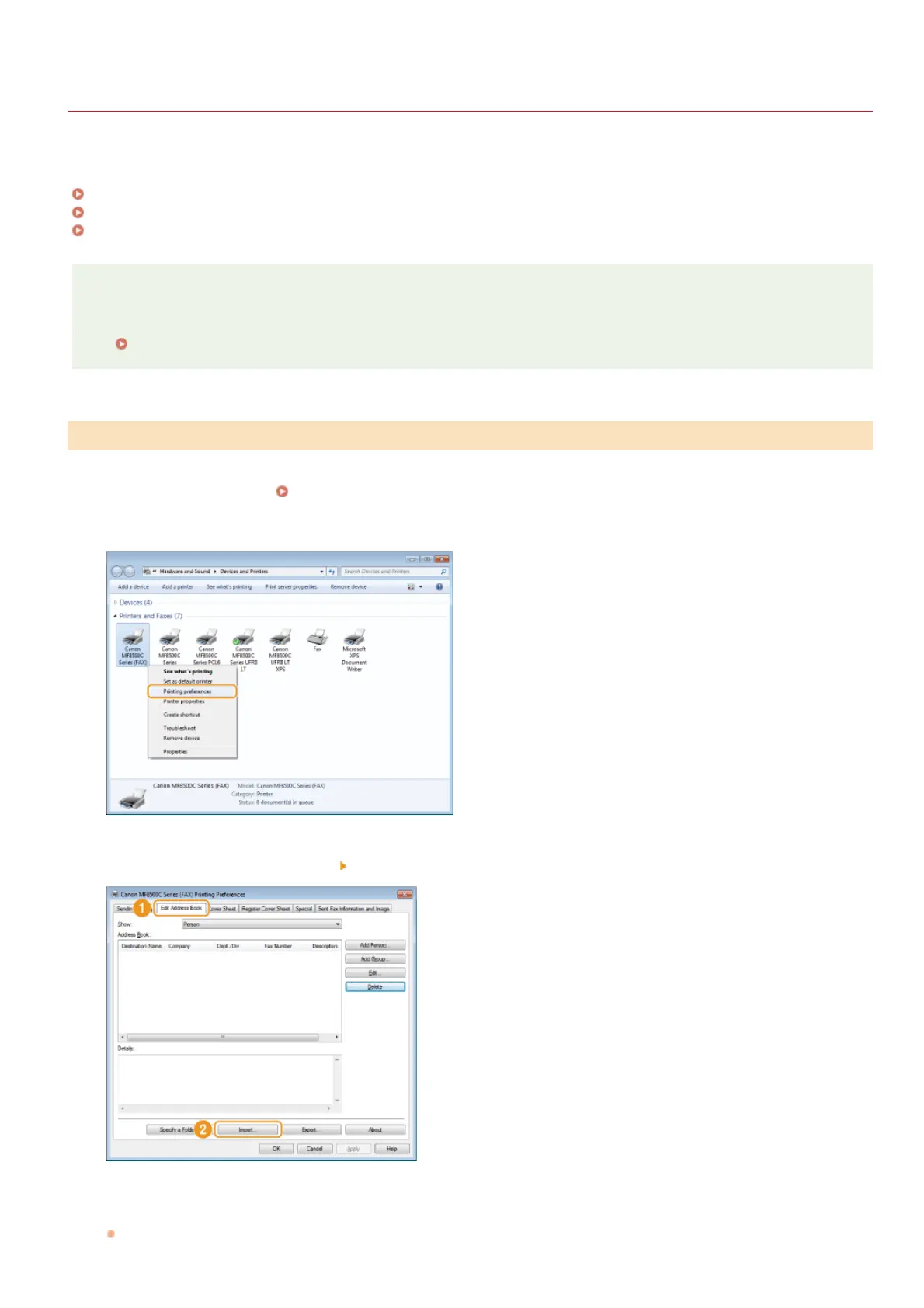
Open the printer folder. Displaying the Printer Folder
Right-click your fax icon and click [Printing preferences].
Click the [Edit Address Book] tab [Import].
Select the file to import and click [Open].
For a CSV file, specify the separators used in the file.
Importing Address Book Data
1
2
3
4
㻝㻤㻠㻌㻛㻌㻢㻣㻢











 To Next Page