0ALJ-05A
Registering Combinations of Frequently Used Print Settings
Specifying combinations of settings such as "1-sided landscape orientation on A4 size paper" every time you print may be time
consuming. If you register these frequently used combinations of print settings as "profiles," you can specify printing settings simply by
selecting one of these profiles from the list. This section describes how to register profiles and how to print using them.
Registering a Profile
Selecting a Profile
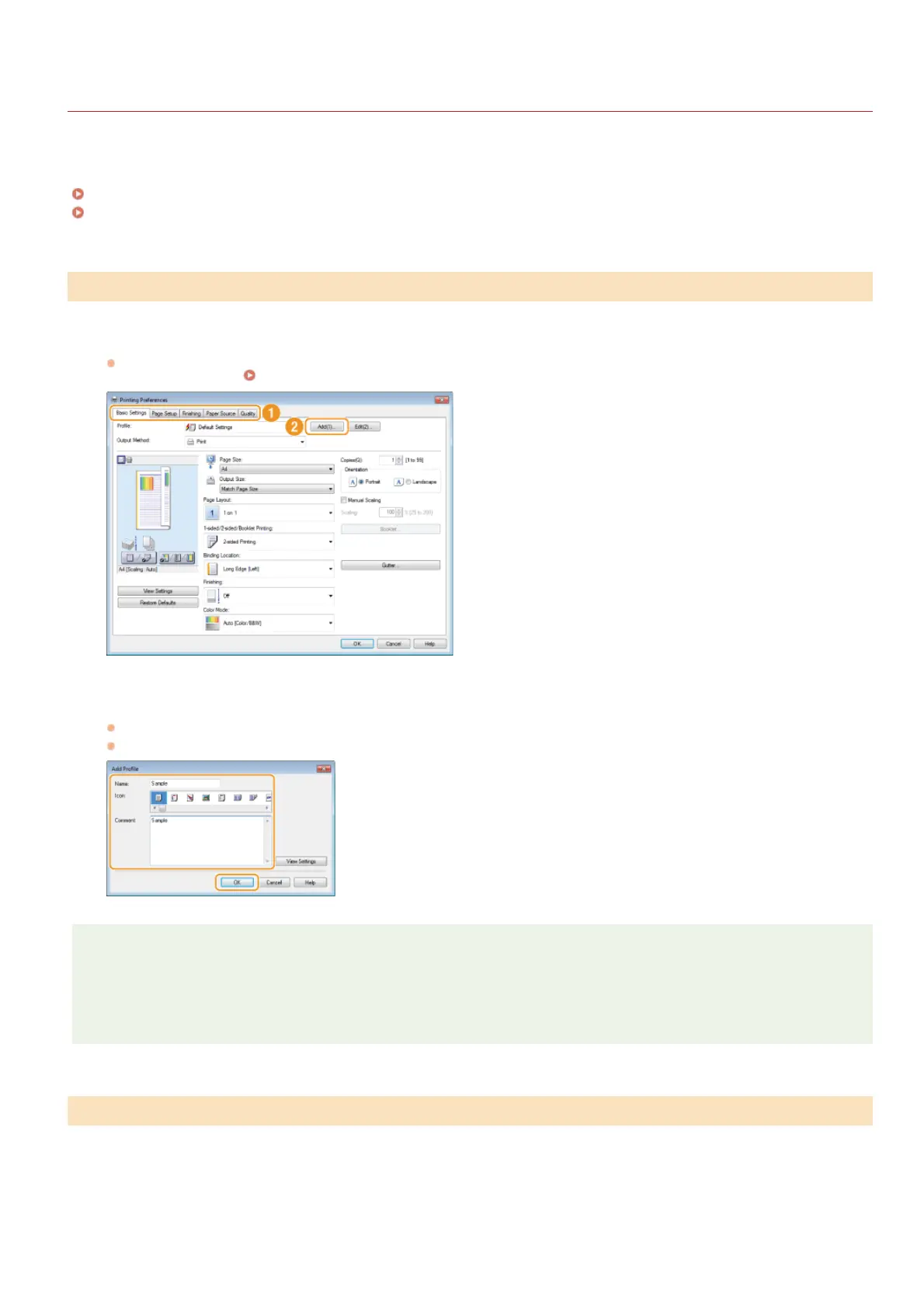
Change the settings that you want to register as a profile, and click [Add].
Click the [Basic Settings], [Page Setup], [Finishing], [Paper Source], or [Quality] tabs to specify the print settings on each
screen as necessary.
Various Print Settings
Enter a profile name in [Name], select an icon, and then click [OK].
Enter comments on the profile in [Comment] as necessary.
Click [View Settings] to see the settings to register.
NOTE
Editing a profile
By clicking [Edit] on the right side of [Add] on the screen shown in step 1, you can change the name, icon, or comment of the
profiles you have previously registered. You cannot edit the pre-registered profiles.
Select the profile that suits your needs, and click [OK].
Registering a Profile
Selecting a Profile
1
2
㻞㻞㻤㻌㻛㻌㻢㻣㻢











 To Next Page