0ALJ-00W
Selecting the Receive Mode
Select the receive mode that suits your intended use beforehand ( Deciding Which Fax Receive Mode to Use).
NOTE
If you previously selected <Set Up Later> on the fax setup screen ( Registering the Fax Number and Unit Name), press
<Fax Settings> <Fax Setup Guide> to display the fax setup screen.
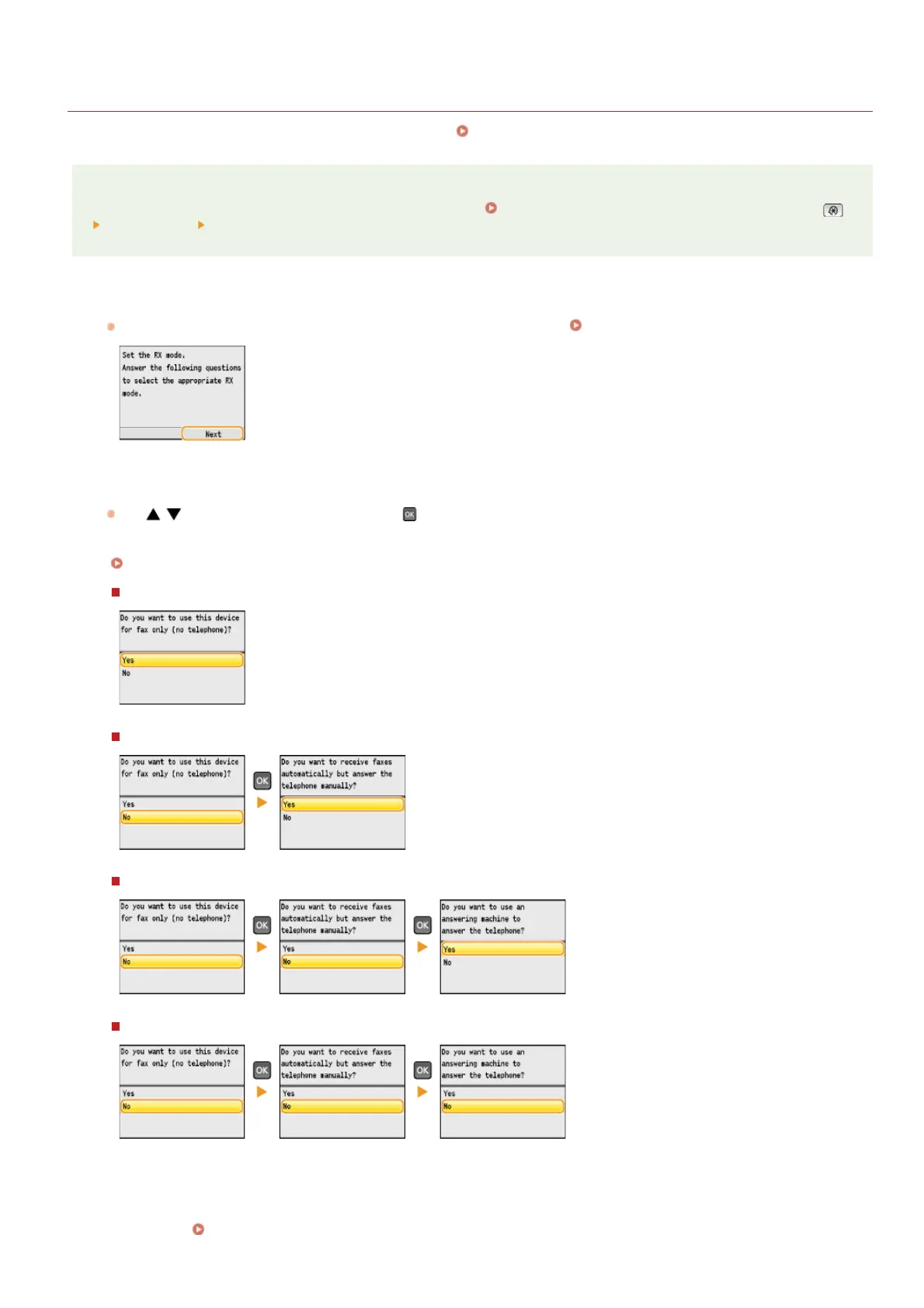
Press <Next>.
The screen shown here is displayed after the unit name has been registered ( Registering the Fax Number and Unit Name).
Select the receive mode that suits your intended use.
Use / to select <Yes> or <No>, and press to select the receive mode.
NOTE:
You may be able to manually set a receive mode other than those described below, depending on your country or region.
Receiving Faxes
To set the receive mode to <Auto>
To set the receive mode to <Fax/Tel Auto Switch>
To set the receive mode to <Answering Machine>
To set the receive mode to <Manual>
Press <Apply>.
Continue to
Connecting the Telephone Line
1
2
3
»
㻠㻣㻌㻛㻌㻢㻣㻢











 To Next Page