7. Other Field Service Ver. 1.0 Aug. 2005
62
bizhub 200/250/350
Maintenance
7.3.19 MFBS Board
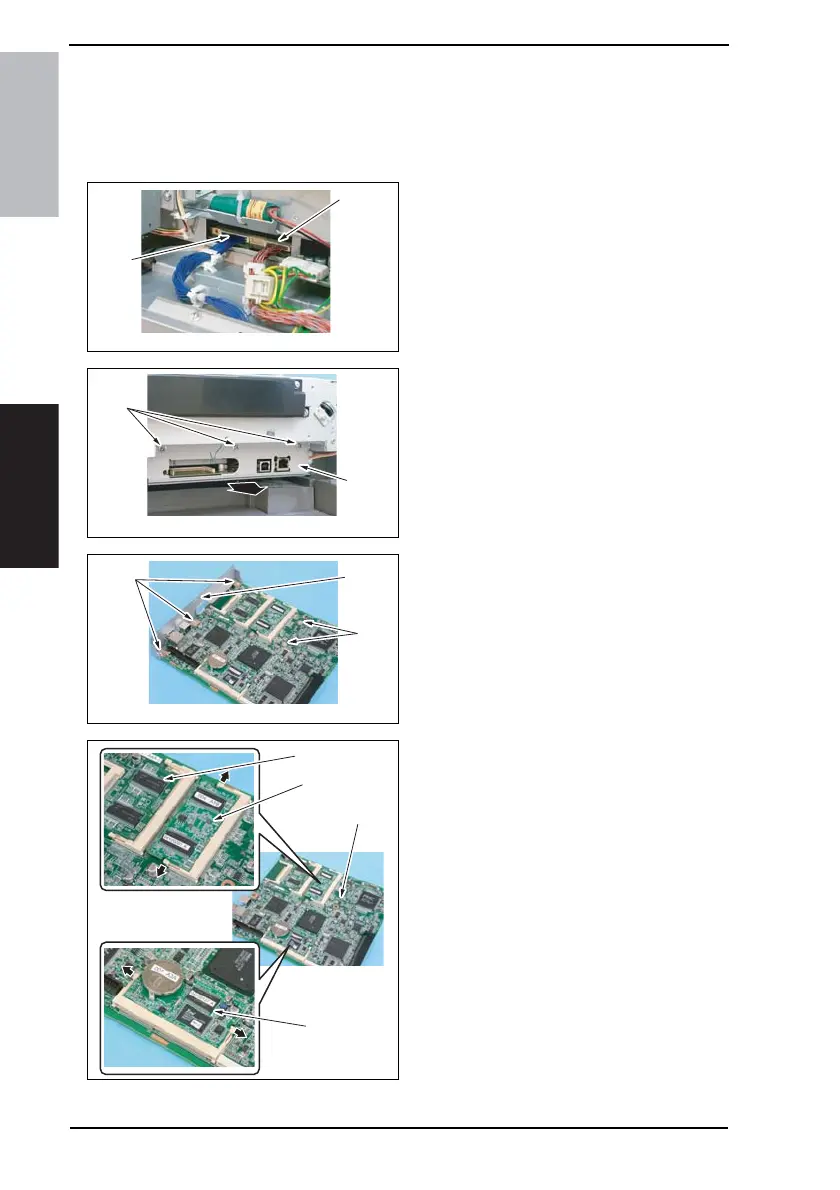
1. Remove the Upper Rear Cover.
☞ 50
2. Remove the IR Right Cover.
☞ 51
3. Unplug the connector (CN7) [1].
NOTE
• If the Fax Kit is mounted, discon-
nect the two connectors (CN7 [1],
CN6 [2]).
4. Remove three screws [3] and the
MFBS Board Assy [4].
5. Remove five screws [5] and the
MFBS Board mounting bracket [6].
NOTE
• Remove the Hard Disk if one is
mounted.
6. Remove the stopper, RAMS Board
[7], and MEMS Board [8].
7. Remove the MFBS Board [9].
NOTE
• Remove the MEM Board [10] if
mounted in the expansion slot.
4040F2C693DA
[2]
[1]
4040F2C694DA
[3]
[4]
4040F2C751DA
[5]
[5] [6]
4040F2C752DA
[7]
[8]
[10]
[9]









 To Next Page