Field Service Ver. 1.0 Aug. 2005 3. Troubleshooting procedures
5
Standard Controller
Troubleshooting
Troubleshooting
3. Troubleshooting procedures
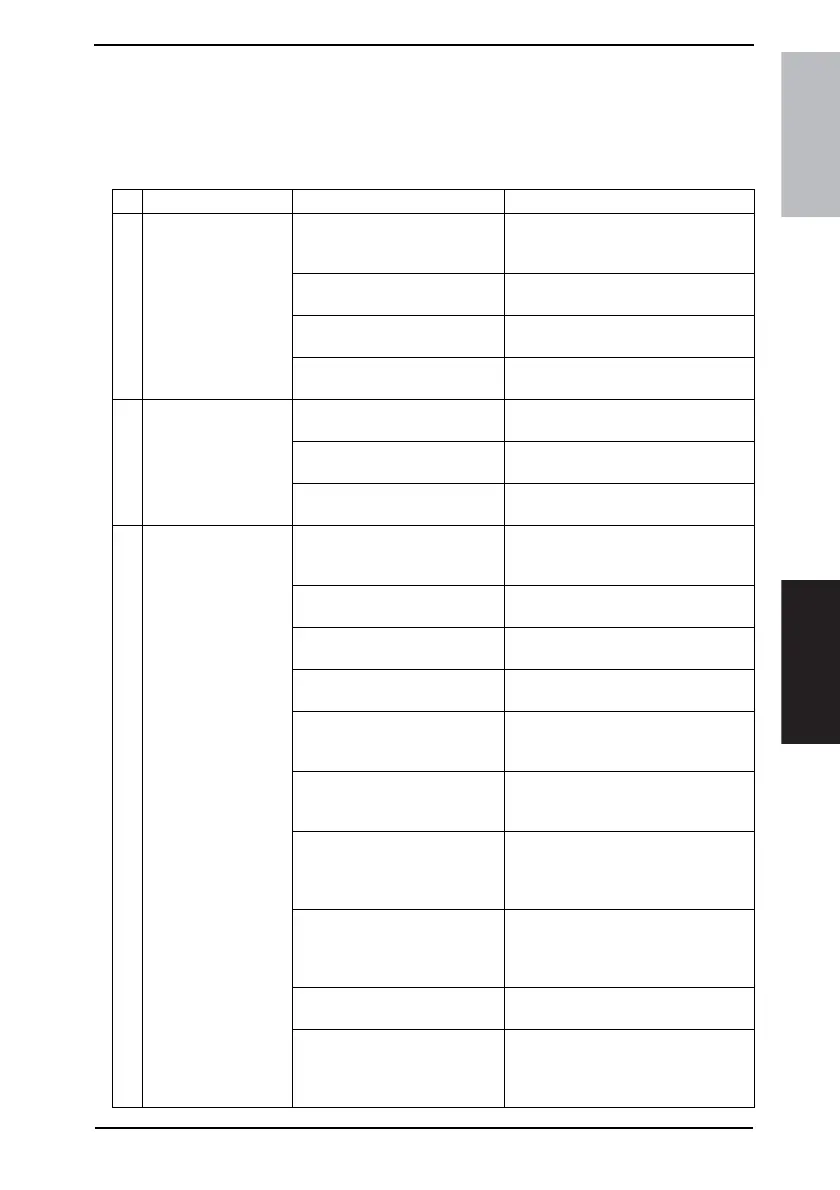
3.1 Unable to print
No. Symptom Probable cause Action
1 The message “No
printers are con-
nected” or “Print error”
appears.
The printer driver selected for
printing is not compatible with
the printer controller.
Check the printer name selected.
The network cable or USB cable
is disconnected.
Check that the cable is connected
properly.
An error has occurred in this
machine.
Check this machine’s control panel.
Available memory space is not
sufficient.
Perform a test print to check whether
printing is possible.
2 A postscript error
appears.
Available computer memory
space is not sufficient.
Perform a test print to check whether
printing is possible.
There is an error in the applica-
tion software settings.
Refer to the user’s manual of the appli-
cation software to check the settings.
The file printing settings are
incorrect.
Change the settings and try to print
again.
3 The machine does not
start printing although
the print job was com-
pleted on the com-
puter.
The printer driver selected for
printing is not compatible with
the printer controller.
Check the printer name selected.
The network cable or USB cable
is disconnected.
Check that the cable is connected
properly.
An error has occurred in this
machine.
Check this machine’s control panel.
A print job is queued in this
machine, delaying printing.
Check the job order on the Active Jobs
list of the machine’s control panel.
“Save in User Box” was selected
for the print job.
Check if the print job is stored on the
Box screen of this machine’s control
panel.
“Secure Print” was selected for
the print job.
Check if the print job is held on the
Secure Print screen of this machine’s
control panel.
If the account track settings have
been applied, an unregistered
account name (or password)
may have been entered.
Enter the correct account name (or
password).
If the authentication settings
have been applied, an unregis-
tered user name (or password)
may have been entered.
Enter the correct user name (or pass-
word).
Available computer memory
space is not sufficient.
Perform a test print to check whether
printing is possible.
The connection of this machine
to the network is not yet estab-
lished (while connecting to a net-
work).
Consult with the network administrator.









 To Next Page