Field Service Ver. 1.0 Aug. 2005 8. Mechanical adjustment
33
FS-508/PU-501/OT-601Adjustment / Setting
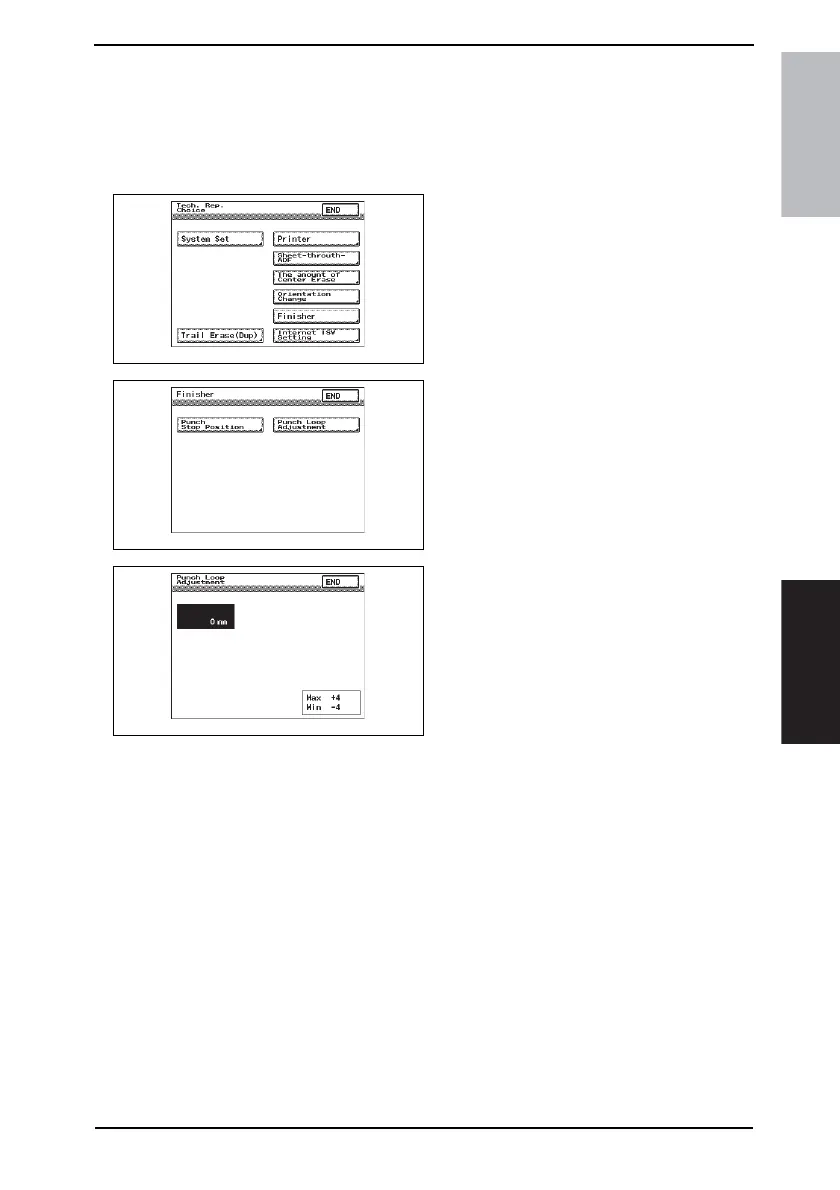
8.5 Punch Loop Length Adjustment (PU-501)
NOTE
This adjustment must be made in any of the following cases:
• When a slant occurs in the punch hole position.
• When misfeed frequently occurs in punch hole mode.
1. Display the Tech. Rep. Mode screen.
☞ For details of how to display the
Tech. Rep. Mode screen, see the
Adjustment/Setting of the main unit
service manual.
2. Touch [Tech. Rep. Choice].
3. Touch [Finisher].
4. Touch [Punch Loop Adjustment].
5. Press the Clear key and use the 10-
Key Pad to set the value.
• To make loop length larger, enter a
positive value.
• To make loop length smaller, enter a
positive value.
Adjustment range: +4 max. and -4 min.
1 increment: 1 mm
Use the ✽ key to switch between + and -.
4349F3E521DA
4349F3E522DA
4349F3E524DA









 To Next Page