Field Service Ver. 1.0 Aug. 2005 6. Utility/Counter Mode
21
FK-503Adjustment / Setting
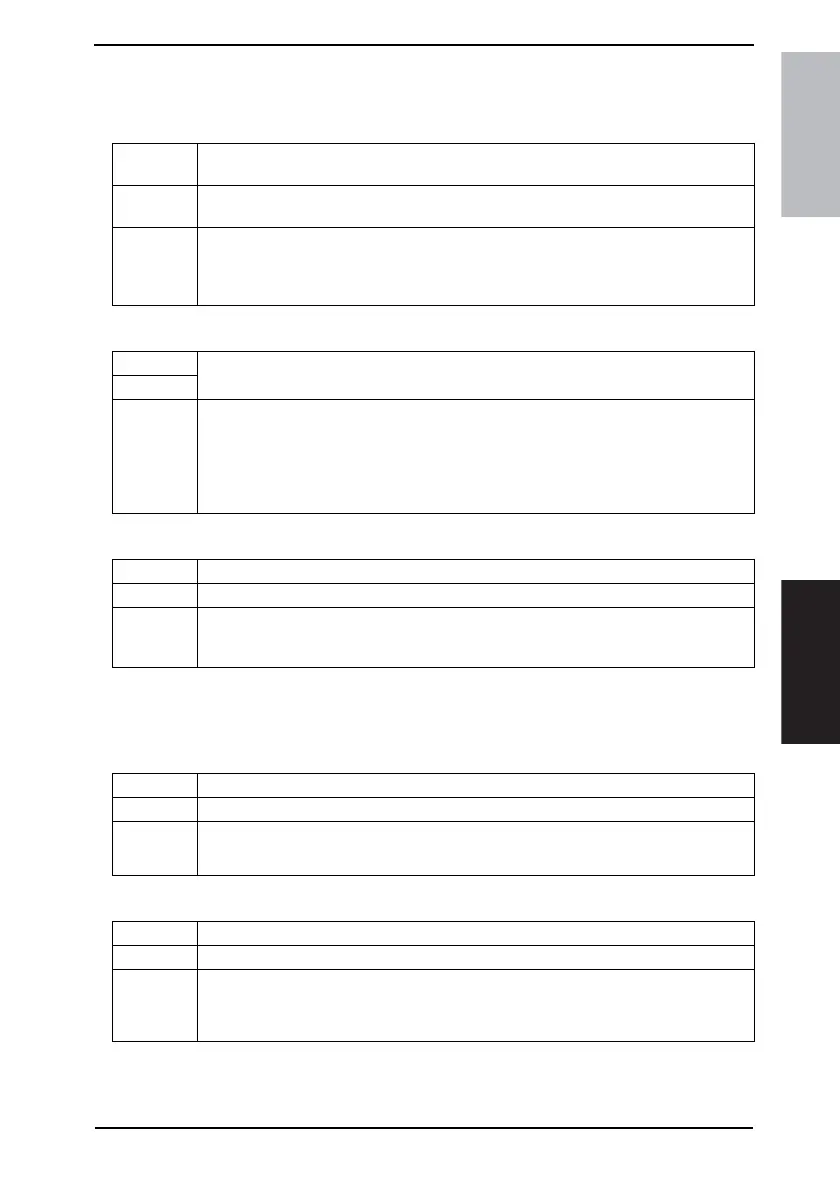
6.5.4 RX Settings
A. Memory RX Time Setting
(1) Memory Lock Time
(2) Memory Lock Password
B. Confidential RX User Box Delete
6.5.5 FAX Setting
A. RX Functions
(1) Reception Mode
(2) Numbers of RX Call Rings
Functions • To set the time of day and the day of the week, at which printing of the received fax is to
be started or stopped.
Use • When a received fax is to be printed at a specific time specified without allowing it to be
printed on the spot
Setting/
Procedure
1. Touch the [Memory RX Time Setting].
2. Touch the [Memory Lock Time].
3. Make the necessary settings and touch [Enter].
* Touch [OFF] if no settings are to be made.
Functions
• To set a password used for printing a fax received at a time not specified.
Use
Setting/
Procedure
• The default setting is “0000”.
1. Touch the [Memory RX Time Setting].
2. Touch the [Memory Lock Password].
3. Touch [Password], then enter the password and touch [Enter].
4. Touch [Confirm New Password], then enter the password a second time and touch
[Enter].
Functions • To delete a private box that has previously been registered.
Use • When deleting a private box.
Setting/
Procedure
1. Touch the [Confidential RX User Box Delete].
2. Select the private box to be deleted.
3. Touch the [Yes].
Functions • To set the reception mode of faxes.
Use • When changing the reception mode of faxes.
Setting/
Procedure
• The default setting is “Auto”.
“Auto” Manual
Functions • To set the number of call rings heard before automatic reception is activated.
Use • When changing the number of call rings heard before automatic reception is activated
Setting/
Procedure
• The default setting is “1x”.
1 to 20
* Setting range when the optional handset is mounted: 0 to 20 rings









 To Next Page