7. Other Field Service Ver. 1.0 Aug. 2005
60
bizhub 200/250/350
Maintenance
7.3.17 Power Supply Unit
1. Remove the Paper Output Cover.
☞ 52
2. Remove the Upper Rear Cover.
☞ 50
3. Remove the Rear Cover.
☞ 51
4. Remove the Rear Left Cover.
☞ 54
5. Remove the Left Cover.
☞ 54
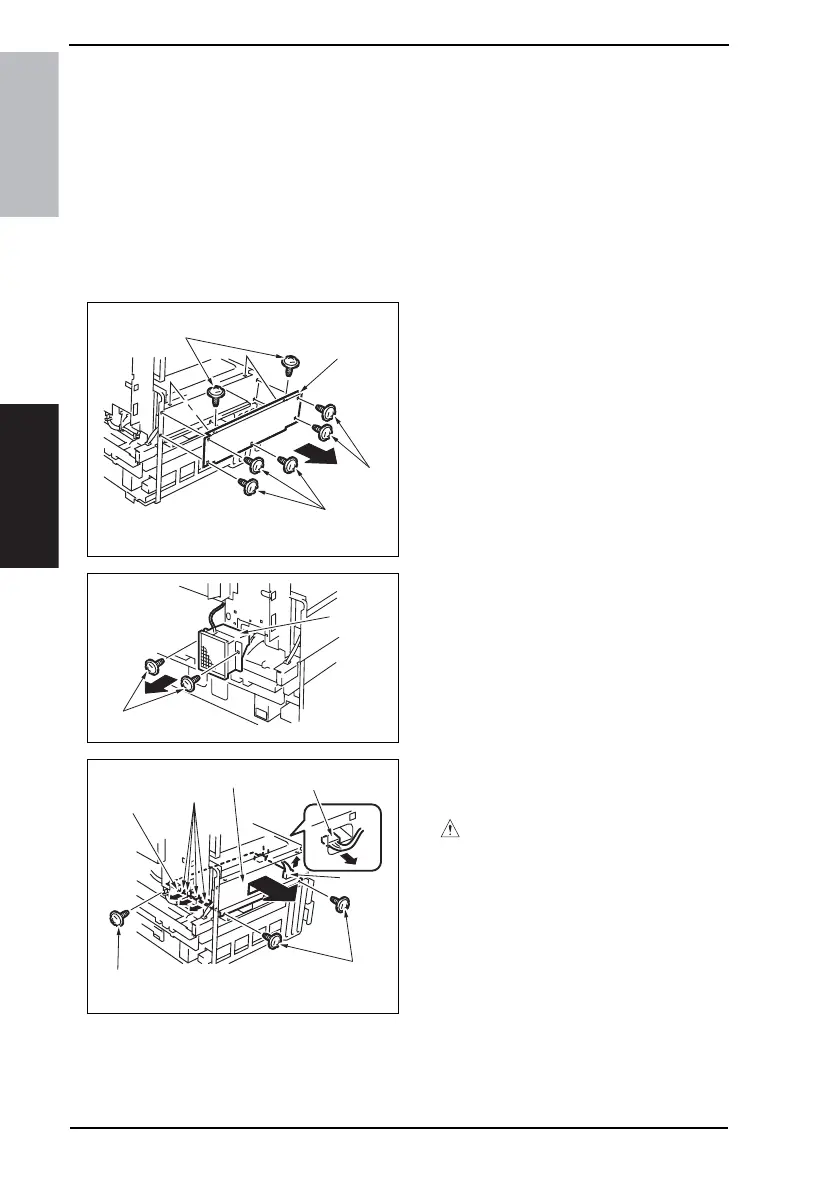
6. Remove seven screws [1] and the
Power Supply Unit Cover [2].
7. Remove two screws [2] and the
Power Supply Cooling Fan Motor [4].
8. Unplug seven connectors [5] and
remove three screws [6] and the
Power Supply Unit Assy [7].
CAUTION
• At reinstallation, make sure that the
harness is not slack.
4040F2C599DA
[1]
[1]
[2]
[1]
4040F2C601DA
[4]
[3]
4040F2C602DA
[6]
[5]
[6]
[7]
[6]
[6]
[5]









 To Next Page