7. Test mode Field Service Ver. 1.0 Aug. 2005
22
SD-502
Adjustment / Setting
7. Test mode
7.1 Entering Function Mode
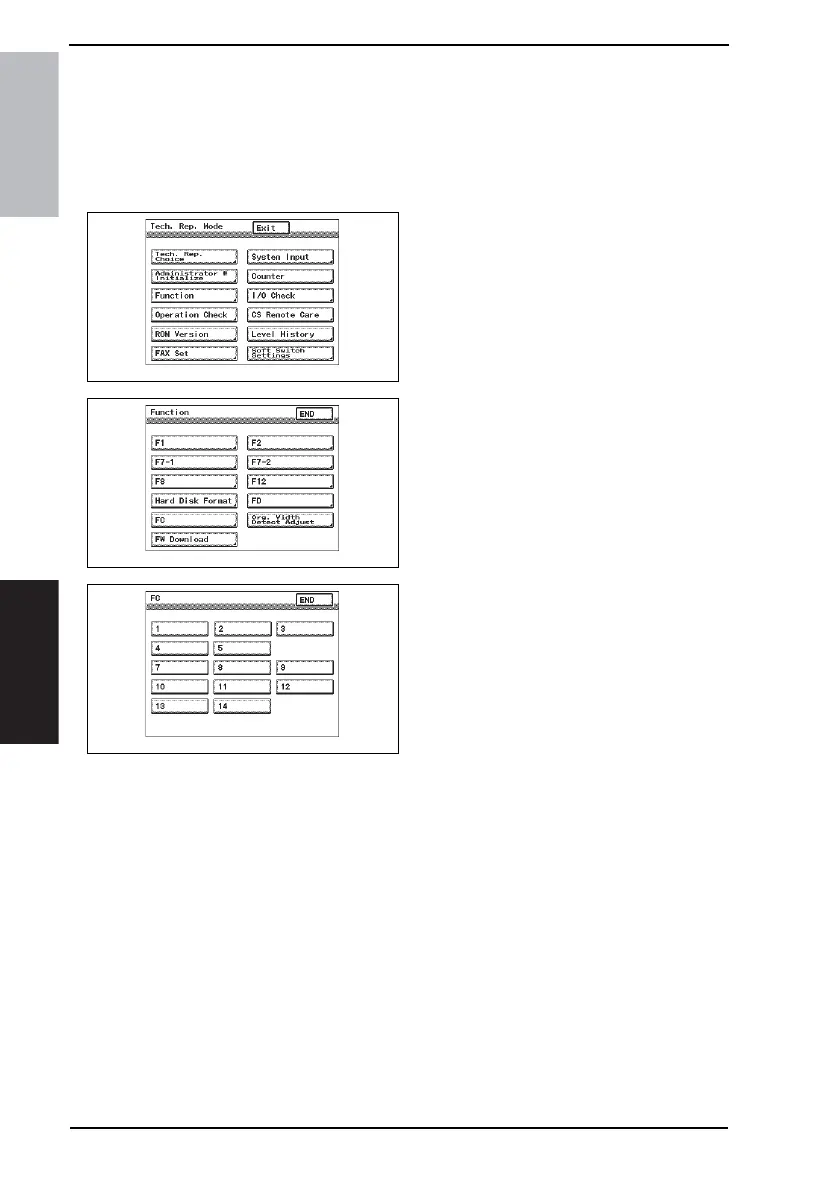
1. Display the Tech. Rep. Mode screen.
☞ For details of how to display the Tech. Rep. Mode screen, see the Adjustment/Setting
of the main unit service manual.
2. Touch [Function].
3. Touch [FC].
4. Touch [8] or [9].
7.2 Function Modes
8: Creasing Unit movement mode
• Performs the creasing drive once.
→ Raises the Layable guide.
→ Stops after the predetermined time.
→ Lowers the Layable guide.
→ The operation is finished.
9: Saddle Unit exit open/close mode
• Opens the Saddle Exit after the Saddle Exit is opened and closed.
→ Stops after the predetermined time.
→ The Saddle Exit closes.
→ The Saddle In & Out Guide advances.
→ Stops after the predetermined time.
→ The Saddle In & Out Guide retracts.
→ The operation is finished.
4349F2E541DA
4349F2E542DA
4349F3E520DA









 To Next Page