Field Service Ver. 1.0 Aug. 2005 5. Adjustment
9
Duplex Unit/
Switchback Unit
Adjustment / Setting
5. Adjustment
5.1 Adjusting the paper reference position
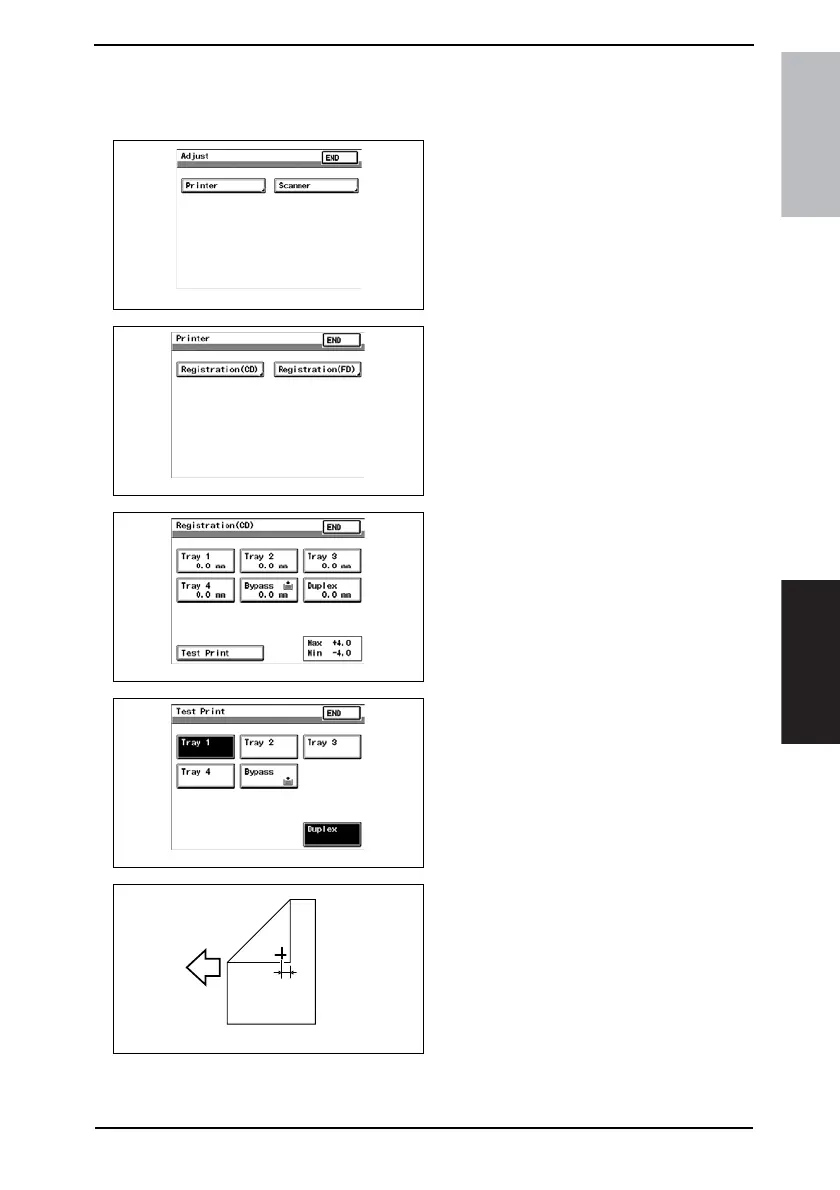
1. Display Adjust Mode.
☞ For details of how to display the
Adjust Mode screen, see the Adjust-
ment/Setting of the main unit service
manual.
2. Touch the [Printer].
3. Touch the [Registration (CD)].
4. Touch the [Test Print].
5. Touch the [Duplex].
6. Press the Start key.
7. Measure the width of printed refer-
ence line A
Specification: 10 mm ± 3.0 mm
8. If width A falls within the specified
range, finish the adjustment proce-
dure.
If outside the specified range, per-
form the adjustment below.
4040F3E567DA
4040F3E568DA
4040F3E569DA
4040F3E570DA
4040F3C571DA
A









 To Next Page