6. Firmware upgrade Field Service Ver. 1.0 Aug. 2005
44
bizhub 200/250/350
Maintenance
6.2.2 Engine
NOTE
• Make sure that the MSC firmware has not been copied to the compact flash card.
• To upgrade both the engine firmware and Finisher firmware at the same time, they
must first be copied onto a single compact flash.
☞ For the Finisher firmware upgrading procedures, see FS-508 Service Manual.
• If the files copied to the compact flash card are those of either the engine or Fin-
isher, or wrong, no screen display is given and thus no firmware can be down-
loaded.
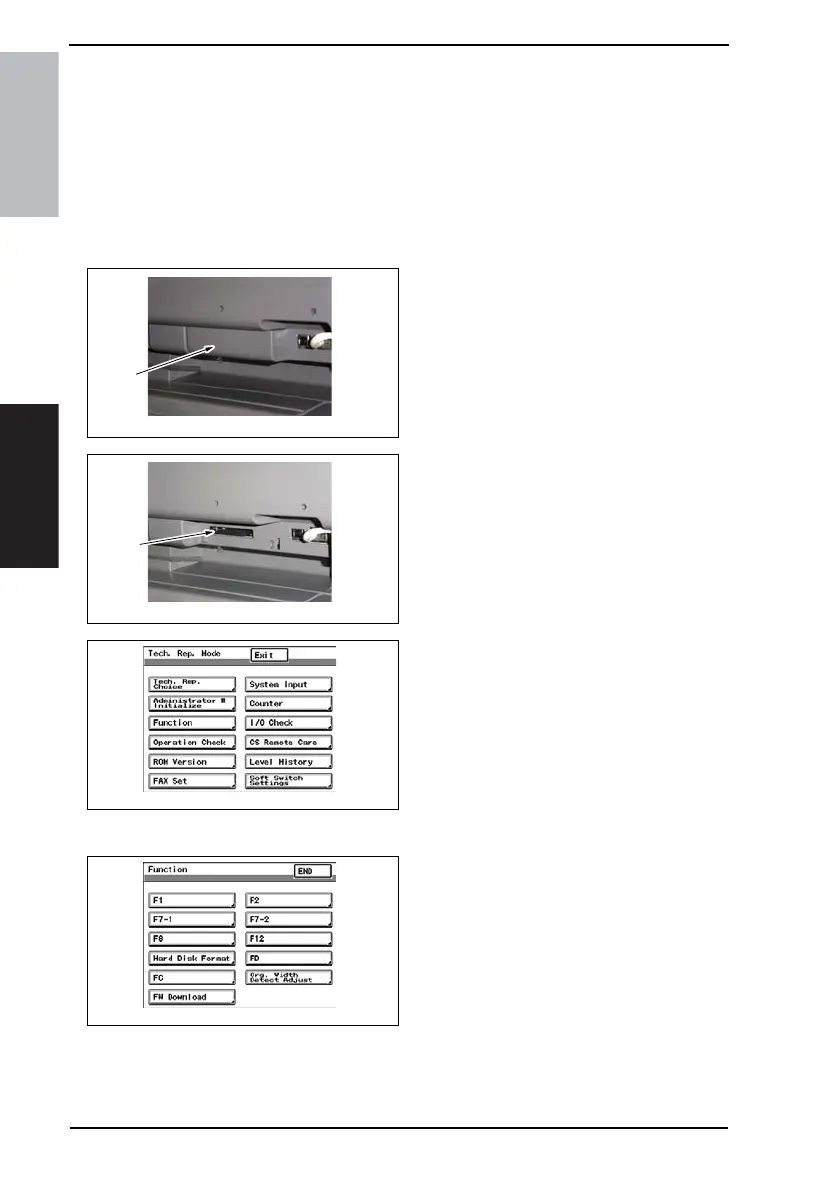
1. Turn OFF the main power switch.
2. Remove the Compact flash Cover
[1].
3. Insert the compact flash card [2], to
which the engine upgrading files
have been copied, into the slot.
4. Open the Right Door.
NOTE
• Be sure to open the Right Door
before turning ON the main power
switch.
5. Turn ON the main power switch.
6. Call the Tech. Rep. Mode to the
screen.
☞ 148
7. Touch [Function].
8. Touch [FW Download].
4040F2C596DA
[1]
4040F2C597DA
[2]
4040F2E767DA
4040F2E766DA









 To Next Page