6. Mechanical adjustment Field Service Ver. 1.0 Aug. 2005
24
PC-402
Adjustment / Setting
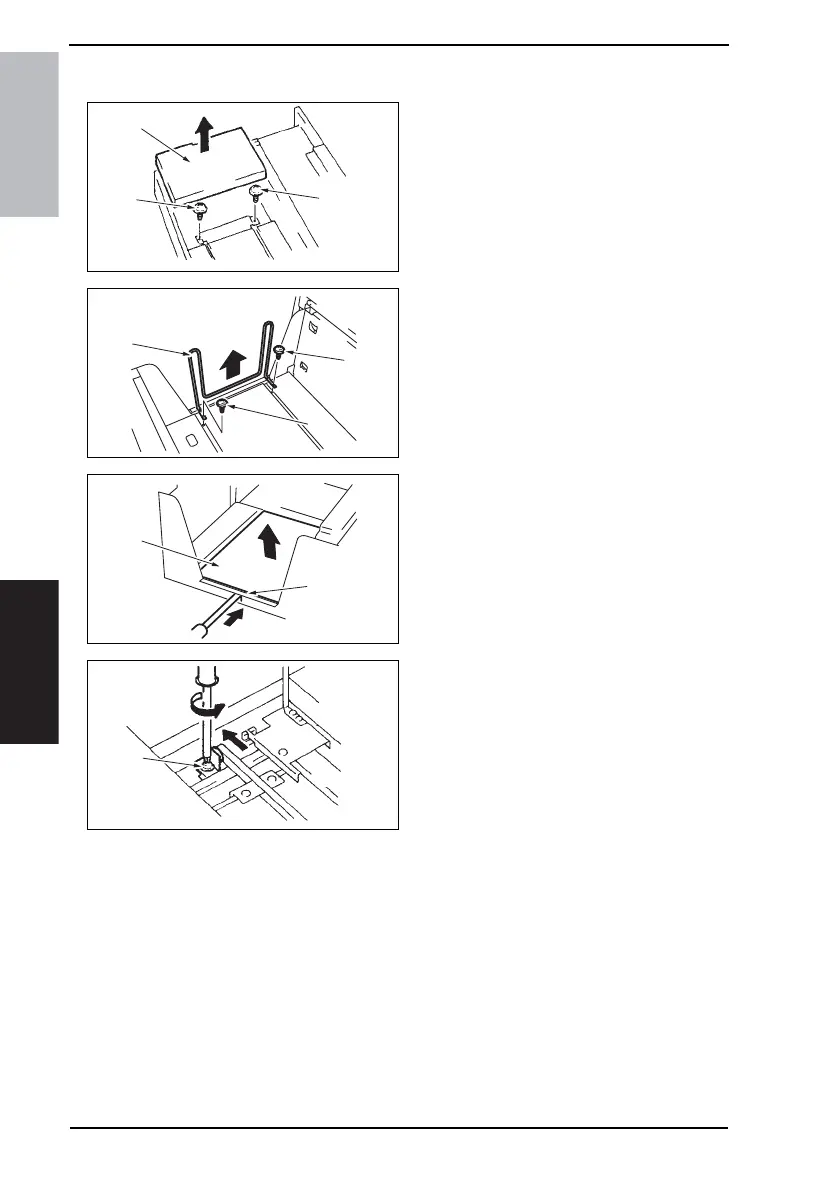
6.3 Shifter Movement Timing Belt Adjustment
1. Slide out the Drawer and remove it.
2. Lift the Main Drawer [1], and remove
two screws [2] fixing the Shift Tray.
NOTE
• When reinstalling, use caution
because the wire of the Main
Drawer comes off easily.
3. Remove two screws [3] and remove
the Shifter [4].
4. Push the tab [6] of the Shift Tray [5]
as shown on the left and release the
lock.
5. Remove the Shift Tray [5].
6. Loosen the screw [7] fixing the Ten-
sion Pulley Assy as shown to the left
and move it in the direction of the
arrow.
7. After moving the Shifter, tighten the
fixing screw [7].
4348fs3501c0
[1]
[2]
[2]
4348fs3502c0
[3]
[4]
[3]
4348fs3503c0
[6]
[5]
4348fs3504c0
[7]









 To Next Page