8. Mechanical adjustment Field Service Ver. 1.0 Aug. 2005
30
FS-508/PU-501/OT-601
Adjustment / Setting
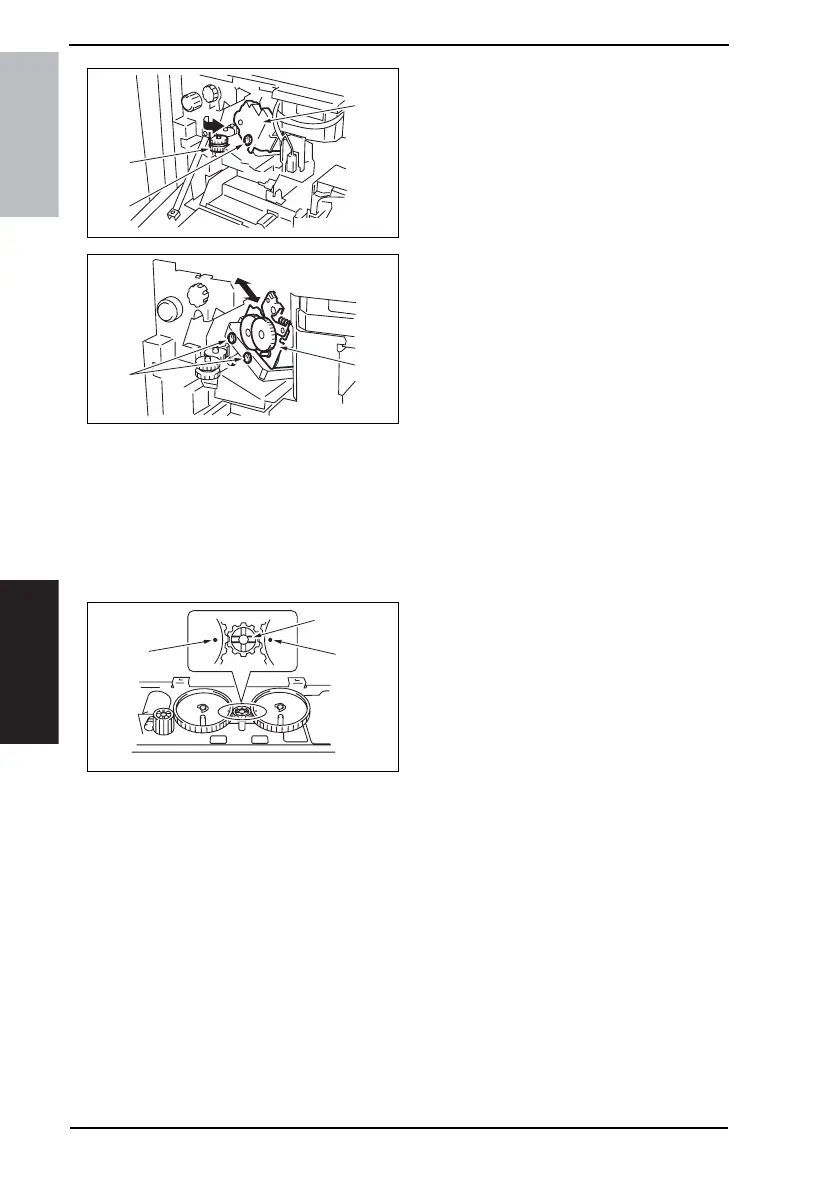
4. Open the Front Door.
5. Turn the dial [1], and move the sta-
pler forward.
6. Loosen the screw [2], and remove
the cover [3].
7. Loosen two adjustment screws [2]
and move the Stapler Unit [3] in the
direction of the arrow to make the
adjustment.
8. Make another copy and check the
staple position.
8.2 Adjustment of the Installation Position of the Shutter Drive
Gear
NOTE
Make this adjustment after any of the following procedures has been performed.
• When any of gear 1, 2, or 3 has been replaced.
• When gears 1, 2, and 3 has been disassembled.
1. Set three gears.
NOTE
• Set the gears so that the marks on
Gears 1 and 3 [1] are aligned with
the rib of Gear 2 [2] as shown on
the right.
4349F3C505DA
[2]
[3]
[1]
4349F3C504DA
[4]
[5]
4349F3C507DA
[1]
[1]
[2]









 To Next Page