Field Service Ver. 1.0 Aug. 2005 7. Other
57
bizhub 200/250/350Maintenance
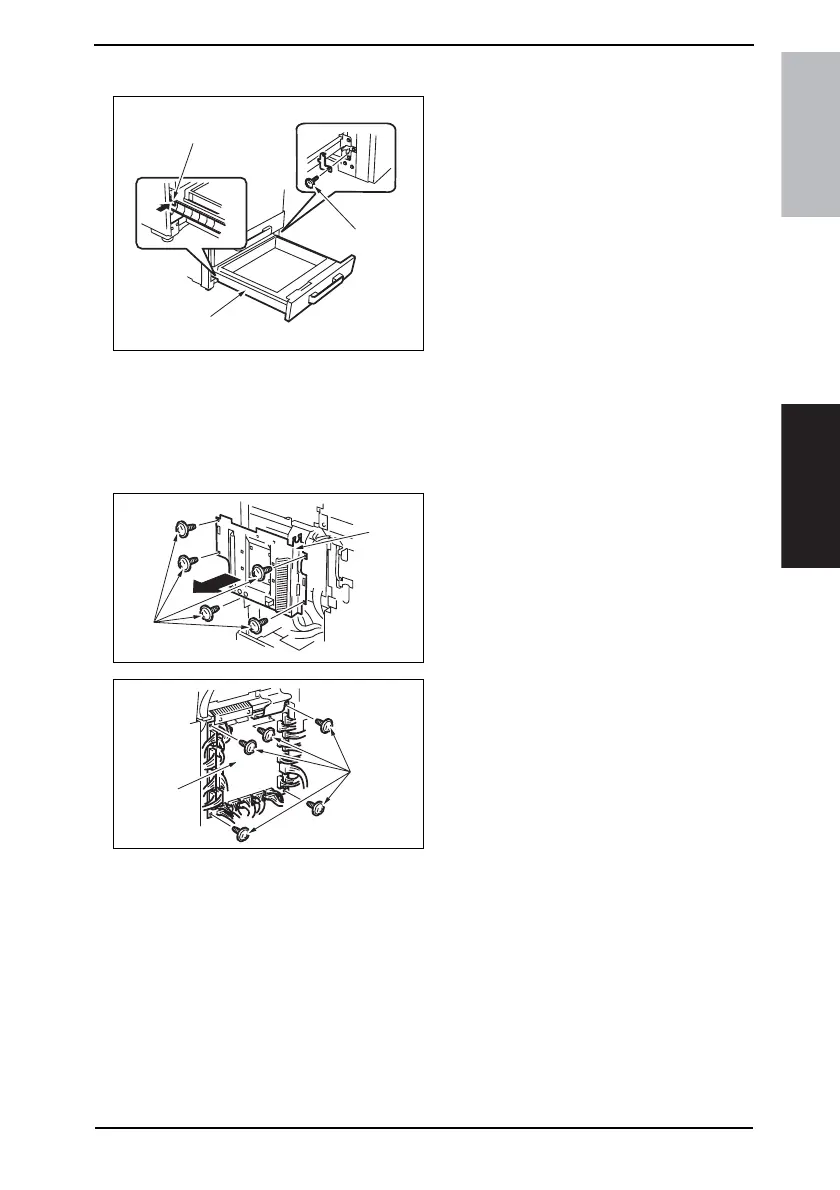
7.3.13 Tray 2
1. Slide out the Tray 2 [1].
2. Remove the screw [2] and, holding
the stopper [3], remove the Tray 2
[1].
7.3.14 Mechanical Control Board Cover
1. Remove the Upper Rear Cover.
☞ 50
2. Remove the Rear Cover.
☞ 51
3. Remove five screws [1] and the
Mechanical Control Board Cover [2].
4. Unplug the all connectors.
5. Remove five screws [3] and the
Mechanical Control Board [4].
NOTE
• When replacing the Mechanical
Control Board, be sure to replace
the EEPROM.
☞ 110
• When the Mechanical Control Board
has been replaced with a new one,
check the ROM version and
upgrade the firmware to the latest
version.
☞ 42
4040F2C589DA
[2]
[3]
[1]
4040F2C561DA
[2]
[1]
4040F2C562DA
[3]
[4]









 To Next Page