Field Service Ver. 1.0 Aug. 2005 3. Other
11
PC-402Maintenance
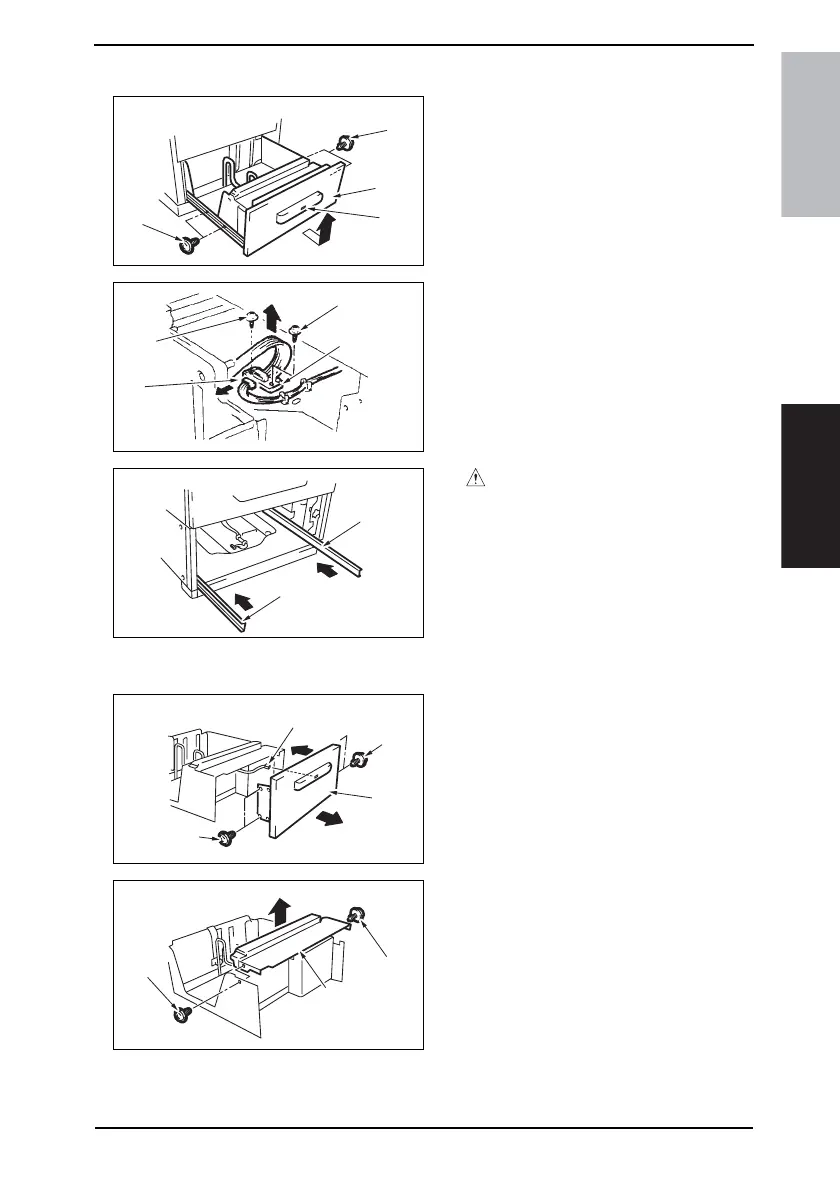
3.3.3 Drawer
1. Press the Drawer Eject Button [1]
and slide out the drawer [2].
2. Remove the paper.
3. Remove four screws [3] and slide out
the drawer [2].
4. Remove two screws [4], the connec-
tor [5], and remove the Connector
Board [6].
5. Remove the Drawer.
NOTE
• When removing the Connector
Board, use care not to drop the
drawer from the guide rail.
CAUTION
• To prevent injuries, press the guide
rail [7] inside the machine.
3.3.4 Wire
1. Remove the Drawer.
☞ 11
2. Remove four screws [1] and remove
the Front Cover Assy [2].
3. Unplug the connector [3].
4. Remove two screws [4] and the Inner
Cover Assy [5].
NOTE
• Do not peel off pulley protective
mylar sheet.
4348fs2522c0
[2]
[3]
[1]
[3]
4348fs2523c0
[4]
[4]
[6]
[5]
4348fs2524c0
[7]
[7]
4348fs2525c0
[1]
[3]
[2]
[1]
4348fs2526c0
[4]
[4]
[5]









 To Next Page