Field Service Ver. 1.0 Aug. 2005 7. Other
71
bizhub 200/250/350Maintenance
7.3.24 Manual Bypass Unit
1. Remove the Rear Right Cover.
☞ 50
2. Remove the Lower Right Rear Cover.
☞ 49
3. Remove the Front Manual Bypass Cover.
☞ 55
4. Remove the Rear Manual Bypass Cover.
☞ 55
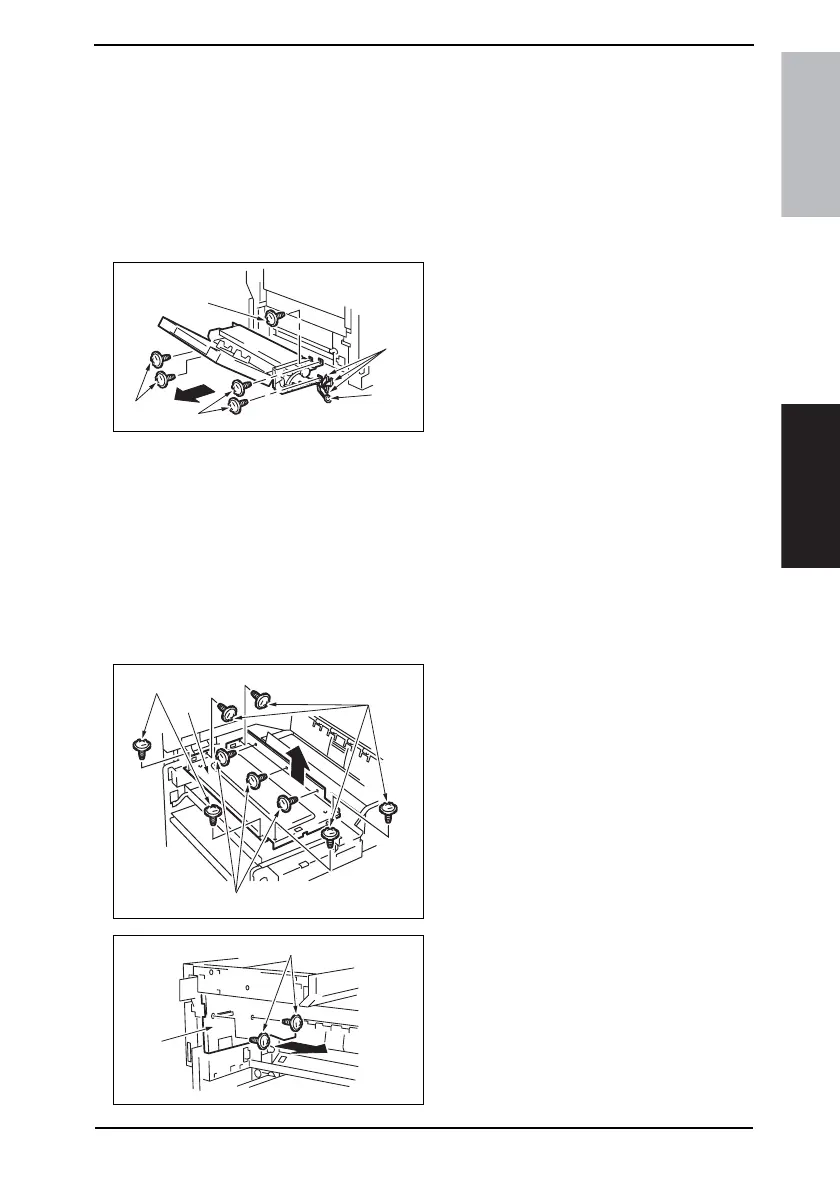
5. Remove five screws [1] and ground
wire [2], disconnect the three con-
nectors [3], and remove the Manual
Bypass Unit [4].
NOTE
• When the Manual Bypass Unit has
been mounted, be sure to perform
the Manual Bypass Unit Installation
Check procedures.
☞ 214
7.3.25 PH Unit
1. Remove the Upper Rear Cover.
☞ 50
2. Remove the Rear Cover.
☞ 51
3. Open the Front Door.
4. Remove the Paper Output Cover.
☞ 52
5. Remove nine screws [1] and the PH
protective metal bracket [2].
6. Remove two screws [3] and the
Paper Output Tray Rear Cover [4].
4040F2C574DA
[3]
[1]
[1]
[1]
[2]
4040F2C611DA
[2]
[1]
[1]
[1]
4040F2C612DA
[3]
[4]









 To Next Page