8. Mechanical adjustment Field Service Ver. 1.0 Aug. 2005
26
SD-502
Adjustment / Setting
8.4 Center Staple Position Adjustment
NOTE
Make this adjustment after any of the following procedures has been performed.
• When Staple Unit 1 or 2 has been replaced.
• When center staple position is misaligned.
• When center staple angle adjustment has been made.
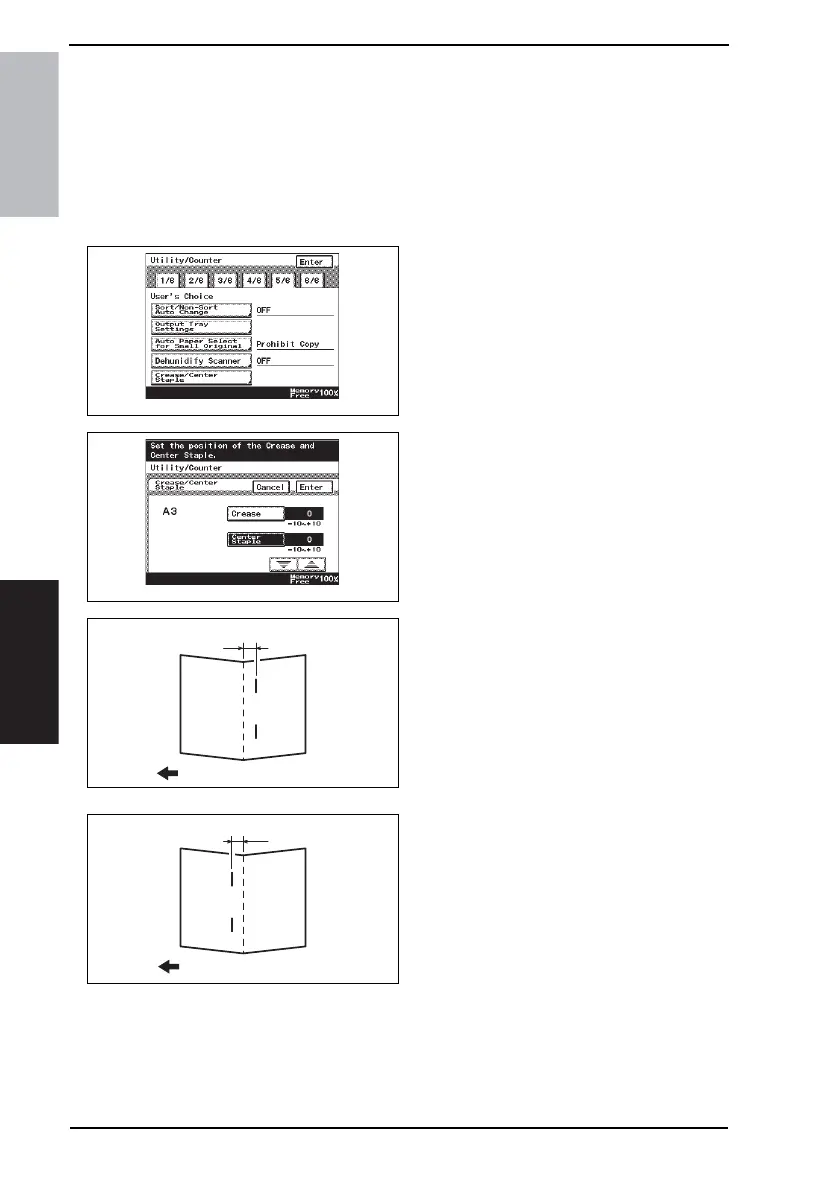
1. Make a copy in the Center Staple mode. (A3 Size)
2. Press the Utility/Counter key, and
touch [User’s Choice].
3. Touch the [5/6] tab.
4. Touch [Crease/Center Staple].
5. Select [A3] and touch [Enter].
6. Touch [Center Staple].
7. Check the copy of step 1 and make
the following adjustment.
If the staple position is offset as
shown on the left
8. Fold the copy in half at the center
and measure width A.
Specification: 0 ± 1.5 mm
9. Touch [▲] and set the appropriate
numeric value.
Adjustment range: 0 to +10
(1 increment 0.5 mm)
If the staple position is offset as
shown on the left
10. Fold the copy in half at the center
and measure width B.
Specification: 0 ± 1.5 mm
11. Touch [▼] and set the appropriate
numeric value.
Adjustment range: 0 to -10
(1 increment 0.5 mm)
12. Touch [Enter].
13. Make another copy, and check the deviation.
4511F3E513DA
4511F3E515DA
4511F3C510DA
A
Exit direction
4511F3C511DA
B
Exit direction









 To Next Page