Field Service Ver. 1.0 Aug. 2005 4. Other
15
FS-508/PU-501/OT-601Maintenance
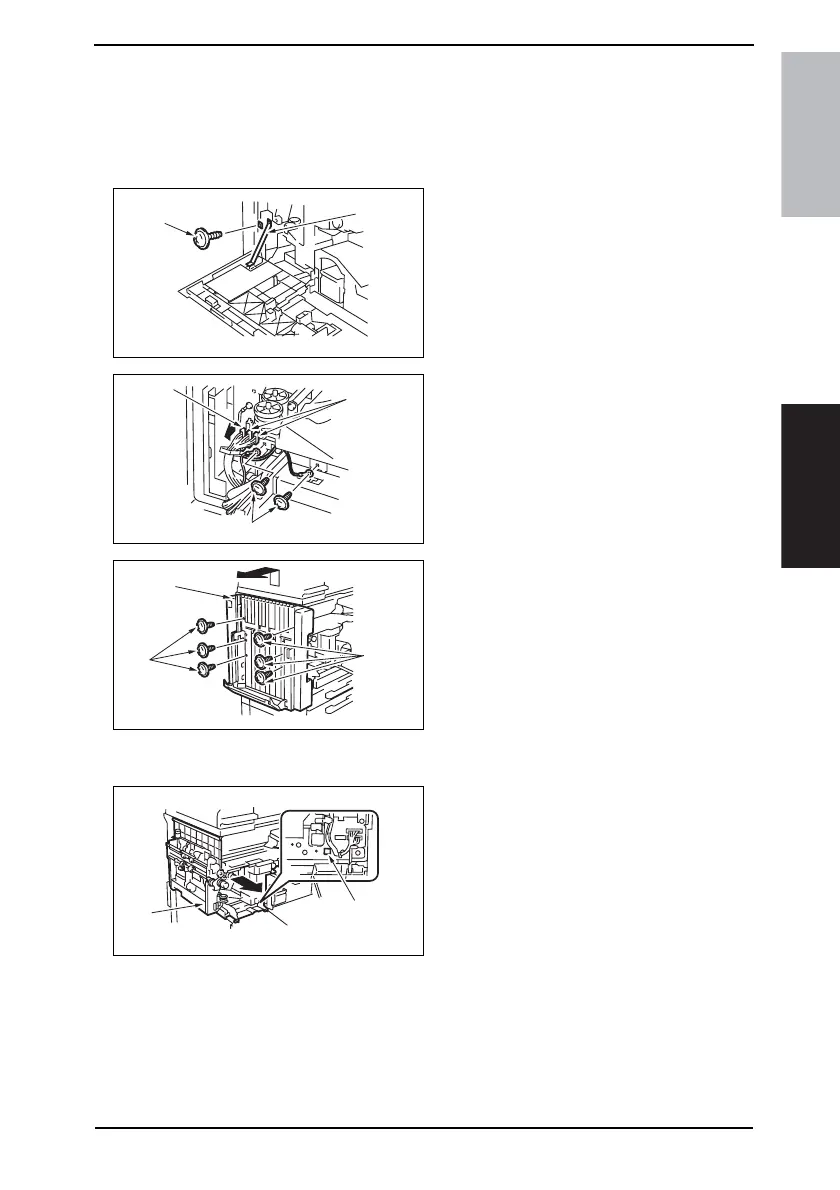
4.3.9 Sorted Copy Tray
NOTE
• When removing the Sorted Copy Tray, set the Sorted Copy Tray to its home posi-
tion.
• If the Exit Tray (OT-601) is installed, remove it in advance.
1. Open the Front Door.
2. Remove the screw [1], and remove
the Front Door Stopper [2].
3. Remove the Horizontal Transport
Left Front Cover.
☞ 13
4. Disconnect three connectors [3].
5. Remove two screws [4], and remove
the ground wire.
6. Remove six screws [5], and lift the
Sorted Copy Tray [6] upward and off
the copier.
4.3.10 Horizontal Transport Unit
1. Remove the Sorted Copy Tray.
☞ 15
2. Remove the Front Right Door.
☞ 13
3. While holding down the lock release
button [1], remove the Horizontal
Transport Unit [2].
4349F2C507DA
[1]
[2]
4349F2C509DA
[3]
[4]
[3]
4349F2C510DA
[5]
[5]
[6]
4349F2C511DA
[1]
[2]









 To Next Page