Field Service Ver. 1.0 Aug. 2005 2. Periodical check
9
DF-605Maintenance
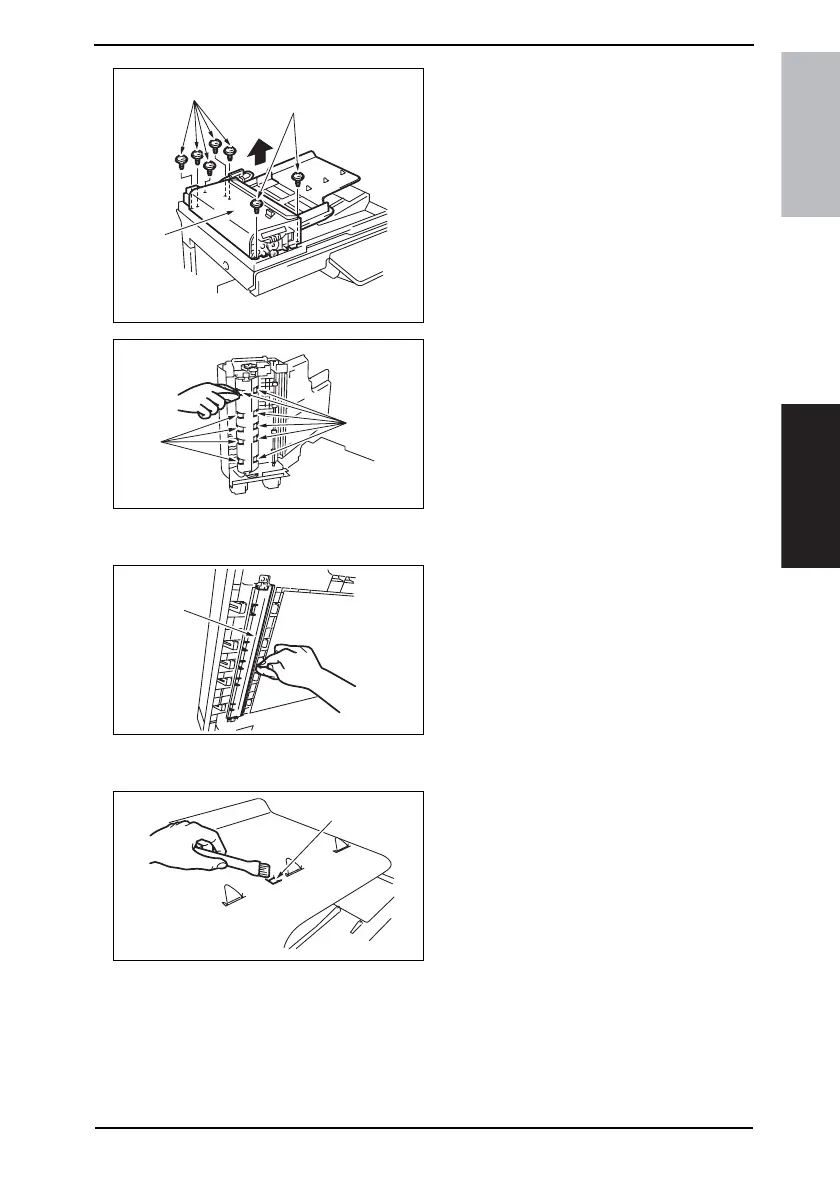
8. Remove seven screws [7], and
remove the Paper Feed Unit [8].
9. Using a soft cloth dampened with
alcohol, wipe the roller [9].
2.1.6 Cleaning of the Scanning Guide
1. Open the Duplexing Document
Feeder.
2. Using a soft cloth dampened with
alcohol, wipe the Scanning Guide [1]
clean of dirt.
2.1.7 Cleaning of the Reflective Sensor Section
1. Clean the sensor [1] using a brush or
other similar tools.
4344F2C531DA
[7]
[7]
[8]
4344F2C532DA
[9]
[9]
4344F2C533DA
[1]
4344F2C518DA
[1]









 To Next Page