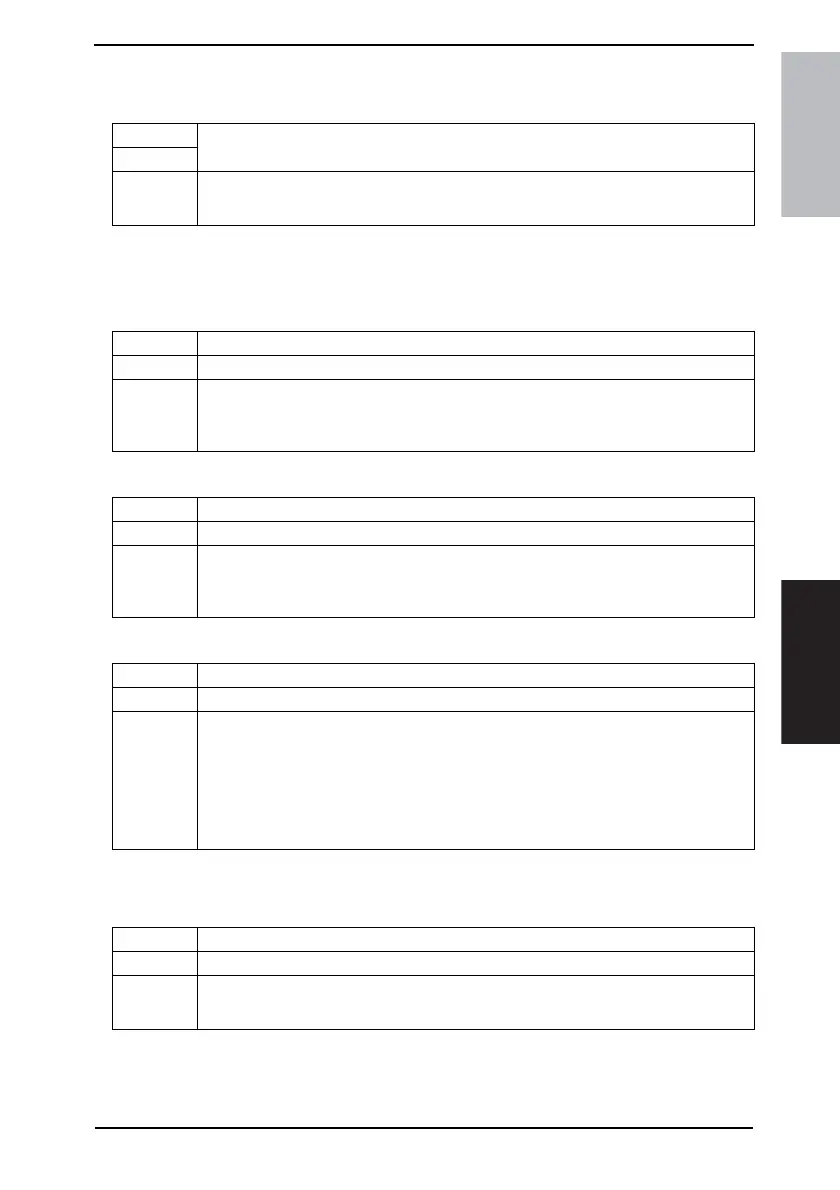
Field Service Ver. 1.0 Aug. 2005 6. Utility/Counter Mode
19
FK-503Adjustment / Setting
6.5.2 Admin. Set
A. Restrict One-Touch Editing
6.5.3 TX Settings
A. Quality/Mode
(1) Default Density
(2) Default Density
(3) Communication Mode
B. Comm. Menu
(1) TX
Functions
• To restrict the user from registering or modifying one-touch dials.
Use
Setting/
Procedure
• The default setting is “OFF”.
ON “OFF”
Functions • To set the default image quality selected during transmission.
Use • To change the default image quality selected during transmission.
Setting/
Procedure
• The default setting is “Standard”.
“Standard” Fine SuperFine
Text/Photo GSR Super GSR
Functions • To set the default image density selected during transmission.
Use • To change the default image density selected during transmission.
Setting/
Procedure
• The default setting is “Std.”
• Setting range: 5 steps
Light to Std. to Dark
Functions • To set the communication mode established during transmission.
Use • To change the communication mode established during transmission.
Setting/
Procedure
<FAX>
G3-1 G3-2
<Internet FAX>
Internet FAX IP-TX IP Relay
<PC>
E-Mail Scanner
Functions • To set the type of transmission to be made.
Use • To change the type of transmission to be made.
Setting/
Procedure
• The default setting is “Memory TX”.
“Memory TX” Quick Scan TX



 To Next Page