Field Service Ver. 1.0 Aug. 2005 4. Periodical check
33
bizhub 200/250/350Maintenance
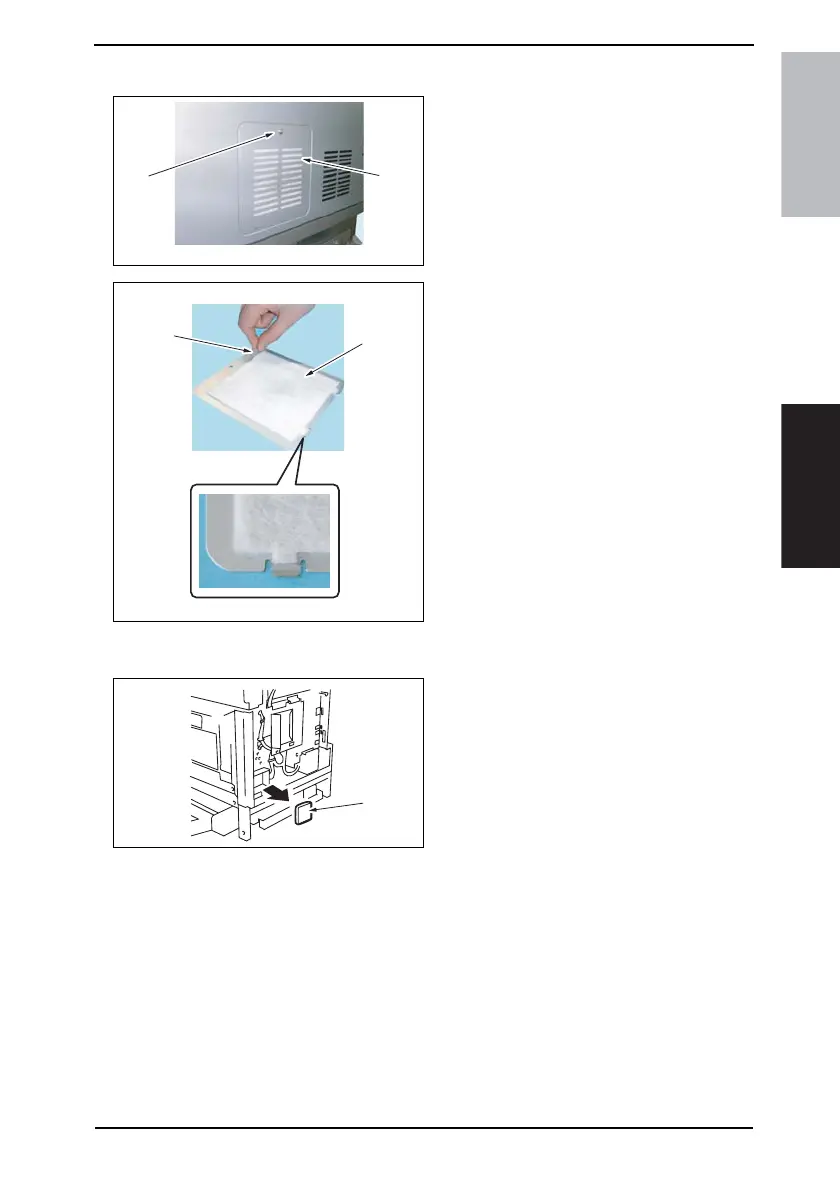
4.5.12 Replacing of the Toner Filter (Main Unit)
1. Remove the screw [1] and the Toner
Filter Rear Cover [2].
2. Pull on the tape portion [3] and peel
off the Toner Filter (Main Unit) [4].
NOTE
• When mounting the filter, not the
correct mounting position that is
shown on the left.
• Replace the Developing Unit with a
new one at the same time.
4.5.13 Replacement of the Ozone Filter
1. Remove the Upper Rear Cover.
☞ 50
2. Remove the Rear Cover.
☞ 51
3. Remove the Ozone Filter [1].
4040F2C558DA
[1]
[2]
4040F2C557DA
[4]
[3]
4040F2C559DA
[1]









 To Next Page