7. Other Field Service Ver. 1.0 Aug. 2005
106
bizhub 200/250/350
Maintenance
7.6 Option counter
7.6.1 Installation method for the Key Counter
1. Remove the Upper Rear Cover.
☞ 50
2. Remove the IR Right Cover.
☞ 51
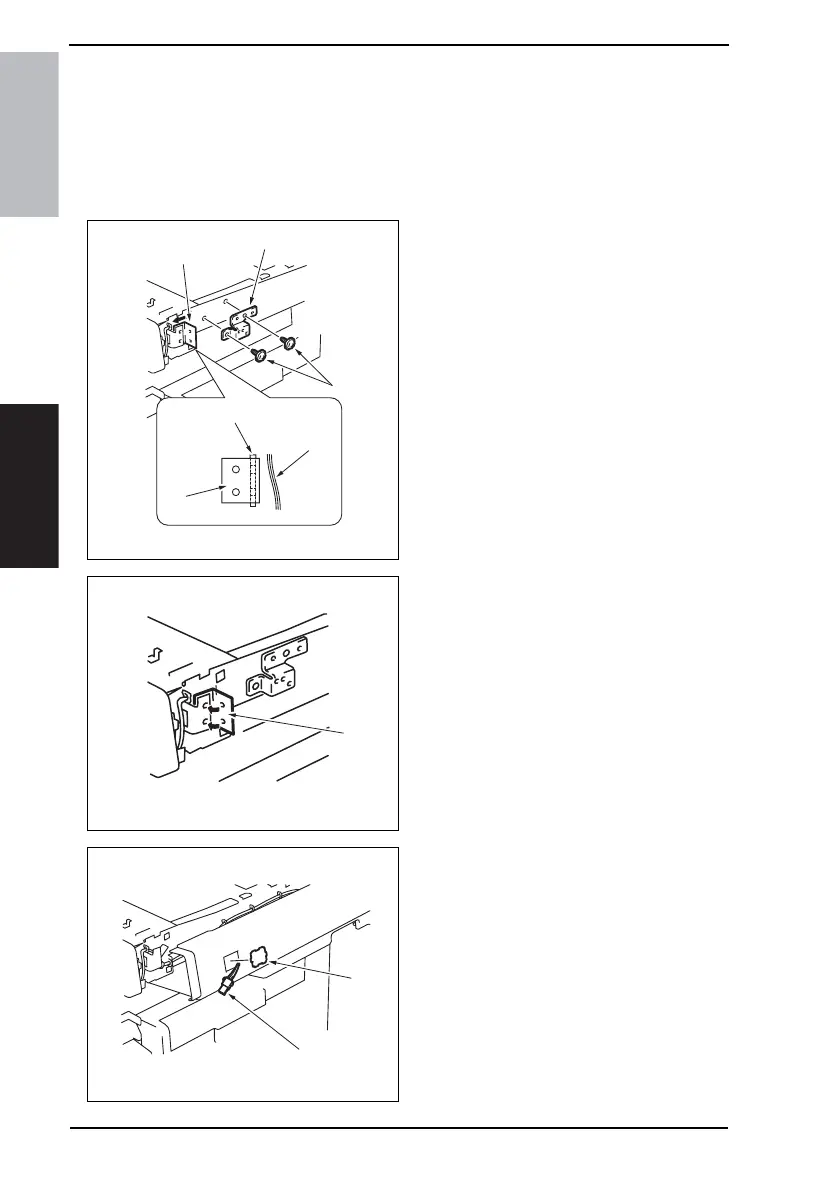
3. Install the spacer [2] using two
screws [1].
4. Fold the sheet [3] in half.
5. Insert the edge of the sheet having
no holes between the harness [4]
and the Key Counter Mounting
Bracket [5].
6. Peel off the tape [6] from the sheet.
7. Align threaded holes in the sheet
with those in the Key Counter Mount-
ing Bracket. Then, affix the folded
halves together so as to sandwich
the Mounting Bracket.
8. Remove the knockout [7] from the IR
Right Cover.
9. Pass the Key Counter Harness [8]
through the IR Right Cover.
10. Reinstall the IR Right Cover.
4040F2C738DA
[1]
[4]
[5]
[3]
[2]
[3]
4040F2C739DA
[6]
4040F2C740DA
[7]
[8]









 To Next Page