Field Service Ver. 1.0 Aug. 2005 7. Other
65
bizhub 200/250/350Maintenance
7.3.22 CCD Unit
A. Replacing Procedure
1. Remove the IR Upper Left Cover.
☞ 49
2. Remove the Front Holding Bracket.
☞ 49
3. Remove the Original Glass.
☞ 49
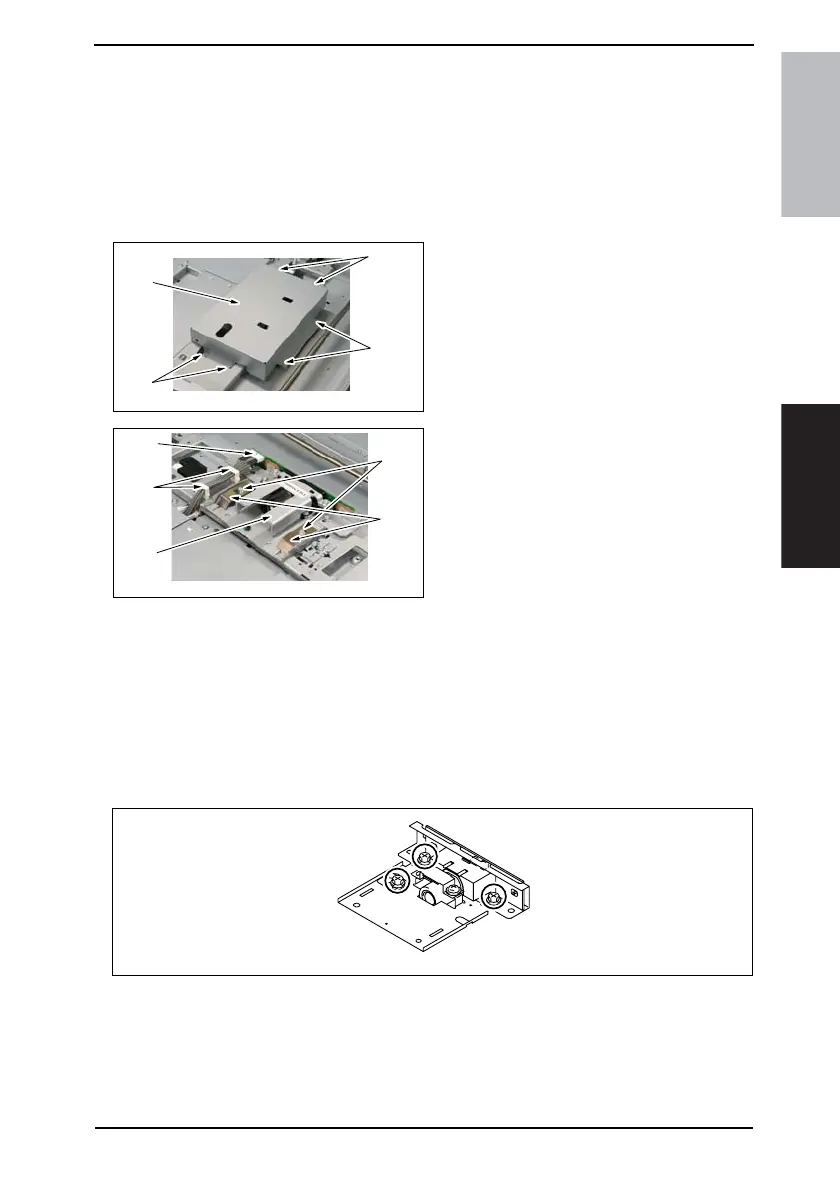
4. Remove six screws [1] and the CCD
Unit Cover [2].
5. Move the Exposure Unit, remove the
wiring saddle [3], and disconnect the
connector [4].
6. Remove two screws [5] and two flat
springs [6]. Then, remove the CCD
Unit [7].
NOTE
When the CCD Unit has been replaced
with a new one, make the installation
adjustment that must be made when
the CCD Unit is replaced.
☞ 65
B. Installation Adjustment to be Made when CCD Unit is Replaced
NOTE
• Make this adjustment only when the CCD Unit has been replaced with a new one.
• Before attempting to make this adjustment, make sure that registration and erase
adjustments for the printer have been completed.
• Do not loosen or remove the screws shown below.
4040F2C675DA
[1]
[1]
[1]
[2]
4040F2C676DA
[7]
[3]
[4]
[5]
[6]
4030D601AA









 To Next Page