Field Service Ver. 1.0 Aug. 2005 7. Other
105
bizhub 200/250/350Maintenance
7.5 Mount Kit MK-709
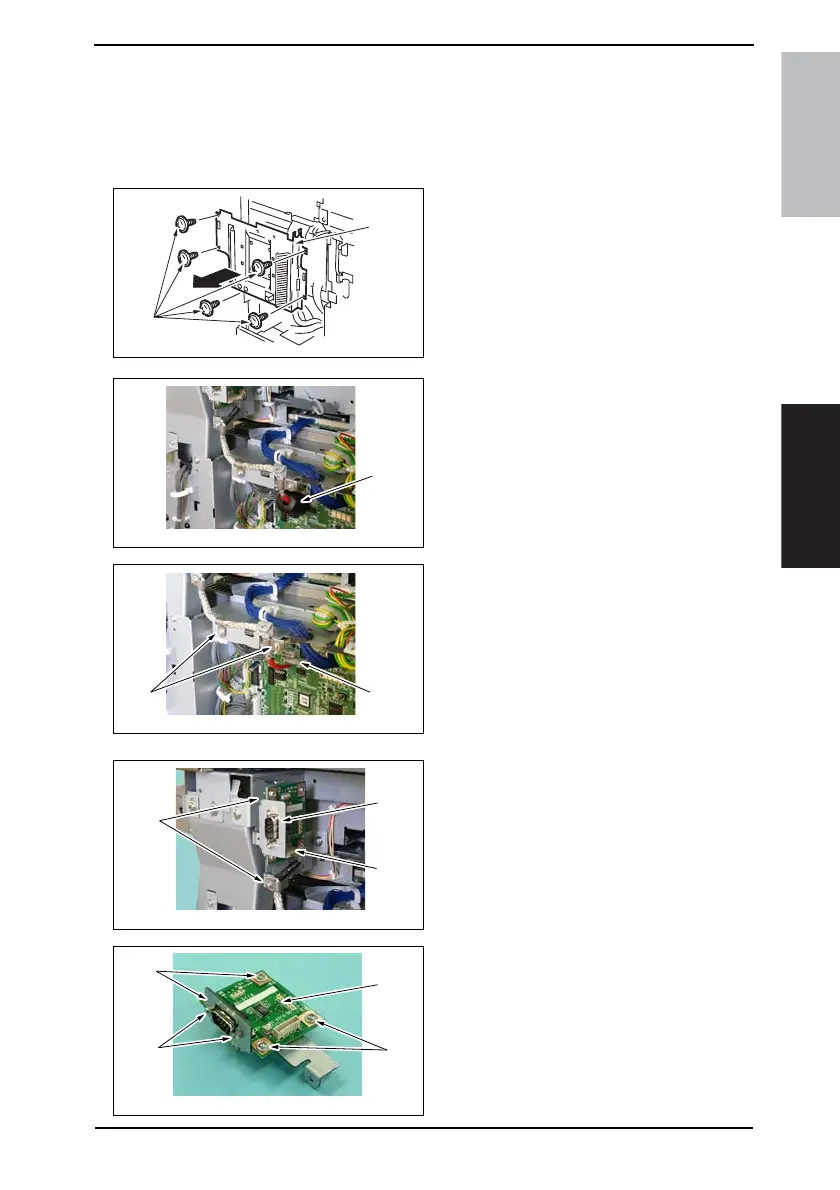
1. Remove the Upper Rear Cover.
☞ 50
2. Remove the Rear Cover.
☞ 51
3. Remove five screws [1] and Mechan-
ical Control Board Cover [2].
4. Remove the ferrite core (black) [3].
5. Remove the Connector [4].
6. Remove two screws [5], shield
clamp, and harness.
NOTE
• When the connector is to be con-
nected, plug the side of the har-
ness, around which red tape is
wound, in the connector (PJ38) of
the Mechanical Control Board.
7. Remove the Connector [6].
8. Remove two screws [7] and the
Mount Kit Assy [8].
9. Remove four screws [9], two shoul-
der screws [10], and the Mount Kit
Board [11].
4040F2C561DA
[2]
[1]
4040F2C734DA
[3]
4040F2C735DA
[4]
[5]
4040F2C736DA
[6]
[8]
[7]
4040F2C737DA
[9]
[11]
[10]
[9]









 To Next Page