Field Service Ver. 1.0 Aug. 2005 4. Disassembly/Reassembly
9
FK-503Maintenance
4.3 Ni-MH battery Replacement
1. Check on the screen that the memory capacity still available for use reads 100%.
NOTE
• If the memory capacity does not read 100%, let the machine output contents of the
memory or wait until the machine completes transmission.
2. Turn OFF the Main Power Switch.
3. Remove the Upper Rear Cover.
☞ For details, see Service Manual of the machine.
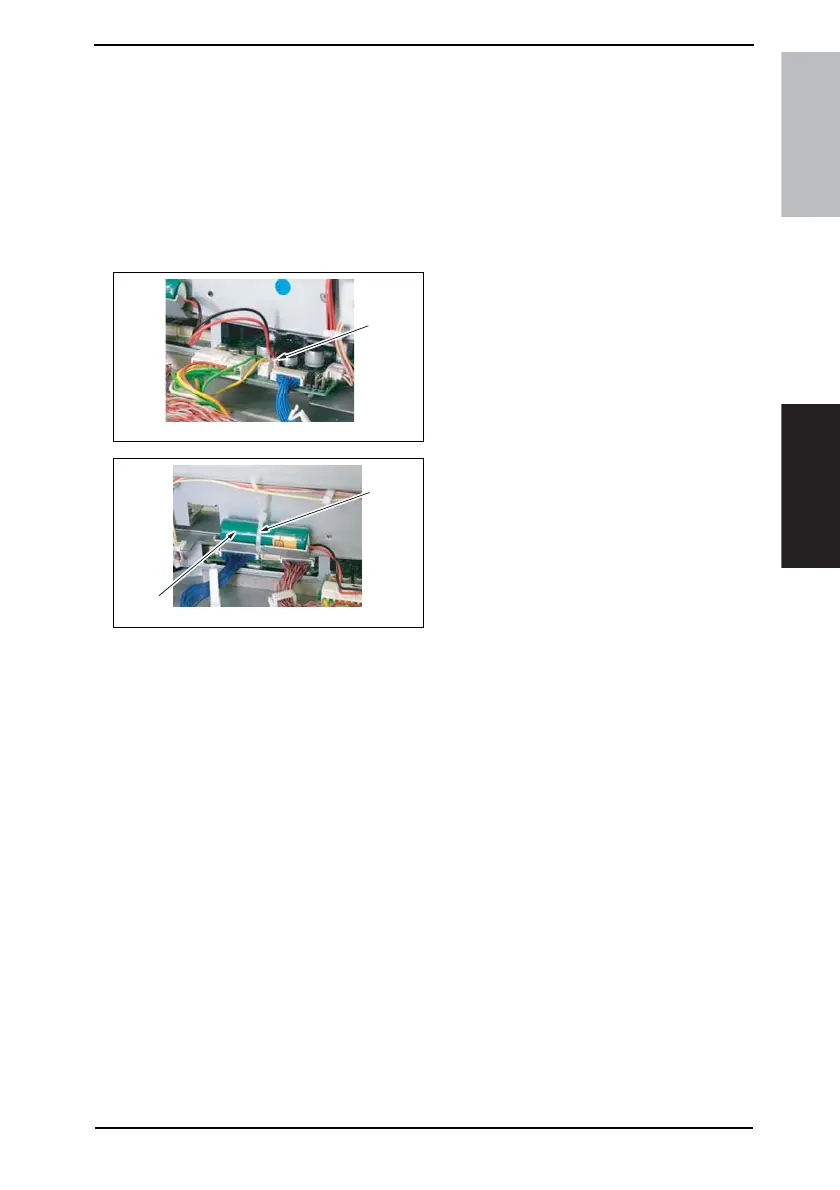
4. Unplug one connectors (CN10) [11]
of the MFB3 Board.
5. Tie band [2] is cut with nippers, and
the Ni-MH battery [3] is replace.
6. Turn ON the Main Power Switch.
NOTE
• After the Ni-MH battery has been replaced with a new one, be sure to turn ON the
Main Power Switch.
• Discard the used battery in accordance with the corresponding local regulations
and NEVER discard it or let it discharge on the user’s premises.
4040F2C738DA
[1]
4040F2C739DA
[1]
[2]









 To Next Page