17. Functions of switches and parts on PWBs Field Service Ver. 1.0 Aug. 2005
218
bizhub 200/250/350
Adjustment / Setting
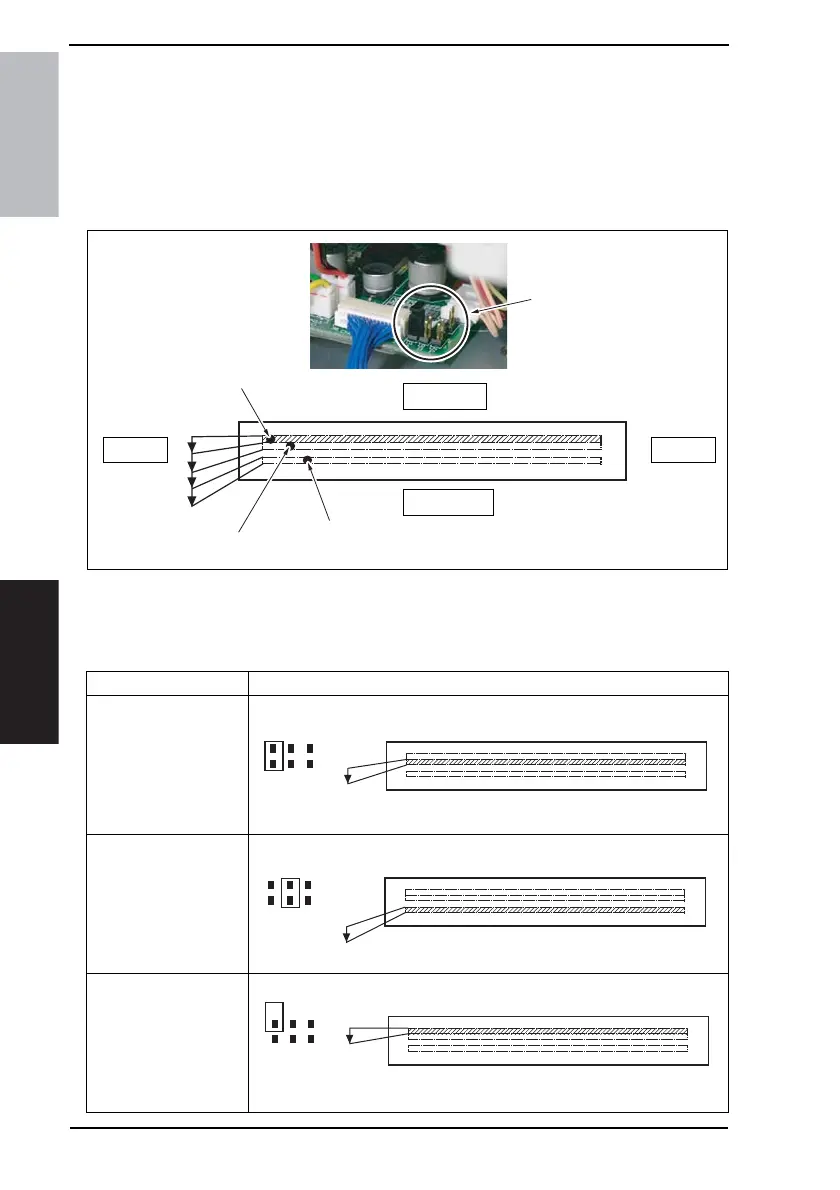
17.2 Read white reference position adjustment
17.2.1 Jumper switch setting
• If fine black lines occur on the copy, adjust the position of the read white reference posi-
tion of the Shading Sheet by using jumper switches.
NOTE
• NEVER make any settings other than the following for the jumper switch.
1. Turn OFF the Main Power Switch.
2. Remove the
Upper Rear Cover.
☞ 50
3. Make the appropriate settings of the jumper switches on the BCRS Board.
4040F3C534DA
IR backIR front
IR left side
IR right side
Step 1
Default
Step 2
Jumper Switch
Scanning Position Jumper Switch Setting
Default scan position
Step 1 scan position
Step 2 scan position
4040F3C537DA
ABP
4040F3C538DA
ABP
4040F3C539DA
ABP









 To Next Page