Field Service Ver. 1.0 Aug. 2005 6. Firmware upgrade
45
bizhub 200/250/350Maintenance
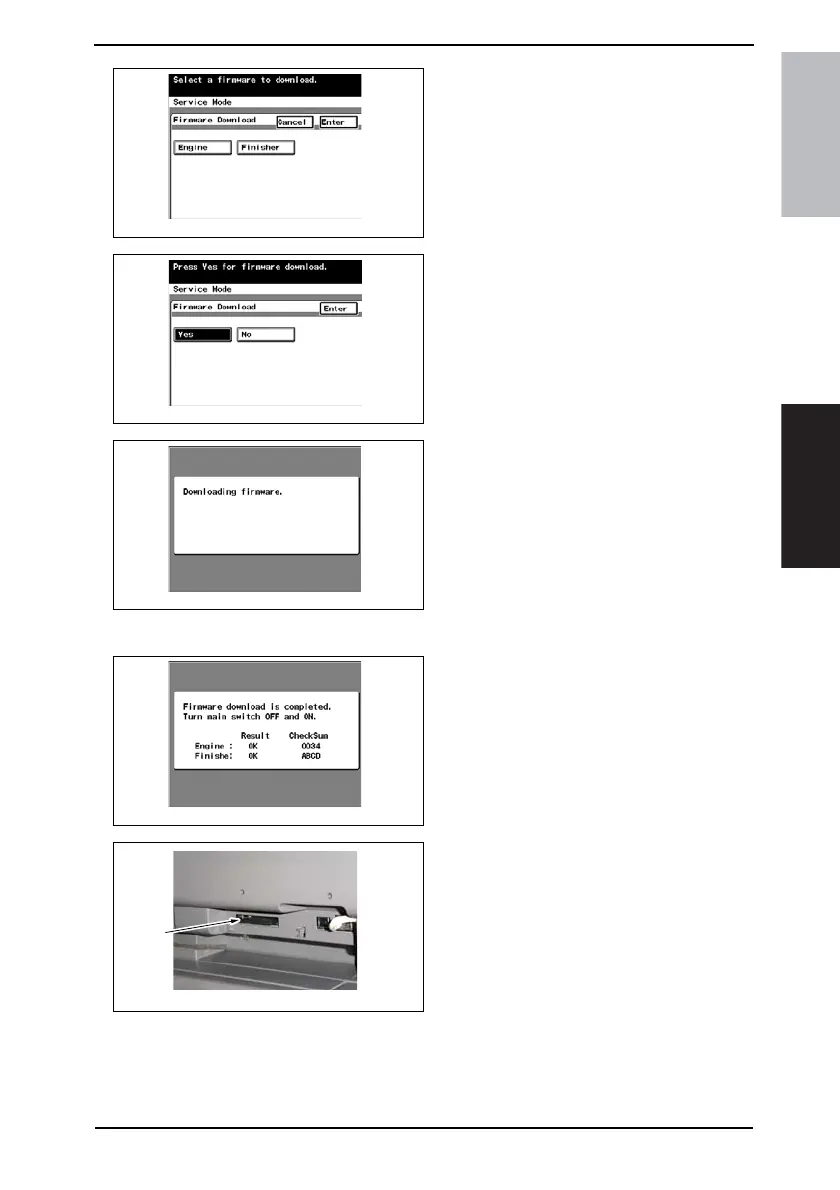
9. Select [Engine] and touch [Enter].
NOTE
• Touch [Finisher] also if the Finisher
firmware is to be upgraded at the
same time.
10. Select [Yes] and touch [Enter].
11. The firmware upgrading sequence
will start.
NOTE
• The firmware upgrading sequence
will last for 5 to 6 min. During this
period, NEVER turn off the machine
power.
• If the Finisher firmware is also
upgraded, the entire sequence will
take about 10 to 11 min.
12. When the upgrading sequence is
completed, turn OFF the main power
switch.
13. Remove the compact flash card [2]
from the slot. After some while there-
after, turn ON the main power switch.
14. Call the Tech. Rep. Mode to the screen.
☞ 148
15. Select [ROM Version].
16. Make sure if the version of Firmware is updated.
4040F2E768DA
4040F2E769DA
4040F2E770DA
4040F2E771DA
4040F2C597DA
[2]









 To Next Page