18. Jam Display Field Service Ver. 1.0 Aug. 2005
234
bizhub 200/250/350
Troubleshooting
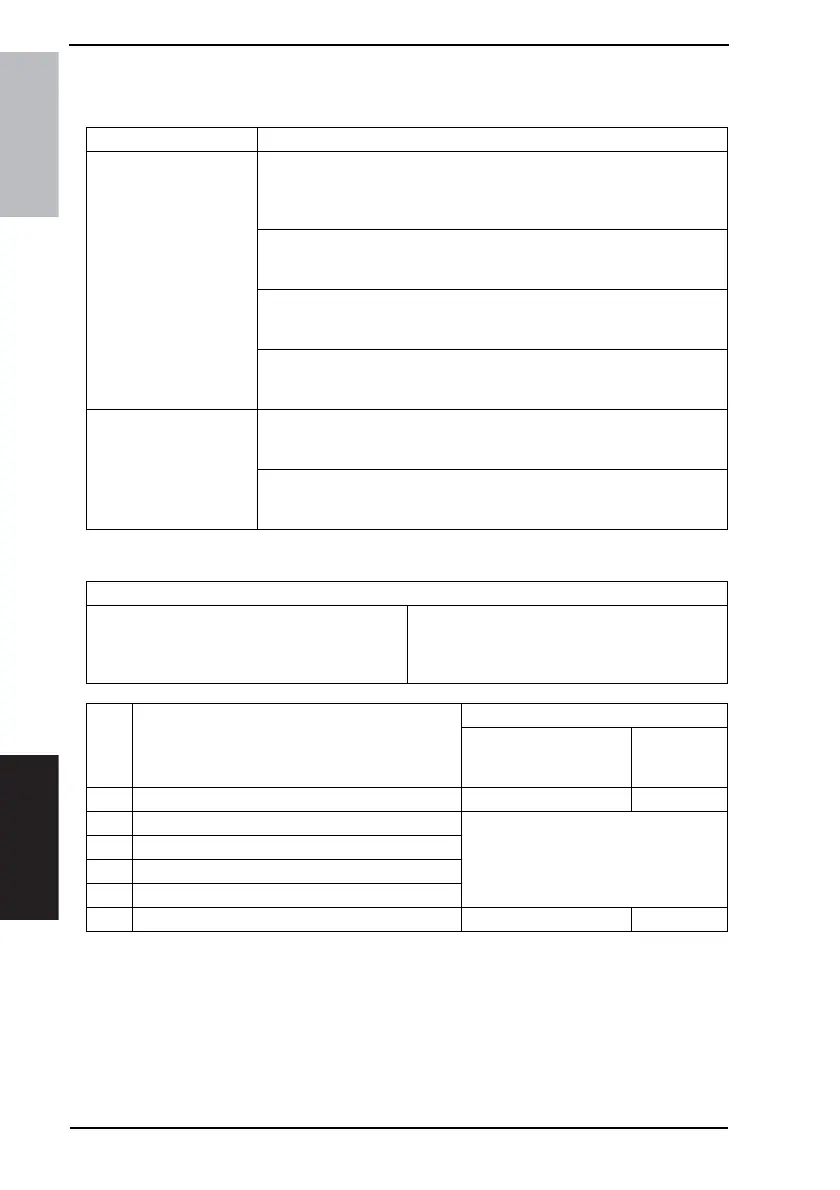
18.3.11 Misfeed at LCT take-up/Vertical Transport section (PC-402)
A. Detection Timing
B. Action
Type Description
Detection of misfeed at
LCT take-up/Vertical
Transport section
The leading edge of the paper does not block the Paper Feed Sensor
(PC1-LCT) or Vertical Conveyance Sensor (PC2-LCT) even after the set
period of time has elapsed after the Paper Feed Motor (M1-LCT) has been
energized.
The Vertical Conveyance Sensor (PC2) is not blocked even after the set
period of time has elapsed after the Vertical Conveyance Sensor (PC2-
LCT) is blocked by the paper.
The Paper Feed Sensor (PC1-LCT) is not unblocked even after the set
period of time has elapsed after the Paper Feed Sensor (PC1-LCT) has
been blocked by the paper.
The Vertical Conveyance Sensor (PC2-LCT) is not unblocked even after
the set period of time has elapsed after the Vertical Conveyance Sensor
(PC2-LCT) has been blocked by the paper.
Detection of paper left in
LCT take-up/Vertical
Transport section
The Vertical Conveyance Sensor (PC2-LCT) is blocked when the Main
Power Switch is set to ON, a door or cover is opened and closed, or a mis-
feed or malfunction is reset.
The Paper Feed Sensor (PC1-LCT) is blocked when the Main Power
Switch is set to ON, a door or cover is opened and closed, or a misfeed or
malfunction is reset.
Relevant Electrical Parts
Paper Feed Sensor (PC1-LCT)
Vertical Conveyance Sensor (PC2-LCT)
Vertical Conveyance Sensor (PC2)
Paper Feed Motor (M1-LCT)
Main Control Board (PWB-C1 LCT)
Step Action
WIRING DIAGRAM
Control Signal
Location
(Electrical
Component)
1 Initial check items - -
2 PC1-LCT I/O check
☞ See PC-402 Service Manual.
3 PC2-LCT I/O check
4 PC2 I/O check
5 M1-LCT operation check
6 Change PWB-C1 LCT - -









 To Next Page