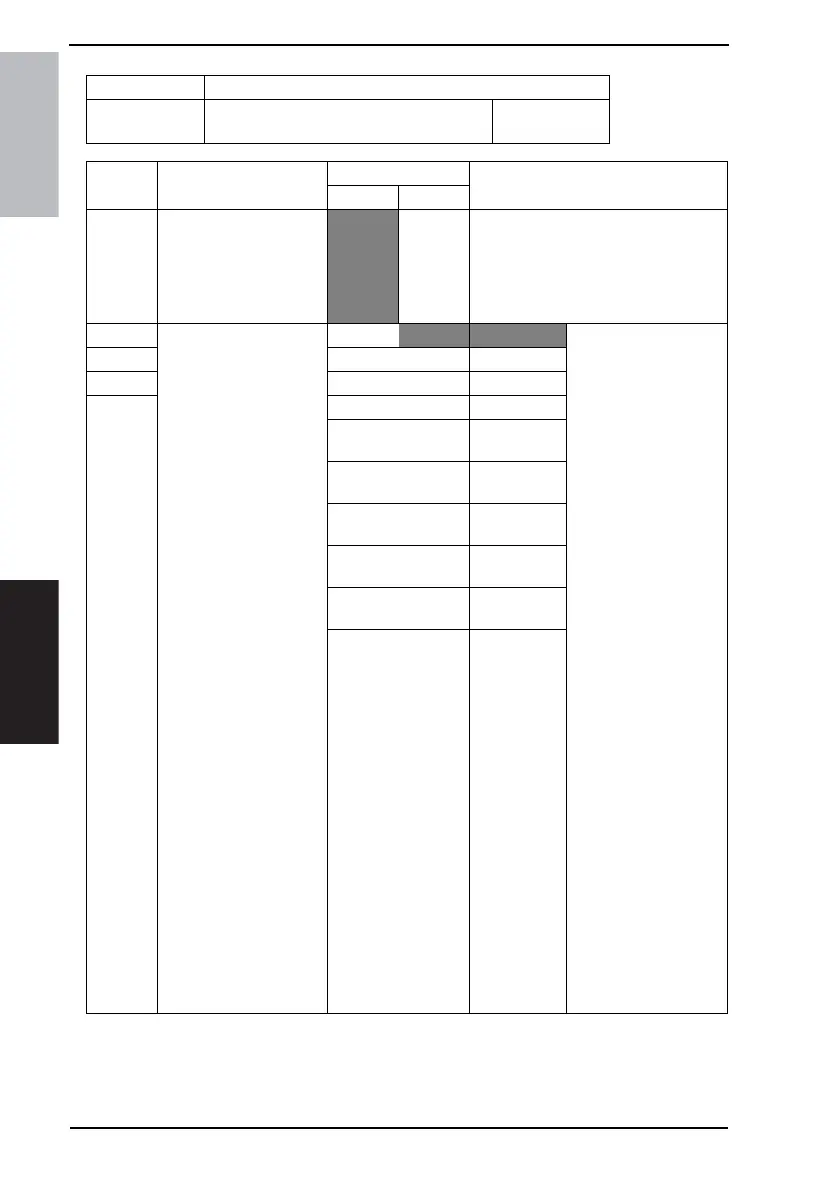
11. Soft Switch List Field Service Ver. 1.0 Aug. 2005
58
FK-503
Adjustment / Setting
NOTE
•
The features with (*) are settable by users. *: Screen setting <*>: Soft switch setting
MODE Factory setting bit
008
Bit: 7654 3210
0000 0000
HEX:00
Bit Feature
Logic
Description
01
7 Where to detect print
papers.
(Valid only when printing a
received document) <*>
From
print
paper
From
cassette
“From print paper” detects print papers
from actual print papers while “From
cassette” indicates print papers with a
cassette size or the last information on
print papers regardless of actual print
papers.
6 Select size of print paper
for received document.
(Valid only when printing a
received document) <*>
Bit 6-3:
0000 Std method 1 “Std method” determines
an appropriate print
paper for the length and
the width of a print
image.
Method 1: Same width
and no reduction.
Method 2: Same width
and minimum margin.
Method 3: No reduction
without considering
width of paper.
Method 4: Minimum
margin without consider-
ing width of paper.
“No wider width” will not
take printer paper wider
than the print image.
No Wider
Width 1: Same width
and no reduction.
Width 2: Same width
and minimum margin.
Width 3: No reduction
without considering
width of paper.
Width 4: Minimum mar-
gin without considering
width of paper.
“Same width only”
selects paper with the
same width as the print
image.
Note.
• Margin means the
non-printed area.
• Methods 2 to 4 are
unavailable to users.
5 0001 Std method 2
4 0010 Std method 3
3 0011 Std method 4
0100 No wider
width 1
0101 No wider
width 2
0110 No wider
width 3
0111 No wider
width 4
1000 Same width
only
Others Not available









 To Next Page