Field Service Ver. 1.0 Aug. 2005 11. Soft Switch List
67
FK-503Adjustment / Setting
NOTE
• This is valid only when “Allow service call? (MODE 026 Bit 6)” is set to “Yes.”
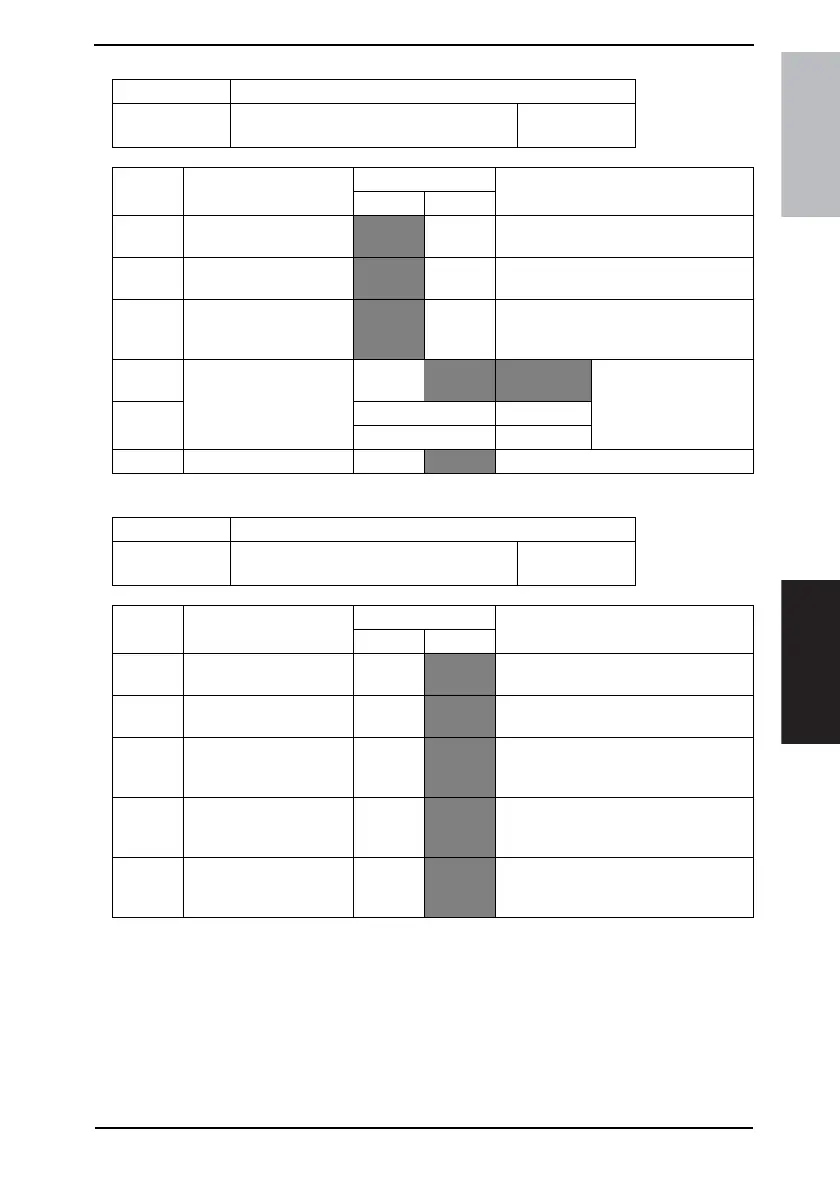
MODE Factory setting bit
024
Bit: 7654 3210
1000 0001
HEX:81
Bit Feature
Logic
Description
01
5 Display Administrator/
User passwords.
Yes No
4 Display forwarding func-
tion button.
No Ye s
3 Select alarm buzzer pat-
tern.
Pattern 0 Pattern 1 Pattern 0: Peep Poop Peep Poop Peep
Poop
Pattern 1: Peep Peep Peep
2 Select ID display order
when receiving.
Bit 2-1:
00 Expansion
IDT → TSI
101TSI
Others Not available
0 Receive by other user. No
Yes
MODE Factory setting bit
025
Bit: 7654 3210
0111 1111
HEX:7F
Bit Feature
Logic
Description
01
6 Service call for printer
option failure.
No
Yes Specifies whether to make a service call
for PC printer unit option failure. <Note>
5 Service call for printer fail-
ure.
No
Yes Specifies whether to make a service call
for printer failure. <Note>
4 Service call for scanner
failure.
No
Yes Specifies whether to make a service call
for exceeding specified # of papers.
<Note>
1 Service call for reaching
near empty cycles of
toner.
No
Yes Set whether to make a service call for
reaching near empty or empty cycles of
toner. <NOTE>
0 Service call for reaching
life times of drum.
No
Yes Set whether to make a service call for
reaching near life time or life times of
drum. <NOTE>









 To Next Page