3. Firmware upgrade Field Service Ver. 1.0 Aug. 2005
8
FS-508/PU-501/OT-601
Maintenance
4. Open the Right Door.
NOTE
• Be sure to open the Right Door
before turning ON the main power
switch.
5. Turn ON the main power switch.
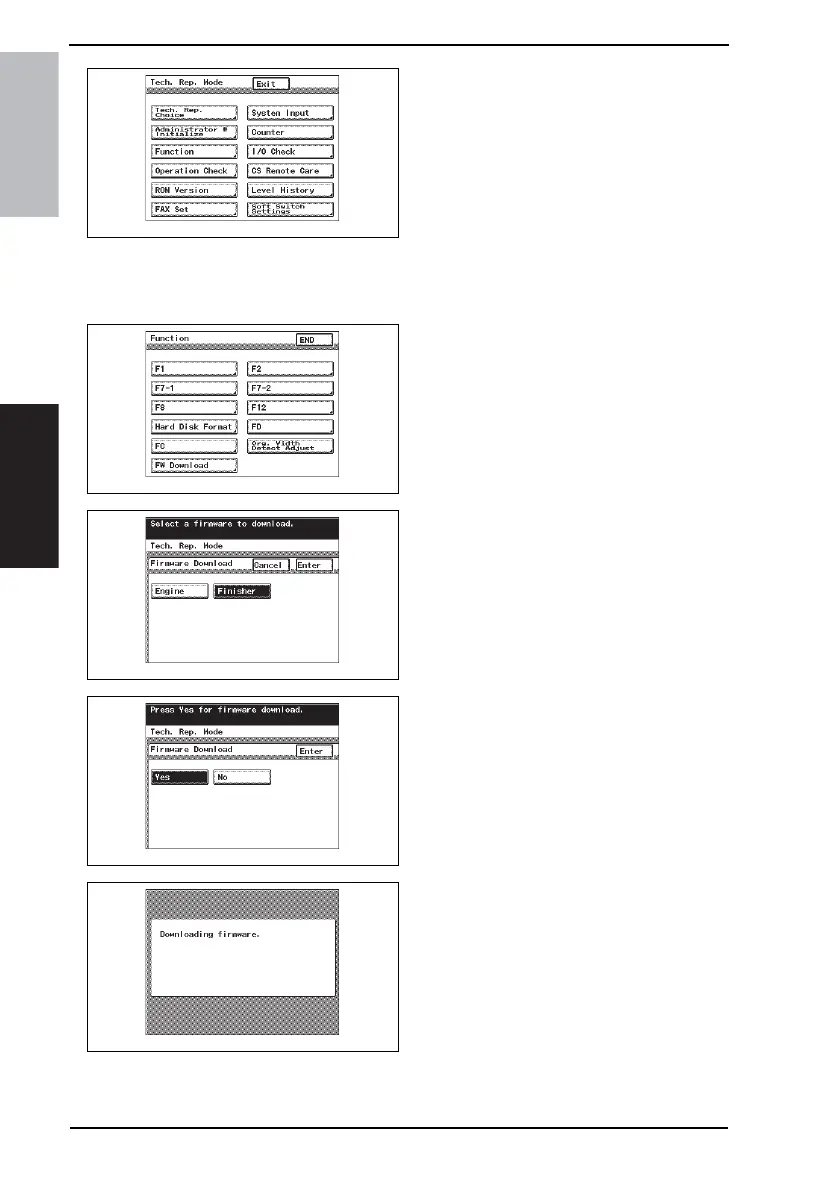
6. Display the Tech. Rep. Mode screen.
☞ For details of how to display the
Tech. Rep. Mode screen, see the
Adjustment/Setting of the main unit
service manual.
7. Touch [Function].
8. Touch [FW Download].
9. Select [Finisher] and touch [Enter].
NOTE
• Touch [Engine] also if the Engine
firmware is to be upgraded at the
same time.
10. Select [Yes] and touch [Enter].
11. The firmware upgrading sequence
will start.
NOTE
• The firmware upgrading sequence
will last for 5 to 6 min. During this
period, NEVER turn off the machine
power.
• If the Engine firmware is also
upgraded, the entire sequence will
take about 10 to 11 min.
4349F2E541DA
4349F2E542DA
4349F2E543DA
4349F2E544DA
4349F2E545DA









 To Next Page