6. Test Mode Operations Field Service Ver. 1.0 Aug. 2005
10
MT-501
Adjustment / Setting
6. Test Mode Operations
6.1 Entering Function Mode
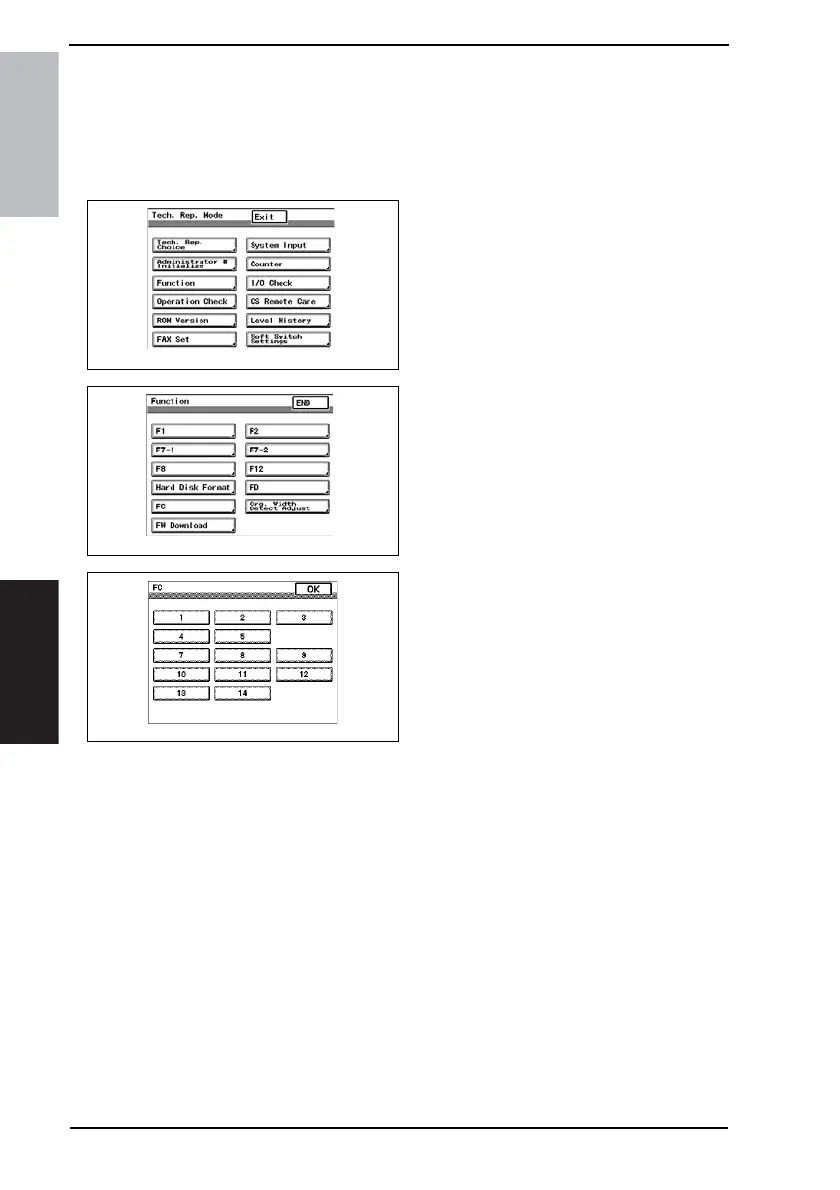
1. Display the Tech. Rep. Mode screen.
☞ For details of how to display the Service Mode screen, see the Adjustment/Setting of
the main unit service manual.
2. Touch [Function].
3. Touch [FC].
4. Touch [12].
6.2 Function Modes
12: Mailbin solenoid drive mode
• Bin Entrance Switching Solenoids 1, 2 and 3 switch, in order, at the predetermined times.
→ Bin Entrance Switching Solenoid 1 (SL1-MK) activates for the predetermined time.
→ Bin Entrance Switching Solenoid 2 (SL2-MK) activates for the predetermined time.
→ Bin Entrance Switching Solenoid 3 (SL3-MK) activates for the predetermined time.
→ All Bin Entrance Switching Solenoids deactivate.
→ The operation is finished.
4510F3C504DA
4510F3C505DA
4349F3J503DA









 To Next Page