Field Service Ver. 1.0 Aug. 2005 4. Periodical check
35
bizhub 200/250/350Maintenance
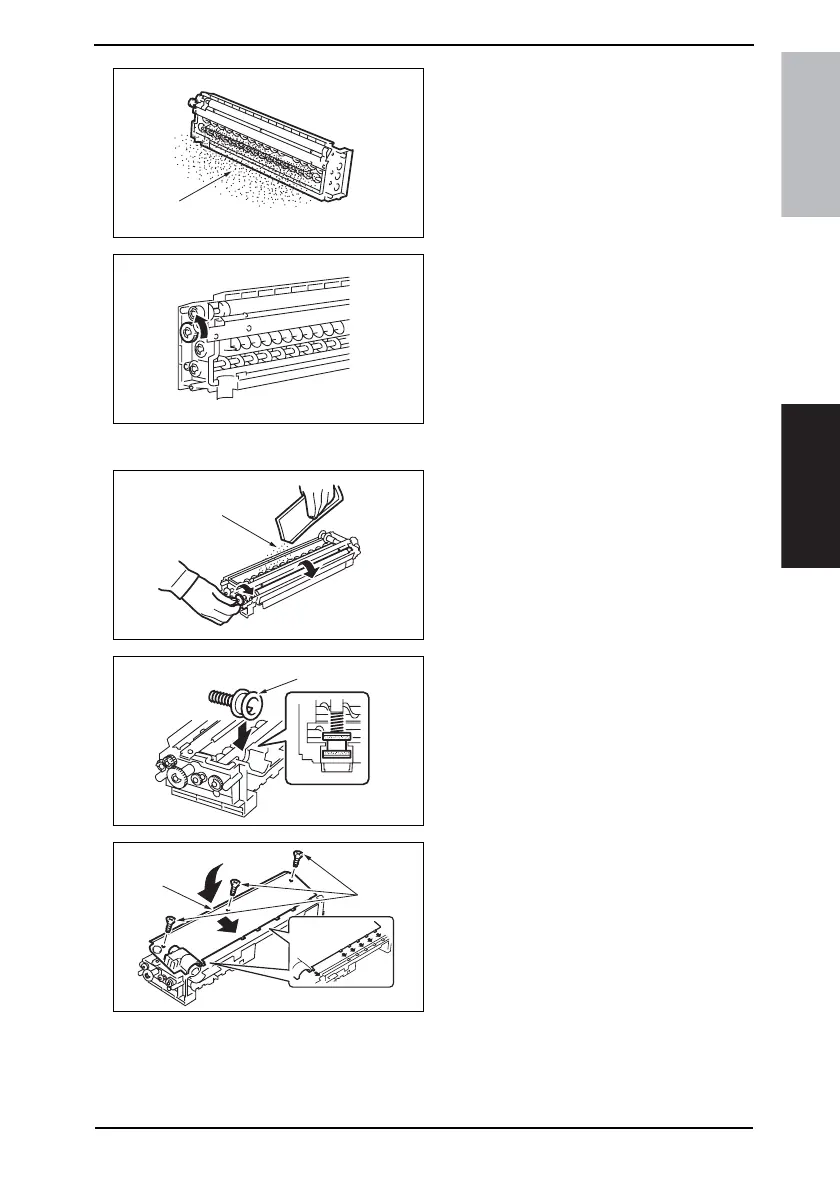
9. Remove the developer [8].
Removal of the Developer
• Dump the developer on the Sleeve
Roller by rotating the gear in the
direction of the arrow.
• If you rotate the gear in reverse,
mylar for cleaning the ATDC Sen-
sor.
• Dump developer until almost no
developer sticks to the Sleeve
Roller.
10. Set the developer [9] while rotating
the gear in the direction of the arrow.
11. Reinstall the Toner Supply Port [10].
12. Using three screws [11], secure the
Developer Scattering Prevention
Plate [12].
4040F2C581DA
[8]
4040F2C582DA
4040F2C583DA
[9]
4040F2C584DA
[10]
4040F2C585DA
[11]
[12]









 To Next Page