EasyManua.ls Logo

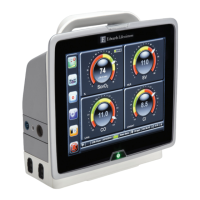
Edwards HemoSphere - User Manual

Edwards HemoSphere
238 pages
Print Icon
To Next Page IconTo Next Page
Loading...
HemoSphere
Advanced Monitor
HemoSphere
Advanced Monitor
Operator’s
manual
Status = Released Printed Date: 2018-01-16 Released Date: 2017-09-14

Table of Contents

Questions and Answers

  • J
    jonesadamSep 12, 2025
    What should I do if my Edwards Monitor displays an 'Alert: HIS Connectivity Loss'?
    • M
      mullinsedwardSep 12, 2025
      If the Edwards Monitor displays an 'Alert: HIS Connectivity Loss', check the Ethernet connection and the Wi-Fi connection. If the problem persists, contact Edwards Technical Support.
  • P
    Paula ElliottSep 12, 2025
    What does 'Fault: Module Slot 1 – Software Failure' mean on my Edwards HemoSphere?
    • J
      Juan KingSep 12, 2025
      If you encounter a 'Fault: Module Slot 1 – Software Failure' on your Edwards Monitor, contact Edwards Technical Support, as there is a software error with the module inserted in module slot 1.
  • R
    Raymond CarsonSep 12, 2025
    What to do if the Edwards Monitor displays an 'Alert: Wireless Module Failure'?
    • S
      scottfarrellSep 12, 2025
      If the Edwards Monitor displays an 'Alert: Wireless Module Failure', disable and re-enable the wireless connection.
  • A
    Annette SchneiderSep 9, 2025
    What should I do if my Edwards Monitor says 'Fault: Oximetry Cable Disconnected'?
    • H
      holmesrandySep 10, 2025
      If your Edwards Monitor displays 'Fault: Oximetry Cable Disconnected', verify the oximetry cable/catheter connection is secure. Also, check the oximetry cable connector for bent or missing pins.
  • M
    michaeldaviesSep 8, 2025
    How to fix 'Fault: Second Oximetry Cable Detected' on Edwards HemoSphere Monitor?
    • E
      Erica RothSep 8, 2025
      To fix the 'Fault: Second Oximetry Cable Detected' error on your Edwards Monitor, disconnect one of the oximetry cables.
  • S
    Stacy ReidSep 7, 2025
    What to do if the Edwards HemoSphere displays an 'Alert: Battery Disconnected'?
    • N
      nathan39Sep 8, 2025
      If the Edwards Monitor displays 'Alert: Battery Disconnected', confirm the battery is properly seated in the battery bay. If it is, remove and re-insert the battery pack. You can also try changing the HemoSphere battery pack. If the problem persists, contact Edwards Technical Support.
  • J
    Julie ReeseAug 23, 2025
    What to do if the Edwards HemoSphere system temperature is too high and shutdown is imminent?
    • A
      Amanda HaynesAug 23, 2025
      To address a 'System Temperature Too High - Shutdown Imminent' fault on your Edwards Monitor, first, move the monitor away from any heat sources. Then, make sure that the monitor's ventilation openings are clear of obstructions and dust. If the problem continues, contact Edwards Technical Support.
  • T
    Theresa SchmidtSep 5, 2025
    What should I do if my Edwards HemoSphere Monitor displays a 'Fault: Cable Port 1 – Communication Error'?
    • R
      Rebecca Rodriguez MDSep 6, 2025
      If the Edwards Monitor displays 'Fault: Cable Port 1 – Communication Error', first, reinsert the cable. If that doesn't work, check the connection points on the cable or port for bent or broken pins. You can also try switching to cable port 2. If the problem persists, contact Edwards Technical Support.
  • N
    Nicholas MartinSep 4, 2025
    What should I do if my Edwards HemoSphere displays a 'Fault: Module Slot 2 – Communication Error'?
    • E
      Edward WilliamsSep 5, 2025
      If the Edwards Monitor displays 'Fault: Module Slot 2 – Communication Error', first, reinsert the module. If that doesn't work, check the connection points on the slot or module for bent or broken pins. You can also try switching to module slot 1. If the problem persists, contact Edwards Technical Support.
  • J
    Johnathan MossSep 3, 2025
    What should I do if my Edwards HemoSphere displays a 'Fault: Module Slot 1 – Communication Error'?
    • W
      Whitney MoraSep 4, 2025
      If the Edwards Monitor displays 'Fault: Module Slot 1 – Communication Error', first, reinsert the module. If that doesn't work, check the connection points on the slot or module for bent or broken pins. You can also try switching to module slot 2. If the problem persists, contact Edwards Technical Support.

Summary

1 Introduction

2 Safety and Symbols

2.2 Warnings

Lists critical warnings for safe operation and potential hazards.

2.3 Cautions

Lists cautions to prevent equipment damage or data invalidation.

3 Installation and Setup

4 HemoSphere Advanced Monitor Quick Start

4.1 HemoSphere Swan-Ganz Module Cardiac Output Monitoring

Brief instructions for setting up and monitoring with the Swan-Ganz module.

4.3 HemoSphere Oximetry Cable Monitoring

Brief instructions for setting up and monitoring with the oximetry cable.

5 Navigating the HemoSphere Advanced Monitor

7 Advanced Settings

7.1 Alarms; Targets

Explains how to configure physiological and technical alarms and target ranges.

9 HemoSphere Swan-Ganz Module Monitoring

9.2 Continuous Cardiac Output

Explains how the monitor measures cardiac output continuously.

10 Monitoring with the HemoSphere Pressure Cable

10.3 FloTrac Sensor Monitoring

Details how to use the FloTrac sensor for monitoring.

11 Oximetry Monitoring

11.2 In Vitro Calibration

Steps for calibrating the oximetry cable before patient use.

13 Troubleshooting

Appendix F: System Care, Service and Support

Edwards HemoSphere Specifications

General IconGeneral
TechnologyAdvanced hemodynamic monitoring
ConnectivityEthernet, USB
Power Supply100–240 VAC, 50/60 Hz
Parameters MeasuredCardiac output, stroke volume, systemic vascular resistance
TrendingYes
AlarmsConfigurable alarms for various parameters
Data StorageInternal memory
ApplicationsCritical care
DisplayTouchscreen

Related product manuals