3GS Technical Manual
Issue 4.5 August 2005
Programming Menus 8-77
Modem communications
The following describes important parameters and modem settings required for high speed modem configuration (9600
bps and 19200 bps) to the 3GS Controller
The commands detailed refer specifically to Multitech modems. For other modem types, please refer to the manufacturer
manual for equivalent settings.
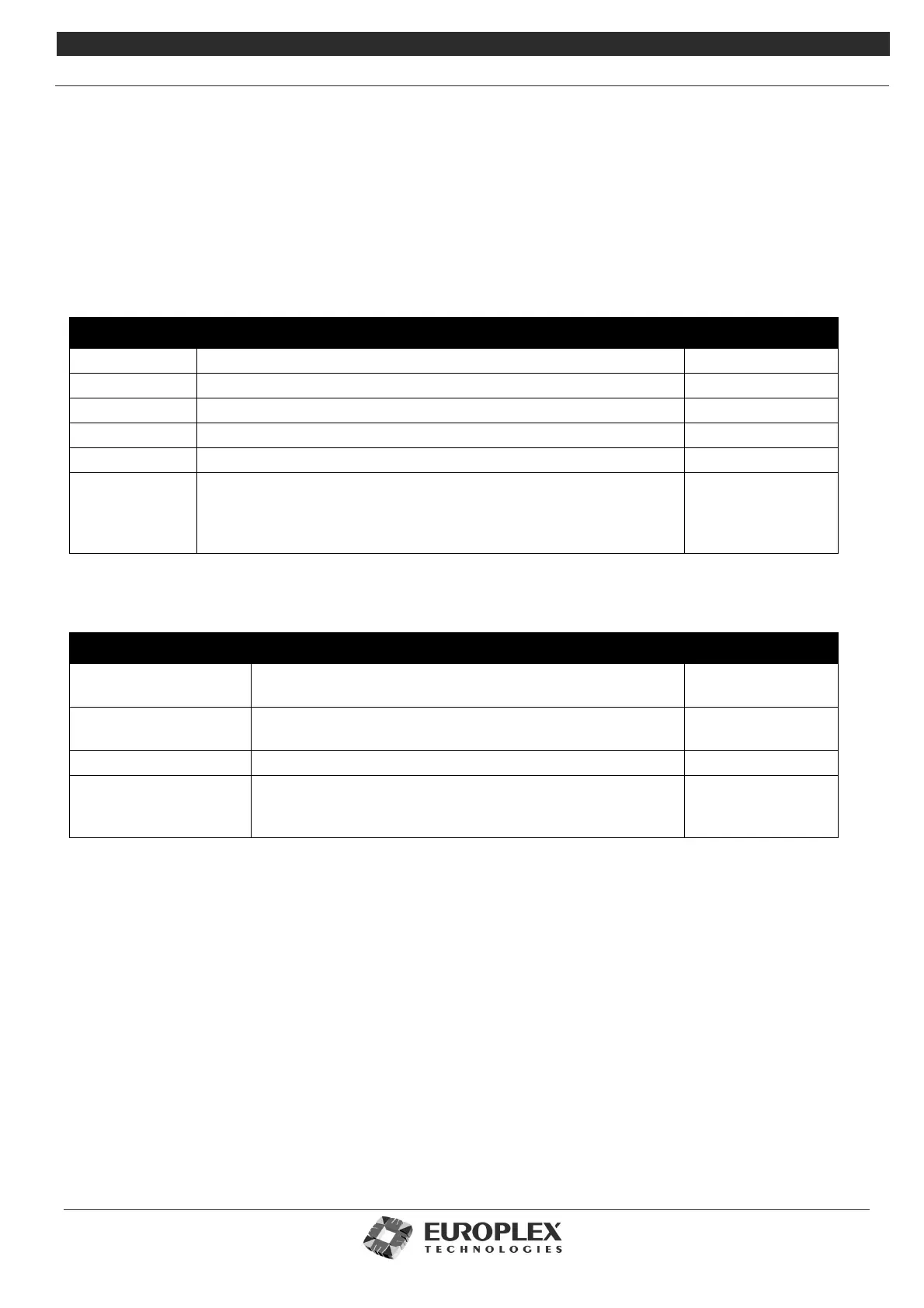
The following tables show parameters to be set for modem communication (in this case Multitech modem) with Panelman/
ED2000:
Normal settings
Parameter Description AT Command(s)
Echo Turn echo off E0
Response Include connection speed in response X1
Verbose Modem responds in ‘words’ rather than code V1
Auto Answer Accepting incoming call after specified number of rings S0=1
Flow Control Both Hardware and Software based flow control must be disabled &E3
DTR Signal The PC will normally provide its modem with Data Terminal Ready
(DTR) signal. If this is not available, the Modem will not respond.
The panel doesn’t provide DTR, so its modem must be configured to
ignore this signal.
&D2 (PC)
&D0 (Panel)
High speed settings
Parameter Description AT Commands
Max Speed Sets upper limit for incoming and outgoing speeds. $MB19200
$SB19200
V.42 Error Correction Disable Error Correction. This means carrier signal will be estab-
lished once speed is matched.
AT&E0
Data Compression Data Compression should be disabled. AT&E14
V.32 Terbo Tones For communication at 19200bps, the connection response
CONNECT 19200 (rather than CONNECT 14400) is required.
Not all Multitech modems support this feature.
AT#V0



 To Next Page