Issue 4.5 August 2005 DM1200 Digital Communicator/Modem 12-7
Programming the DM1200
● YES - Used to enter a menu/option or to select an
option.
● NO - Used to scroll forward through menu options,
thereby refusing them, and to toggle between certain
options.
● QUIT - Used to exit from an option to submenu or
from submenu to root menu.
● NEXT - Moves cursor to the left or scrolls the current
menu forward.
● PREVIOUS - Moves cursor to the right or scrolls the
current menu back.
● ENTER - Used to accept current/displayed data.
● SHIFT/DELETE - Used to select keypad characters.
Also used to delete characters if held down for more
than 1 second.
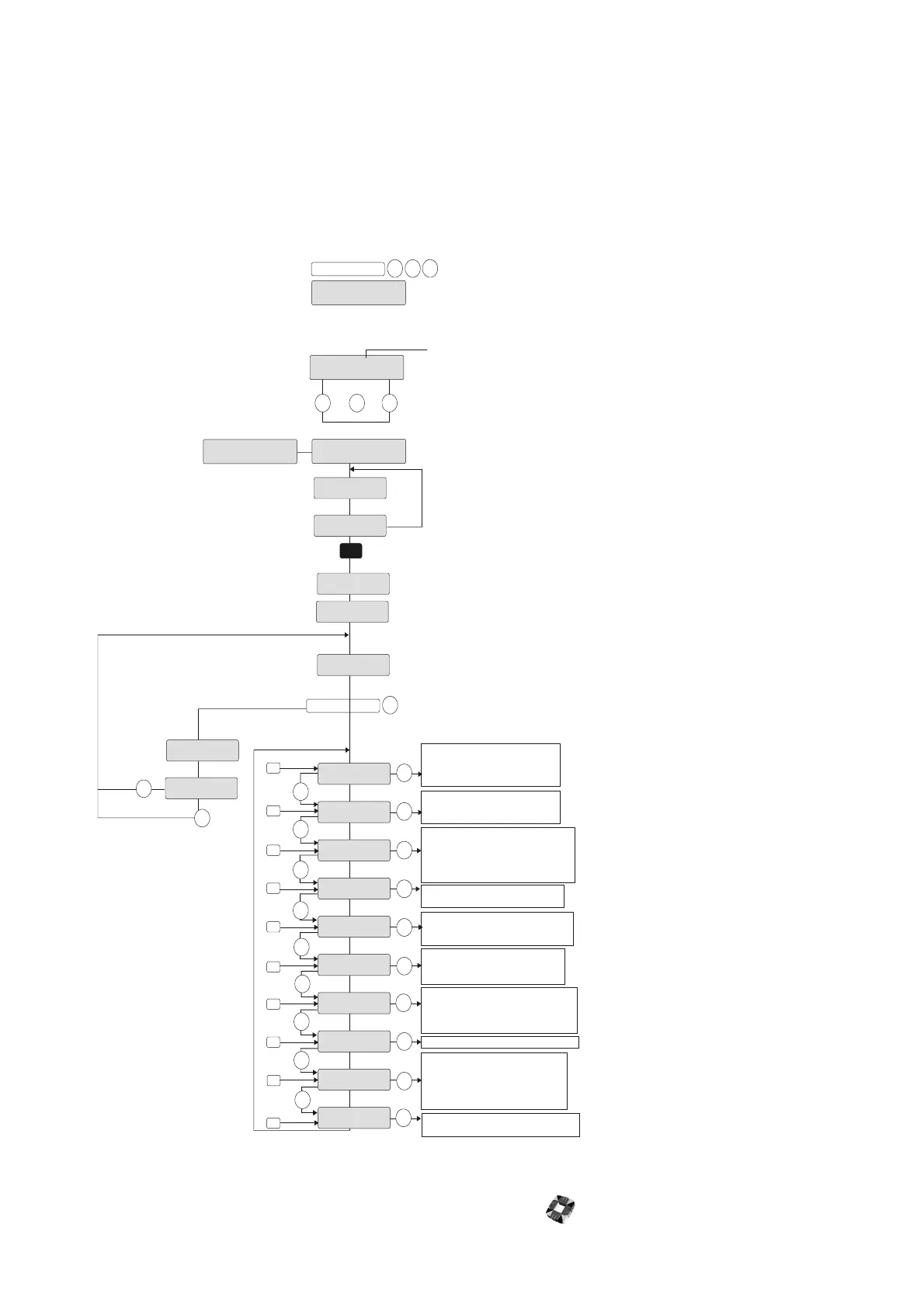
DM 1200 PROGRAMMER
!! PRESS ANY KEY !!
VER P X.X CS YYYY
ENGINEER CODE------
COUNTRY
ENGINEER CODE ERROR!
DEFAULT DM 1200?
TELEPHONE NUMBERS?
DIALLING OPTIONS?
CHANNEL OPTIONS?
FORMAT OPTIONS?
LINE MONITOR OPTI ONS?
OUTPUT OPTIONS?
SERIAL PORT SETUP?
PROG ENGINEER CODE?
ADVANCED OPTIONS?
PRINTER?
YES
YES
YES
YES
YES
YES
YES
YES
YES
YES
YES
NO
NO
NO
NO
NO
NO
NO
NO
NO
NO
0
1
2
3
4
5
6
7
8
9
#
INSTALLER CODE _ _ _ _
No key pr essed
KEY
Version number & Checksum displayed
Default Installer code=123456
Incorr ect code ent er ed
Enter the central station numbers and
account codes. Make a t est call .
Program telephone numbers for remote
PC access via modem.
This option allows you to assign outputs
and telephone numbers for up to 16 channels
(max 8 chan nel s- sl ow f ormat ). I f a channel i s
not being used it should be left at its default
setting where it is assigned as output 0.
Enter this option to configure the unit’ s
dialli ng sequence, e.g. ‘ Number of Call
Attempts’, ‘Inter call time’ etc.
Configure Slow/Fast f or mat or SIA options.
Also configures the test call.
The DM 1200 offers a line monitoring facility
which can be configured to report line
failure under various conditions.
The DM 1200 has 2 on-board outputs and
may also be configured to control up to 4
panel outputs.
Use this to configure the DM 1200 to operate
with the host panel’ s serial port. The message
‘COMMS OK!’ must appear on exit from this
option to ensure operation with the 3GS.
Select this option to enter a new installer code.
Select t his option to perform a print-out to
a local printer.
This option is solely intended for advanced
users with specialised applications for the
DM 1200 and therefore it should not be
necessary to enter this option for normal
operation of the unit.
HALF HELP
UNSET
CHECKING...
PORT 2
NO RESPONSE
SHIFT SHIFT FULL
INSTALLER CODE _ _ _ _
Select the port to which the
DM1200 is connected
See "Check Before
Programming”
SET UP DM1200
PORT 1 PORT 2 PORT 3
unset............half...........,,help
By default, port 2 is
configured for DM1200
communications protocol.



 To Next Page