Issue 4.5 August 2005 Nodes 5-9
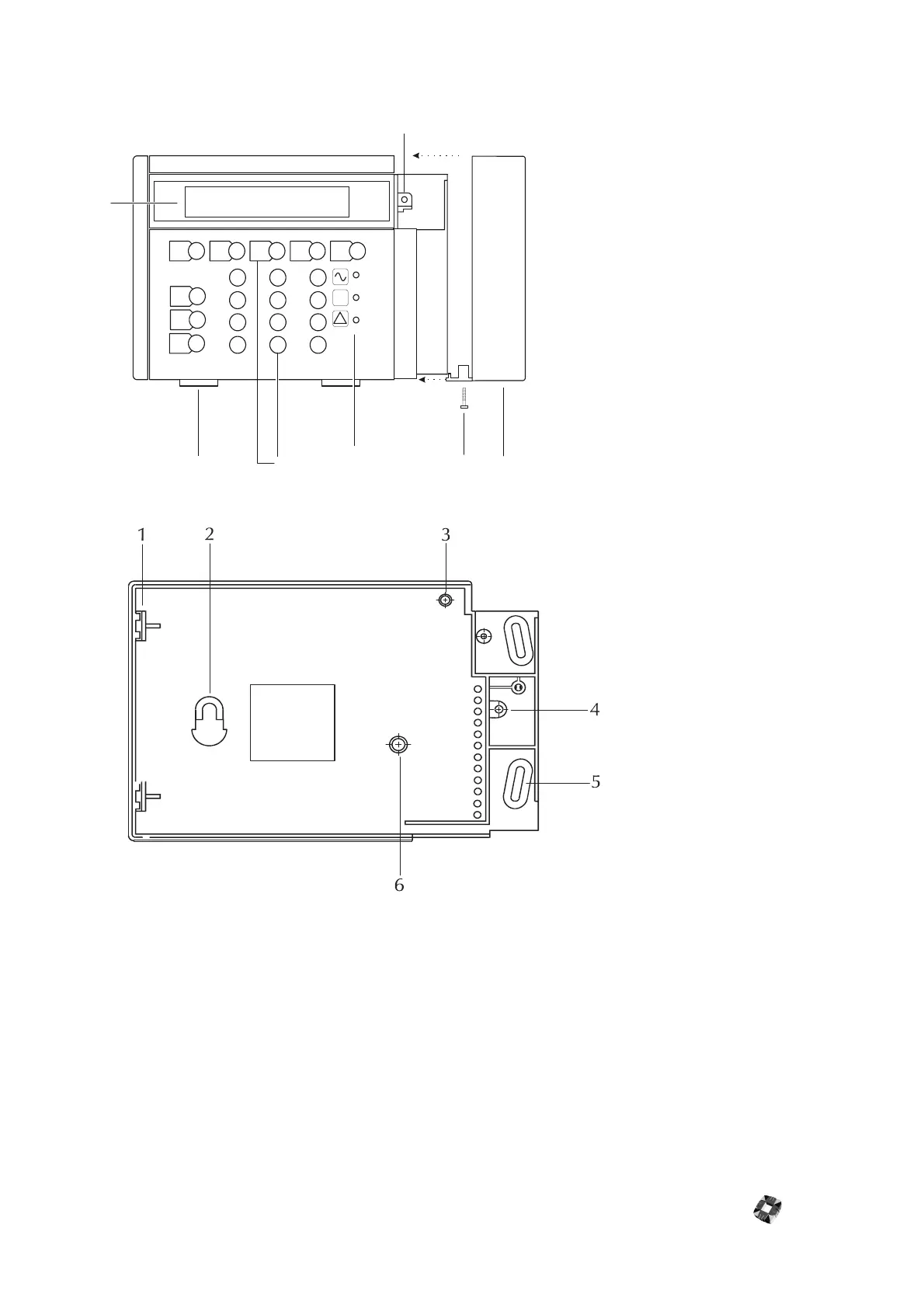
RKD Node Cabinet
Additional Information
Private mode
The private mode feature prevents two separate users from attempting to configure the system at the same time.
When one system RKD is in use, an attempt to key in at any other system RKD will produce the following message:
SYSTEM BUSY ... PLEASE WAIT.
The keypad displays this message until the user at the other keypad is finished, and then returns to normal operations
Text Entry
The orientation of the cursor governs which character is selected. Use the SHIFT key to rotate the cursor for character
selection and press ENTER when text entry is complete. See Typing Text in 3GS Programming.
햲
Securing hole for front of RKD
햳
Terminal block cover
햴
Cover securing screw
햵
Status LED holes
햶
Numeric and function keys
햷
Lid cover clips
햸
Display window
PART
SHIFT
NO
YES
HALF
1
4
7
2
5
8
3
6
9
0
FULL
SET
HELP
UNSET
#
*
?
!
1
23
4
5
6
7
햲
PCB securing clips
햳
Mounting keyhole
햴
PCB locating pillar
햵
Patress box mounting hole
햶
Mounting hole
햷
PCB securing screw



 To Next Page