DMP 128 FlexPlus • DSP Configurator Software 18
2. Connect to the DMP 128 FlexPlus.
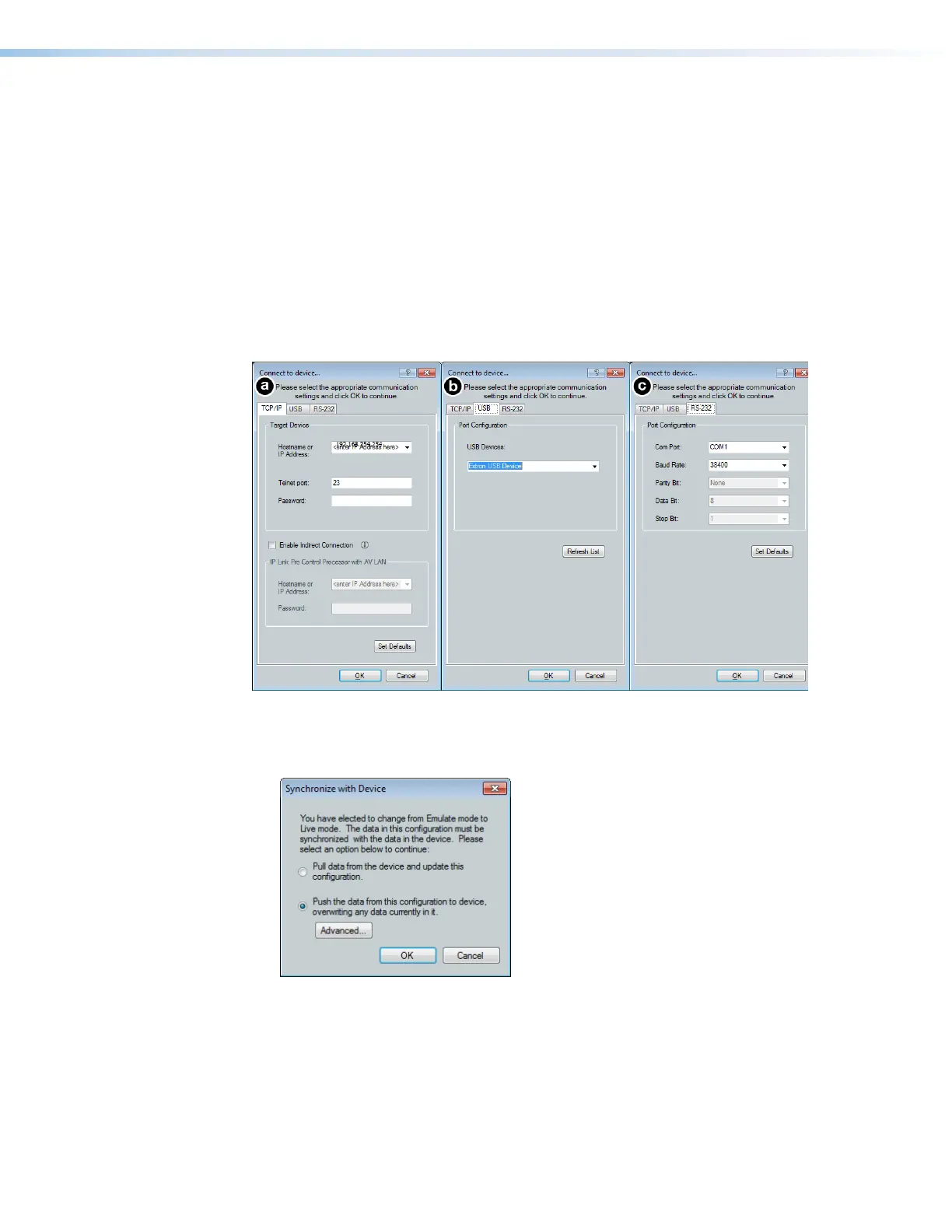
a. To connect via TCP/IP (recommended):
Click the TCP/IP tab in the dialog box. Enter the IP address of the device in the
Hostname or IP Address field. If necessary, enter the device password in the
Password field (see figure 24,
a
below).
b. To connect via USB:
Click the USB tab in the dialog box. Select the device from the USB Devices
drop-down menu (figure 24,
b
).
c. To connect via RS-232:
Click the RS-232 tab in the dialog box. Select the com port the device is connected
to on the host PC from the Com Port drop-down (figure 24,
c
).
Figure 24. Connect to device... TCP/IP, USB, and RS-232 Dialog Box
3. When a connection with a device is established, the Synchronize with Device dialog
box opens.
Figure 25. Synchronize with Device Dialog Box
a. Pull — Pulls the configuration file, presets, macros, and ACP configurations from
the device and displays it in the DSP Configurator main workspace.
figure 16. Connect to device...
figure 17. Synchronize with Device Dialog Box



 To Next Page