FARO Edge
September 2012
41
Chapter 3: Operation
NOTE: Implementation will differ among software suppliers, but generally
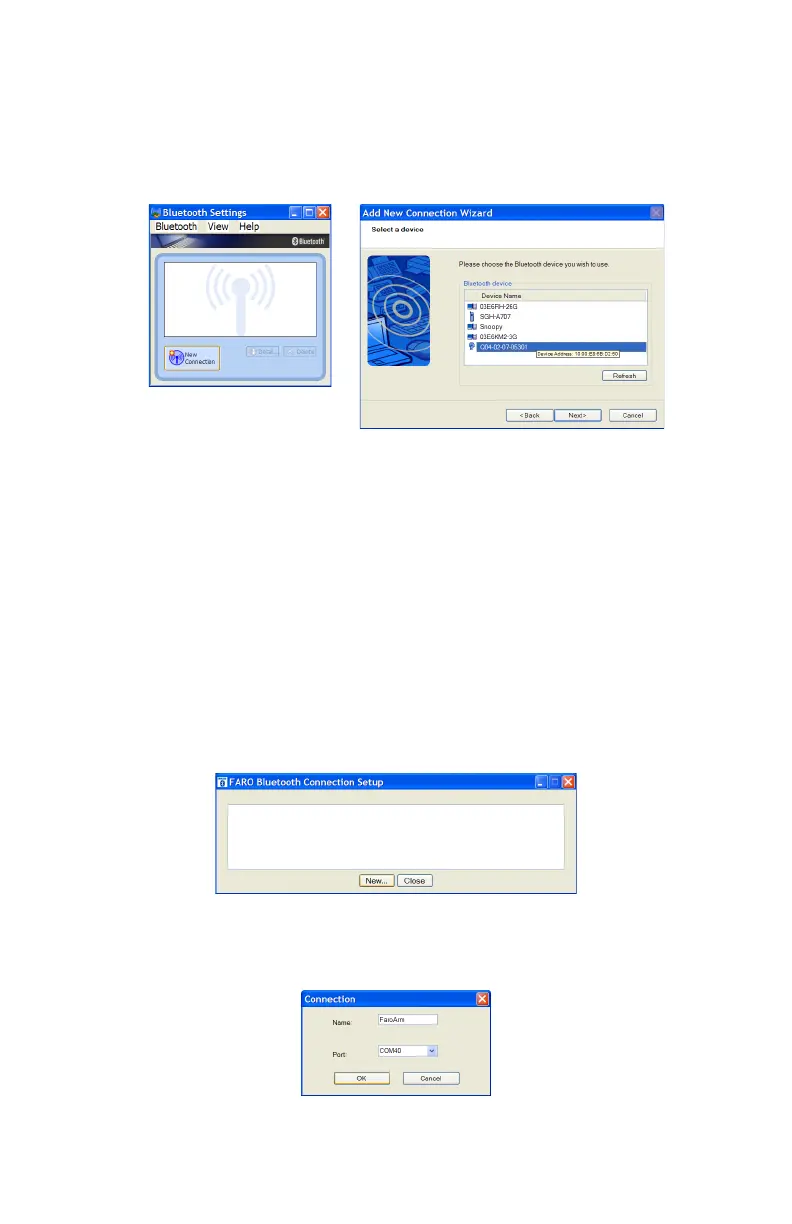
there is a platform specific Bluetooth Wizard that will search for all Bluetooth
devices in range and display them graphically, or in a simple list.
All Edges are identified by their serial number. Once an Edge is identified in the
list, a persistent SPP connection must be created. Once the connection exists, the
software will display the connection’s COM port number, for example COM10.
Write down your SPP connection COM port ______________________
This number is important and will be used later.
N
OTE: If the platform specific Bluetooth Wizard finds two COM ports, usually
labeled “Incoming” and “Outgoing,” for the Edge, use the Outgoing COM
port.
Computer to the FaroArm Driver Connection
The FaroArm driver connects to the SPP connection using the FARO Bluetooth
Connection Setup utility software.
• Start the FARO Bluetooth Connection Setup utility software program.
• Click the NEW button.
Figure 3-8 Connecting the Edge to the Computer
Figure 3-9 Connecting the Edge to the Computer
Figure 3-10 Connection Name and COM port
08M52E00_FaroArm_Edge.book Page 41 Thursday, October 4, 2012 9:31 AM



 To Next Page