Chapter 4: Getting Started (The Standard Template)
Your First Mix
Eclipse User Guide 2.0 107/ 526
Note that the sends to AUX 1 to AUX 4 have been configured
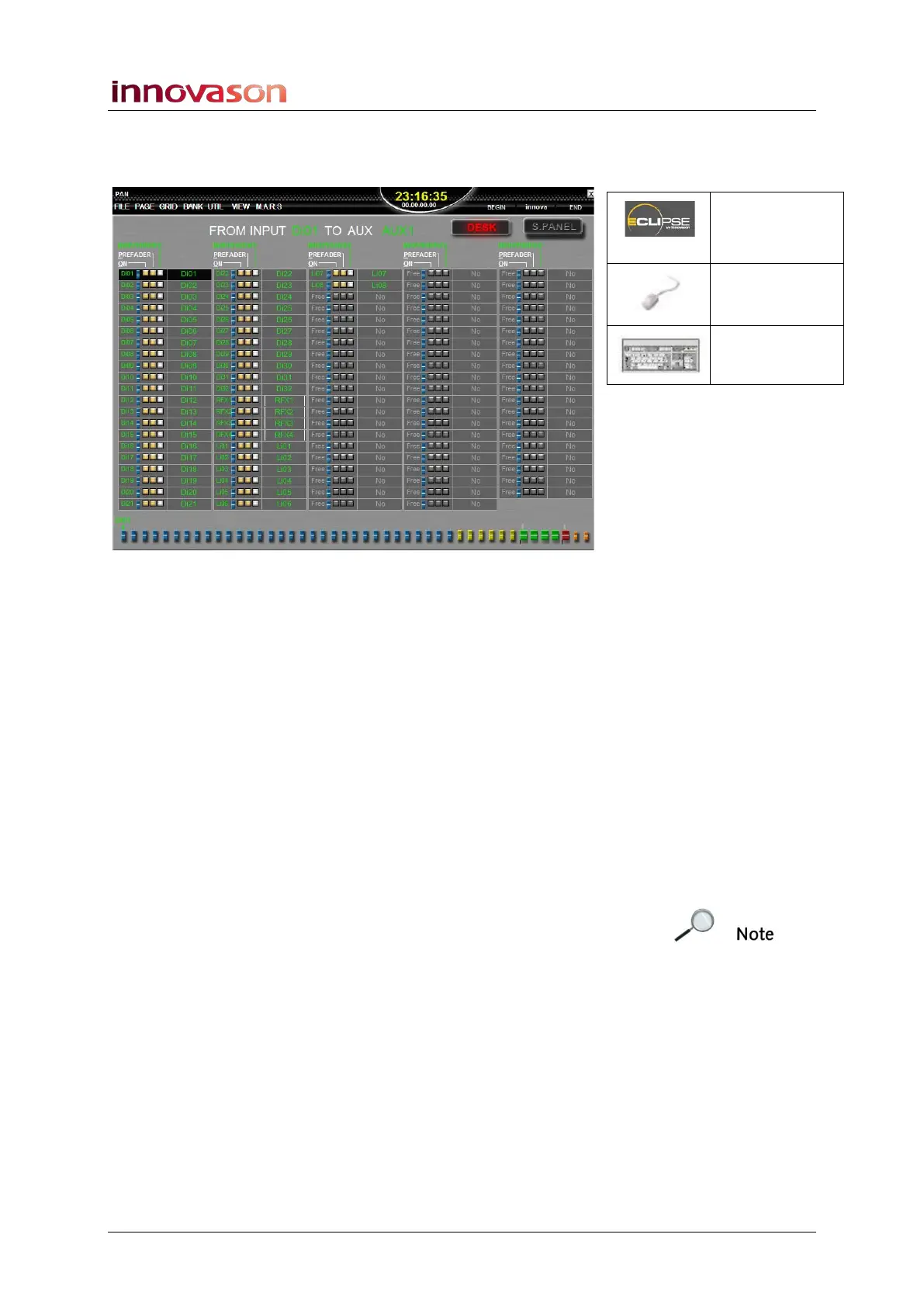
to be pre-fader sends by the Templ1 file. You can see this by
opening the PAN display while an Aux is selected:
The display shows that input channels 1 to 32 are On and Pre-
fader. You can find more details on this display on Page 164.
10. When you have finished setting up the Aux send
mixes, press SEL on an input fader to return your input
channels to their normal operation (main channel level).
Note that the default fader mode (Dual) can be altered from the
General Preferences window. You can also set an option so
that when an input is routed to an Aux, the Aux send is
automatically set to 0dB, see Page 428.
Controlling the Stereo Aux Masters
The four Aux faders (AUX1 to AUX4) are stereo channels, so
settings can be applied to both left and right by selecting the
Aux and adjusting the EQ, DYNAMICS, etc. panels.
Note that processing is applied to the UM8 output card (as for
your stereo Master).
You can adjust the left and right sides of the Aux output by
deploying the component channels to the Smart Panel, see
Page 189 for details.
Pre/Pan
(UTILITIES)
“GRID ->
Pan Screen”
n/a



 To Next Page