Interfacing I/O Devices
Connecting a peripheral device to a computer is called interfacing the device. This requires three
major steps. The presentation of the steps here necessarily follows a certain order, but as you will
see, the ordering of the steps for a particular device may need to be different. The first step is the
design of a hardware connection scheme that will allow the programmer to address the device.
Second, the programmer must write an interrupt service routine (ISR) to handle interrupts from
the device and install its address in the exception vector table. Finally, the programmer must
initialize, or program, the device to work in an appropriate way and enable the device. To
perform these steps correctly, the person interfacing the device must have the appropriate
documentation or data sheet for the device.
Hardware Interfacing
The hardware connection scheme for an I/O device includes appropriate connections to all the
buses. A connection to the address bus is necessary to allow the programmer to address the ports.
Assuming an I/O address space of 256 ports (the standard for older Intel processors which is still
compatible with newer members of the Intel family), we need to be able to decode I/O addresses
of just eight bits, since 2
8
= 256 unique locations. The relevant address lines will therefore be
A0-A7. To be able to send data to the device or receive data from it, a connection to the data bus
is also essential. Some devices now have 16-bit ports, but many still have 8-bit ports. For
simplicity, we will assume that the devices we are interfacing have 8-bit ports, so again, we only
need to worry about the low order eight bits of the data bus: D0-D7. In addition, each device
generally needs to have connections to some of the control bus lines. The task of hardware
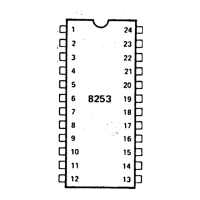
interfacing is to connect the device to these lines appropriately. The data sheet for a particular
device will include the pin diagram for the device. This diagram gives the purpose of each pin
and allows the interfacer to connect the bus lines to the correct pins.
Typically, it is desirable to have the ability to connect more than one device to the CPU. To do
this, we can use a commercially available decoder chip, the 74LS138. This chip is a 3-to-8
decoder. It has three input lines which encode a 3-bit binary number. It also has eight output
lines, logically numbered from zero to eight. Given a particular 3-bit pattern as input, the
74LS138 will activate the output line with the corresponding number. The input pin for the low
order bit of the pattern is A, with pins B and C serving as the inputs for the next bits. For
example, an input on pins A, B, and C of 001, respectively, will activate output line Y4#. This
chip allows interfacing up to eight different devices from a single address bus connection. In
addition the decoder has three "gating signals" that allow a particular set of addresses to activate
the decoder. The output lines connect to various devices, while the input lines connect to the
address and control bus.


 To Next Page