support.dell.com Dell PowerEdge Systems — Microprocessor Upgrade Guide 1-15
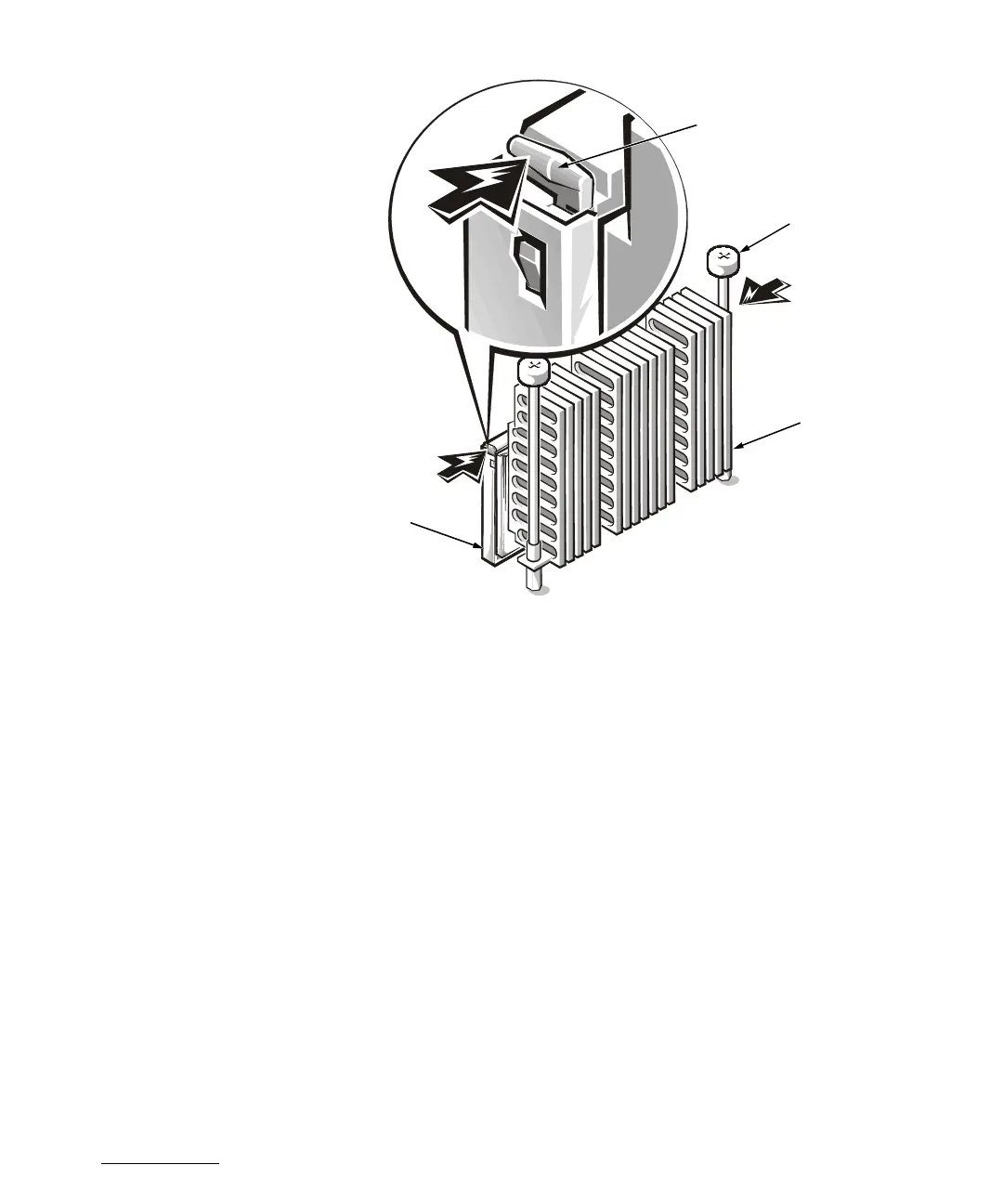
Figure 1-6. Removing the Microprocessor
Removing and Replacing the Guide
Brackets
To remove the guide bracket assembly, perform the following steps:
1. Remove any terminator card installed in the guide bracket.
2. Remove any microprocessor assembly installed in the guide bracket.
3. Use a #2 Phillips screwdriver to loosen the four captive nuts that secure the
guide bracket assembly to the system board (see Figure 1-7).
4. Lift up the assembly to remove it from the four threaded posts.
To install the new guide bracket assembly, perform the following steps:
1. Position the guide bracket over the four threaded posts (see Figure 1-8).
You can install the guide bracket only one way (the captive nuts will not align with
the threaded posts if installed incorrectly).
2. Tighten the four captive nuts using a #2 Phillips screwdriver.
release latches (2)
thumbscrews (2)
heat sink
microprocessor


 To Next Page