8 Operation
8.11 Crop press roller unit
78
Comprima V 180
Original Operating Instructions 150001053_00_en
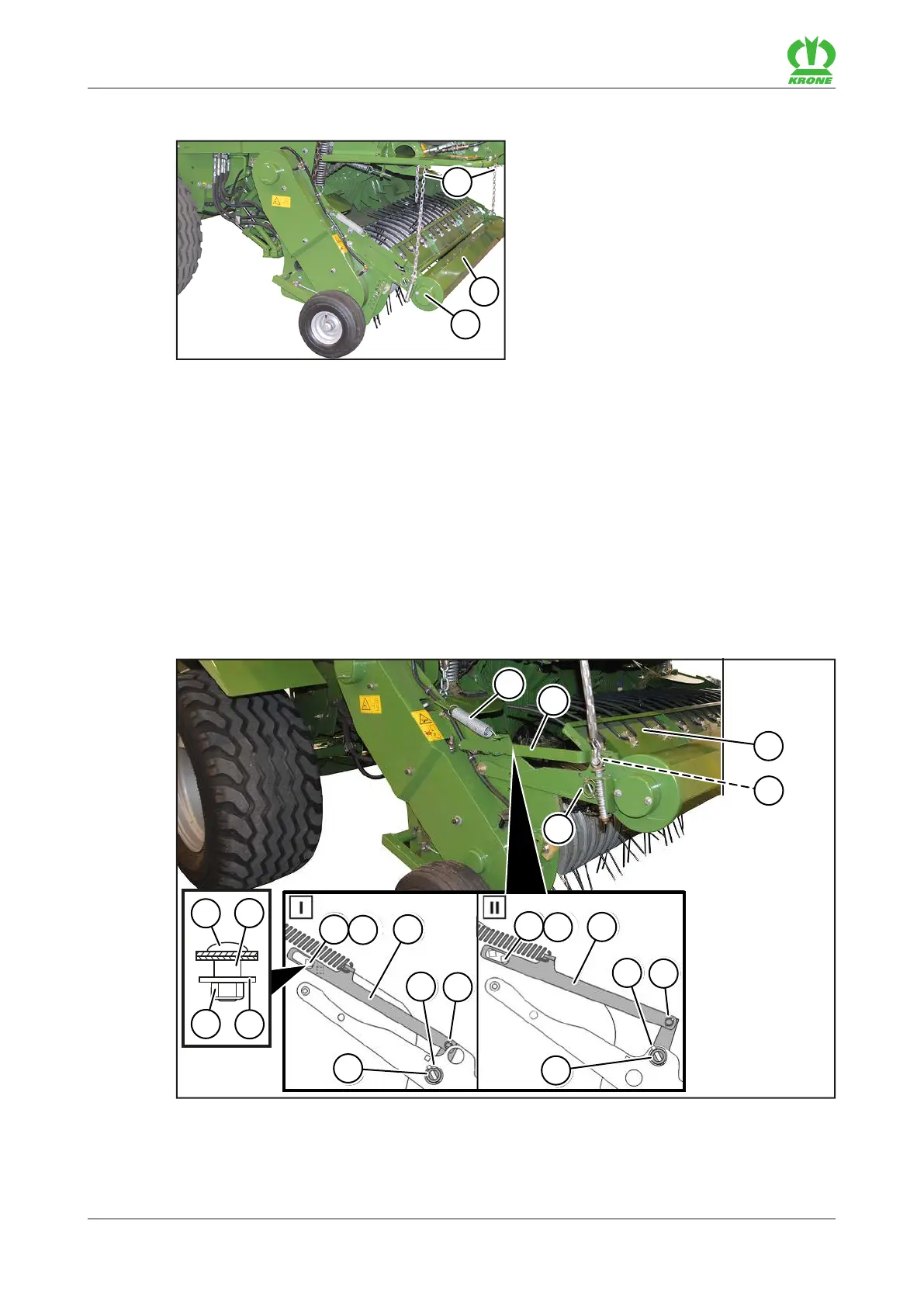
8.11.1 Setting the crop press roller unit
RP000-141
The crop press roller unit (3) regulates the crops at the intake via the pick-up. As a result, the
crops are picked up in a controlled manner.
The height of the crop press roller unit(3) must be set so that the operating crop press roller(2)
continuously touches the swath.
Adjusting the height of the crop press roller unit
Attach the chains(1) to the swath correspondingly higher or lower.
Ensure that the chains(1) on the right and left sides of the machine have been set
identically.
8.11.2 Setting the baffle sheet on the crop press roller unit
1
2
3
4
12
7
3
3
8
9
2
2
4
11
5
13
5
5
10
4
6
RP000-140
The height of the baffle sheet(1) on the crop press roller unit can be adjusted to the swath.
Position(I) has been set at the factory. If the crops are very moist, it is recommended to move
the baffle sheet into position(II).









 To Next Page