8 Operation
8.13 Net and chamber film wrapping
84
Comprima V 180
Original Operating Instructions 150001053_00_en
RP000-040
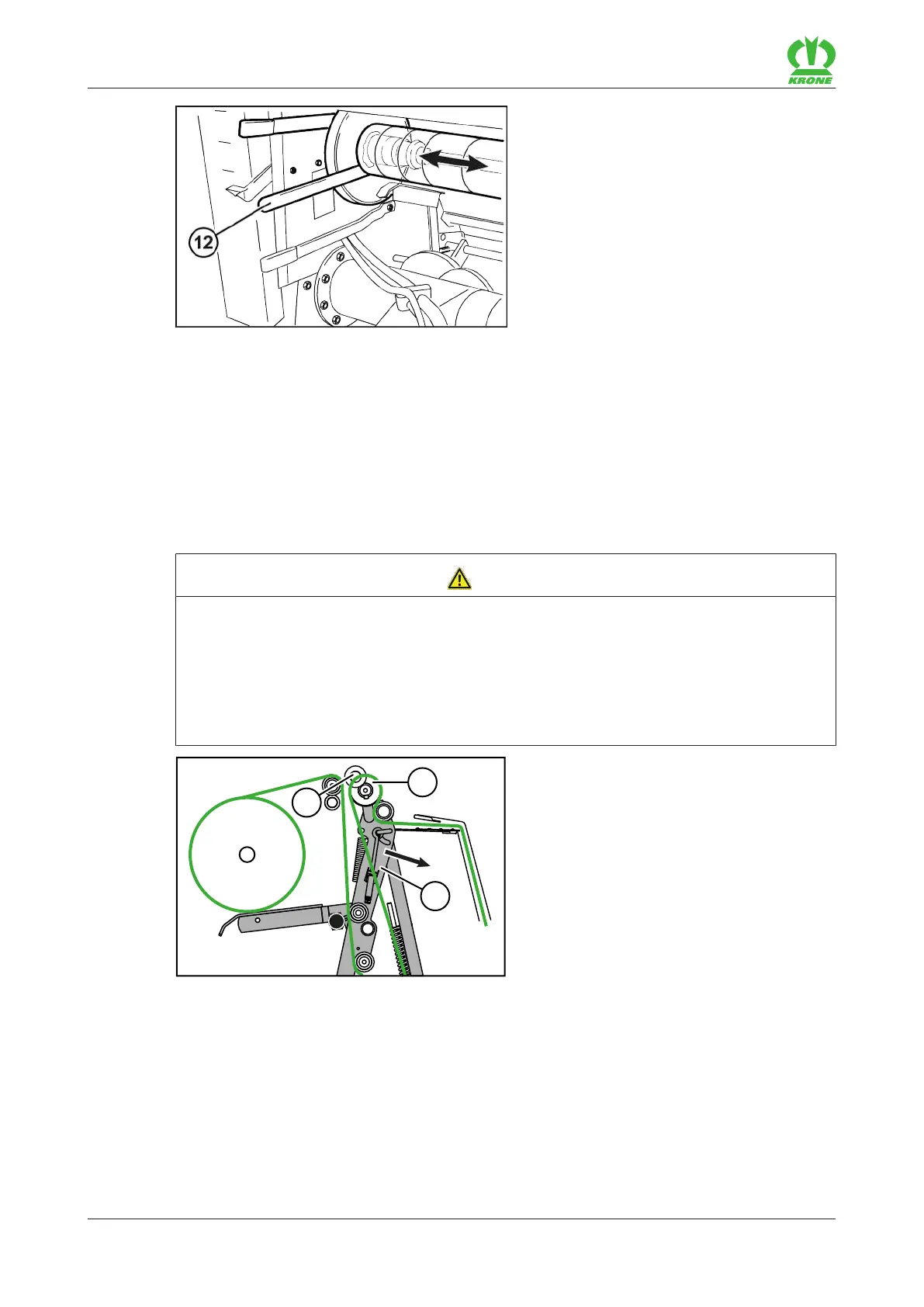
If the net or film roll (9) has not been centrally aligned:
Loosen the two adjusting rings(8,11).
Use a mounting lever (12) to push the net or film roll(9) in the required direction of the arrow
until the net or film roll(9) is positioned in the centre.
Push the two adjusting rings(8, 11) each with a distance of 2-3mm onto the sleeve(10) and
fix them in this position.
8.13.2 Inserting the net or film
WARNING
Risk of injury due to sharp blades at the cutting unit of the tying unit
You may injure your fingers and hands when inserting the wrapping and tying material or
working in the range of the cutting unit of the tying unit.
Always wear protective gloves when inserting the wrapping and tying material and when
working in the range of the cutting unit.
When working in the range of the cutting unit, work particularly carefully and prudently.
RP000-182
ü Net or chamber film wrapping has been selected on the terminal, refer to page122.
Move the feed rocker arm(3) on the terminal in the feed position direction of arrow until
there is a distance of approx. 5cm between the spreading roll(1), covered with red foam,
and the tapered roller(2), refer to page125.









 To Next Page