10 Fault elimination
Maschinenfabrik Reinhausen GmbH 2020 2753587317/21 EN TAPCON
®
Characteristics/detail Cause Remedy
Parallel operation active. Device is follower in parallel oper-
ation.
No error. If necessary, deactivate parallel opera-
tion.
CAN bus communication failure "Auto blocking" behavior is set. Check configuration.
Table119: No regulation in AUTO mode
10.3 Unwanted on-load tap-change operation
Characteristics/detail Cause Remedy
Compensation activated Setting:
▪ R-X compensation
▪ Z compensation
Check parameters.
Correct if necessary.
Table120: Unexplained tap change
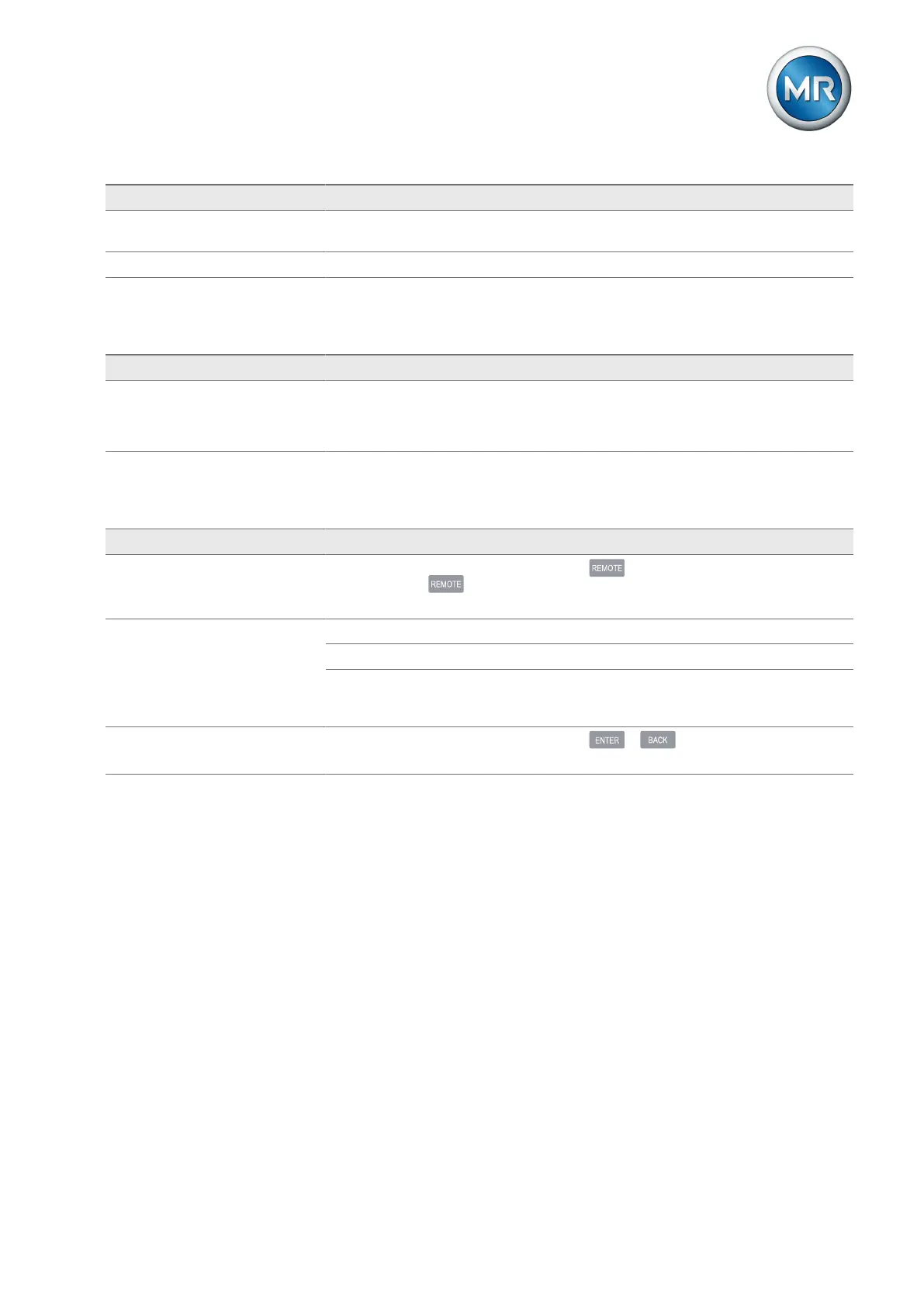
10.4 Human-machine interface
Characteristics/details Cause Remedy
Keys
▪ MANUAL/AUTO operating
mode cannot be changed
REMOTE operating mode active
and LED in key illuminated.
Press to activate LOCAL mode.
Display
▪ No display.
Power supply interrupted. Check the voltage supply.
Fuse faulty. Contact Maschinenfabrik Reinhausen.
Connection cable between front
panel and CPU (ETH 2.1) defec-
tive.
Check connection cable
Display
▪ No reaction to input
Display has crashed.
Press + for longer than 2s to reset
the display.



 To Next Page