Vario PJM PRISMAproduction Explorer
114 A29247-X3-X-6-7670
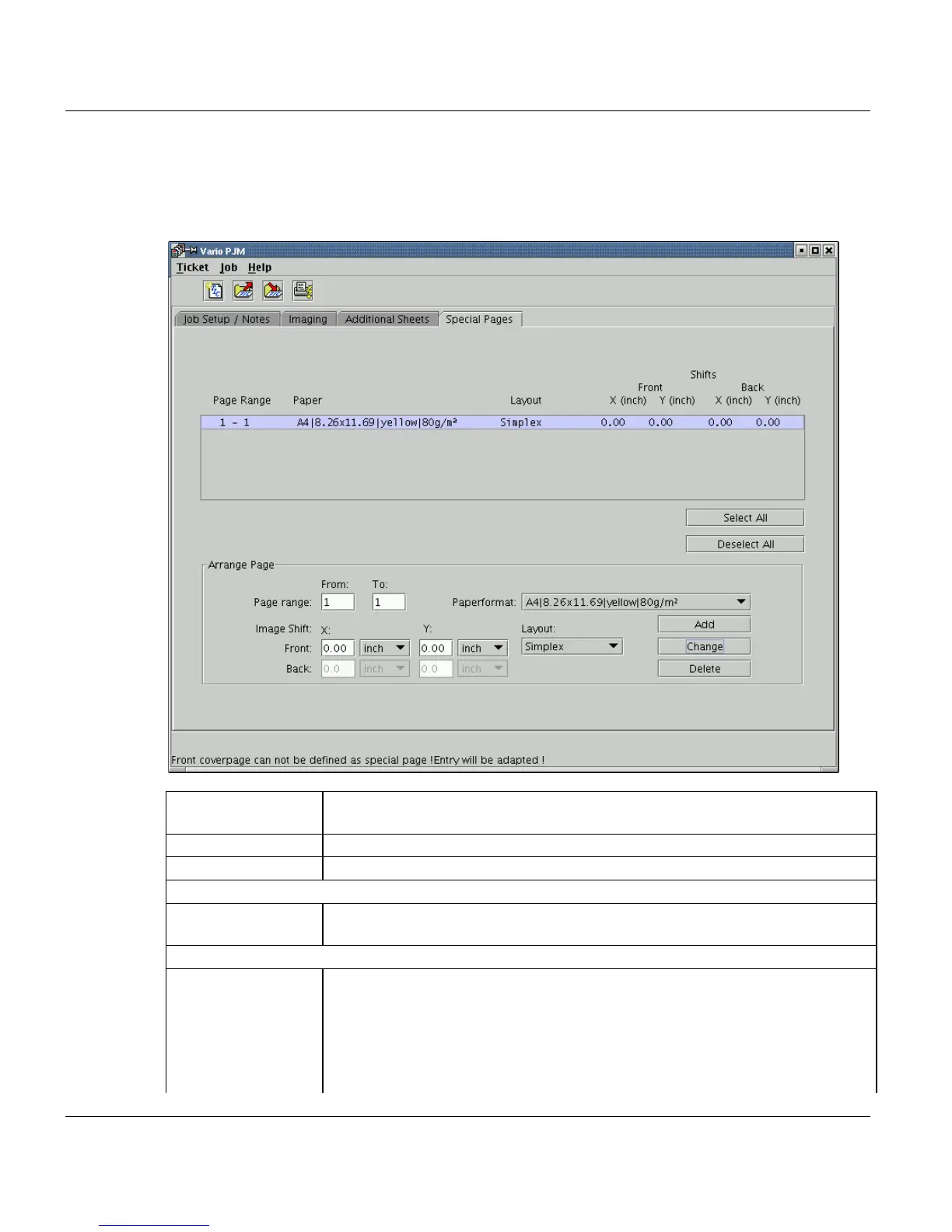
Special Pages
On this tab you define special pages for the print job. This function is only valid for the job-
types ’Standard’ and ’Stiched’.
List Lists all special pages which you insert with the ’Add’ button below the list. Sin-
gle entries in the list can be marked for deletion or modification.
’Select All’ Mark all entries in the list.
’Deselect All’ Demark all entries in the list.
Arrange Page
’Page Range
from...to’
Insert the first and the last special page valid for this entry.
Image Shift
’Image Shift X Front ’ Insert an image shift in x direction on the front page (from -500 to 500 mm or
from -19,68 to 19,68 inch). This is only possible with jobtype ’Standard’.
As measure units you can use ’mm’, ’cm’, ’pixel’ or ’inch’.
’Image Shift Y Front’ Insert an image shift in y direction on the front page (from -500 to 500 mm or
from -19,68 to 19,68 inch). This is only possible with jobtype ’Standard’.
As measure units you can use ’mm’, ’cm’, ’pixel’ or ’inch’.



 To Next Page