PRISMAproduction Explorer Job Lists
A29247-X3-X-6-7670 85
5.7.9 Job Positioning
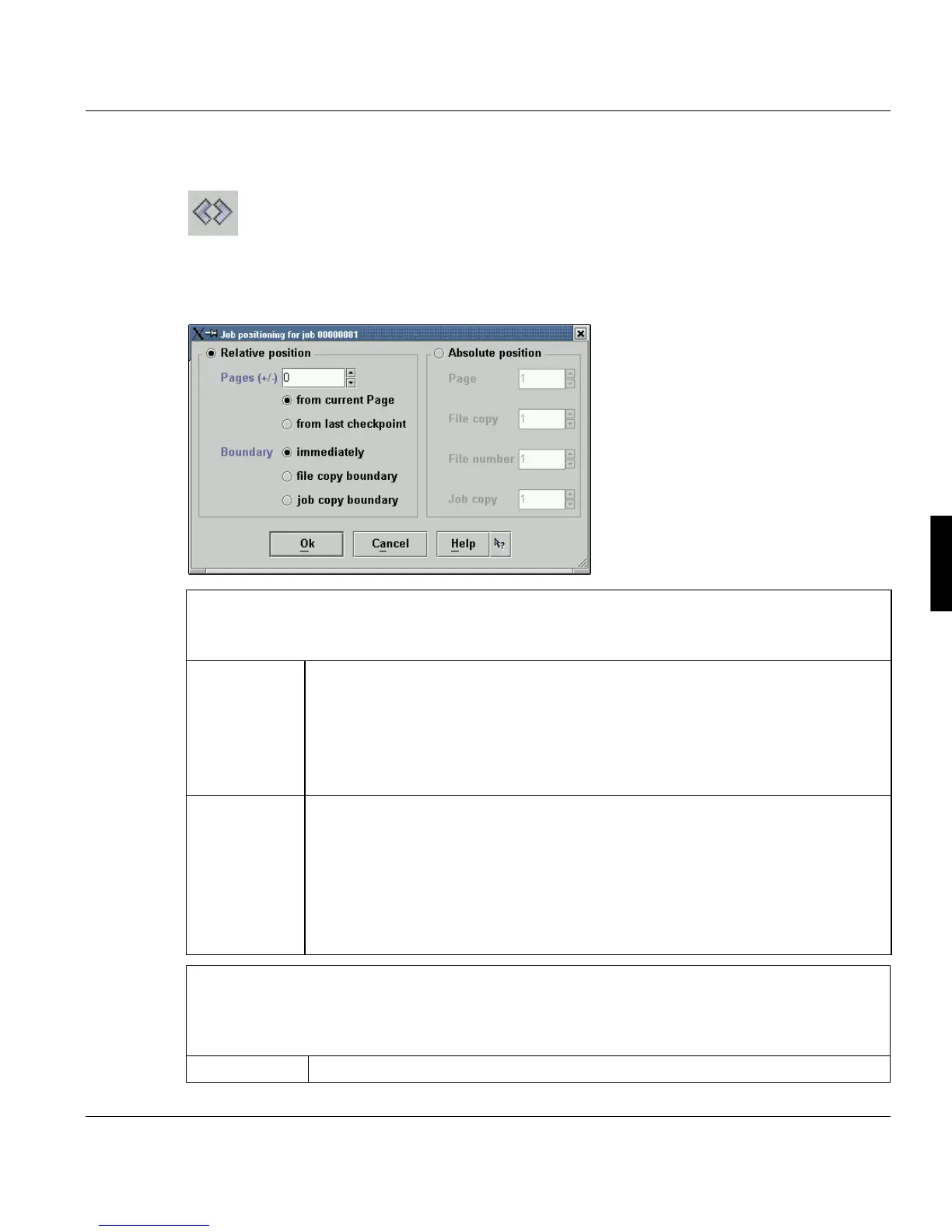
This dialog box is opened when you select the Reposition Job icon. The icon is available
for selection when a job is printing (states 'processing - printing' and 'processing - in output
control').
Relative position
For relative positioning, specify a number of pages before or after the current page or last check-
point. Printing resumes at the specified position. Be sure to enter the correct page value.
’Pages (+/-)’ According to the indicated page numbers in this text field the job is positioned for-
ward or backwards.
from current Page: The starting point of the relative positioning is the current pa-
ge.
from last checkpoint: The starting point of the relative positioning is last check-
point.
’Boundary’ The boundary of the current document is only taken into consideration if it is indi-
cated. If you allow positioning beyond document boundaries, in some cases prin-
ting may resume in a different document.
immediately: The job is repositioned immediately.
after current file copy: The job is repositioned after printing the current file copy.
after current job copy: The job is repositioned after printing the current job copy
(containing more than one file).
Absolute position
Positions to a particular page when you restart a print job. For absolute positioning, specify a page
number in the document and the document copy at which printing is to resume. Be sure to enter
the correct page and copy values.
Page Indicate the page in the file.



 To Next Page