Transfer Belt Unit
SM 4-51 D062/D063/D065/D066
Replacement
and
Adjustment
4.8 TRANSFER BELT UNIT
4.8.1 TRANSFER BELT UNIT REMOVAL
Before you begin, spread a mat or some clean paper on the floor where you intend
to set the transfer belt unit.
Remove:
OPC drum unit ( p.4-30)
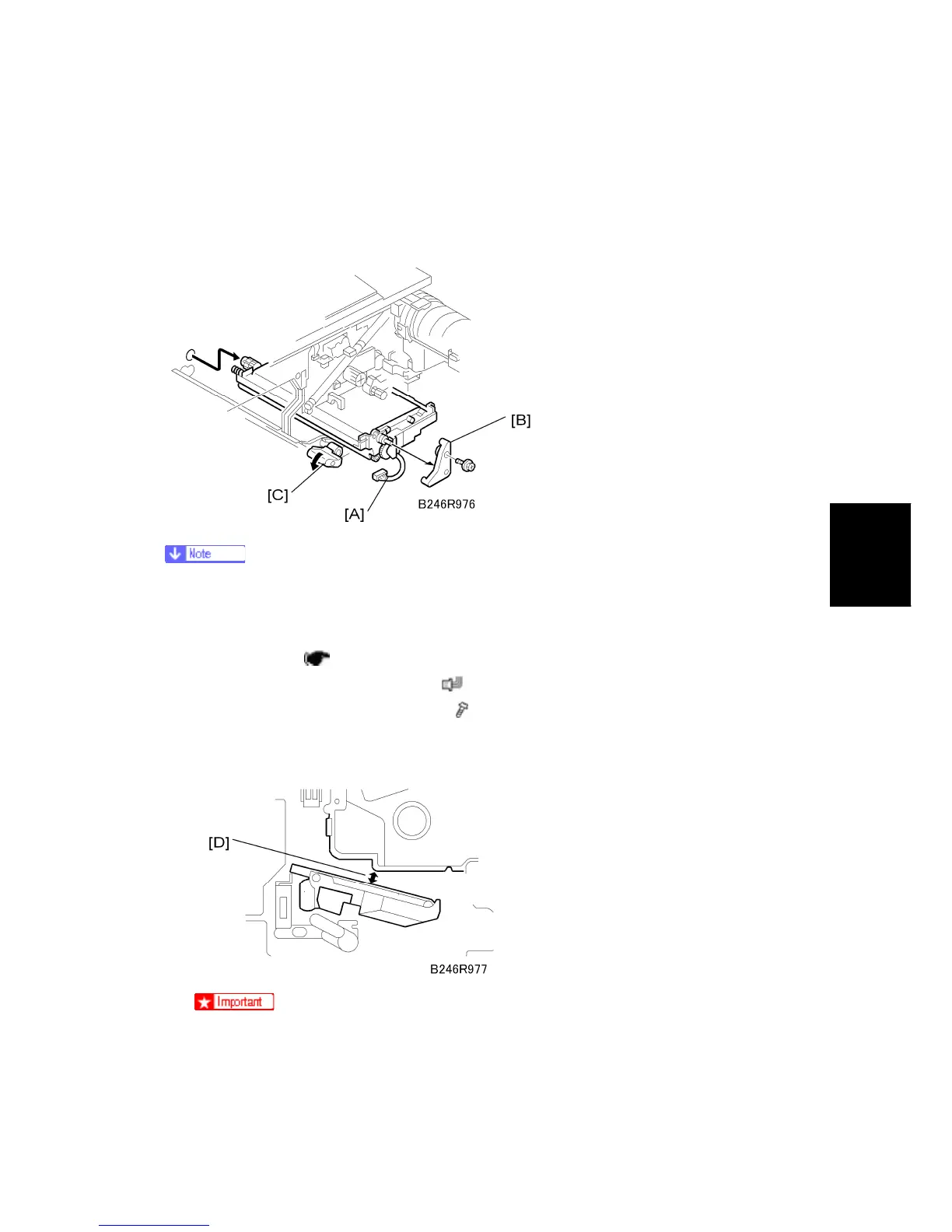
1. Disconnect the transfer belt unit [A] (
x 1).
2. Remove the transfer belt unit stay [B] (
x 1).
3. While supporting the transfer belt unit with your hand, turn the release lever [C]
counter-clockwise to release it, then pull the transfer belt unit out of the machine.
The transfer belt unit can be removed without removing the OPC drum unit.
However, the transfer belt unit must be removed carefully to avoid scratching
the surface of the transfer belt on the OPC drum unit [D].



 To Next Page