Transfer Belt Unit
D062/D063/D065/D066 4-56 SM
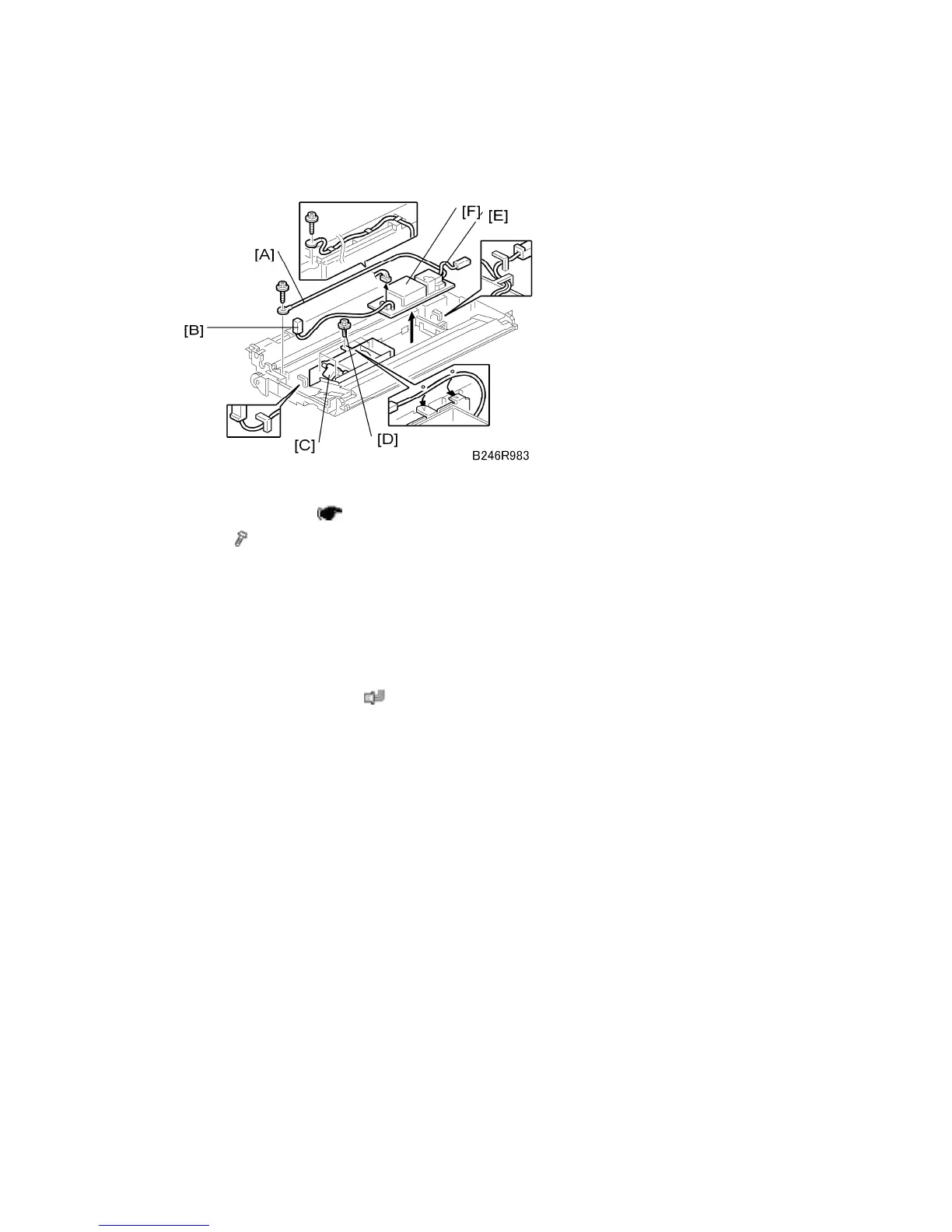
4.8.5 TRANSFER POWER PACK
Remove:
Transfer belt unit (
p.4-51)
1. Wire (
x 1) [A] (all wire guides)
2. Ground terminal wire [B] (wire guide x 1)
This terminal wire does not disconnect from the power pack.
Loosen the two left screws of the transfer belt lift solenoid [C], and remove the top
screw [D] to free the ground terminal wire.
3. Transfer current terminal wire [E] (wire guides x 2)
4. Transfer power pack [F] (
x 1)
Disconnect the two standoffs on the right edge of the power pack and remove.
Re-installation
Confirm that the left edge of the power pack is below the tabs on the left.
Confirm that the transfer current terminal wire is below the wire guides on the right.
Pass the ground terminal wire under the top connector of the solenoid bracket and
tighten all the screws of the solenoid bracket.
Make sure the wire is below all the wire guides at the top.



 To Next Page